Joining alone from a busy shared-flat room
If you speak frequently, the main thing is whether people can understand you despite the noise in the room. Microsoft Support points out that background noise can distract other participants.


If you’re joining on your own computer, first check that people can understand you despite the usual shared-flat noise, and that your camera shows as little of the communal space as possible. A webcam for one person may be enough. If several people are sitting together in front of one device, a small conference system may be more suitable. However, a room microphone isn’t automatically the more private option in a busy shared flat.
If you speak frequently, the main thing is whether people can understand you despite the noise in the room. Microsoft Support points out that background noise can distract other participants.
If other people, screens or personal belongings are nearby, check the camera view and preview before joining. The Data Protection Conference notes that images or audio of people nearby may also be processed.
If your workspace isn’t always lit the same way, check how your face and the camera view look in the actual meeting preview before making automatic image features a priority.
A good fit if: you’re joining alone on your own computer and can check the camera view, microphone input and lighting from your seat.
The trade-off: A wide field of view can show more of the room. Manufacturer claims about noise cancellation don’t prove that other people’s conversations will be reliably filtered out.
A good fit if: several people will genuinely be sitting together at one table and joining from the same device. Logitech describes the BCC950 as suitable for small rooms with one to four participants.
The trade-off: A room microphone and speaker are designed for people to join together, but they may also pick up background noise in a shared living space.
A good fit if: the picture is already good enough and the main issue is being heard clearly over the noise in your shared flat.
The trade-off: A new camera won’t necessarily solve an audio-only problem. First check your microphone selection and noise cancellation in the meeting app.
Microsoft Support points out that background noise can distract other meeting participants. The Data Protection Conference also notes that images or audio from people nearby may be processed.
| Priority | What to check before buying | Who it matters most to |
|---|---|---|
| Being heard clearly | Select the microphone input you’ll use and make a test call with the kind of background noise you’d normally expect. | If I want to be heard clearly despite voices or noise from the shared flat, I check the recording from my own seat. Around 36% of consumers put being able to speak clearly at the top of their list. |
| A private camera view | Check the preview from where you’ll be sitting, and use any existing lens cover between meetings. | If I want to keep flatmates or personal belongings out of the call, I check the picture and audio before joining. Around 29% of consumers prioritise protecting their private surroundings. |
| Picture quality in changing light | Check the meeting preview from your intended spot and in your usual lighting conditions. | If my room isn’t always lit the same way, I want to judge how my face looks in the actual preview. Around 21% of consumers prioritise picture quality and lighting. |
| Easy set-up | Check that the USB connection and mounting position are suitable. Once connected, select the camera and microphone in the meeting app. | If I want to use the camera on my own computer without unnecessary set-up steps, I check the connection and device selection. Around 14% of consumers put a straightforward set-up first. |
High resolution doesn’t tell you whether people will be able to understand you or whether the camera view will give you enough privacy.
First test your voice, preview and lighting from the spot where you’ll be sitting. Only then consider whether extra resolution is a priority.
A wide view can show more people or belongings from your shared room.
Check the actual camera view. A wider field of view is mainly worth considering if several people will be joining together.
A manufacturer’s claim about noise cancellation doesn’t prove that conversations in the shared flat will be reliably filtered out. Images or audio of people nearby may also be processed.
For confidential conversations, choose a suitable spot and check what the microphone actually picks up. Treat app filters as an extra feature, not a promise of protection.
The Brio 500 is designed as a webcam for one person at a workstation. The BCC950 is a different type of device, with a speakerphone for groups joining together.
The Taxon QHD is positioned as a webcam for one person, with autofocus and two microphones.
The SmartCam C960 is a straightforward Full HD webcam. EMEET Support lists USB-A, fixed focus and a physical lens cover.
The Meet 2 is aimed at users who want autofocus and auto-framing, for example if they move around during a meeting.
This selection includes webcams for one person using a computer, as well as an all-in-one conference system for several people joining together.
 No image available
For joining a meeting alone from your computer; the stated lens cover can be used between meetings.
4K, Sony IMX363, PDAF autofocus, two microphones, lens cover, 75° field of view and USB-A/USB-C.
 No image available
For meetings on a laptop or desktop; according to the product name, the clip-on mount is designed for these devices.
2K QHD, microphone with noise reduction, clip-on mount, EU version, silver.
 No image available
For team meetings on your computer if you want a webcam with a stated lens cover.
4K, autofocus, two microphones, privacy cover, USB-A, EU version, black.
 No image available
For video calls if auto-framing and a physical privacy switch are among the features you’re looking for.
4K, 1/2" sensor, auto-framing, HDR, microphone with AI Noise Cancellation and gesture control.
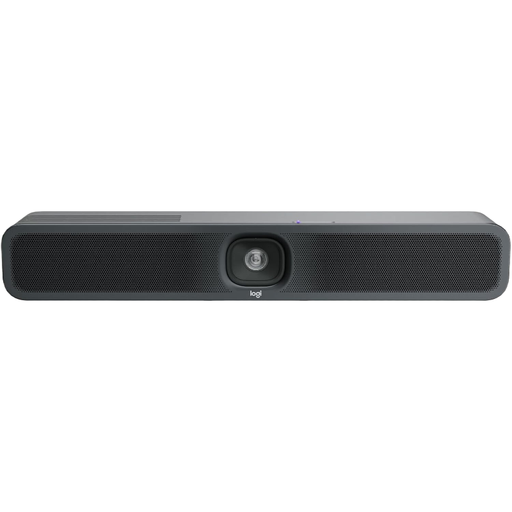 No image available
For several people joining together; the all-in-one design combines a camera, microphone and speaker.
4K, microphone and speaker, USB; according to the product name, designed for Zoom, Microsoft Teams and Google Meet.
Not just because it’s a team meeting. First check the picture and audio from your own spot. Logitech describes the BCC950 as suitable for small groups of one to four people joining together.
Connect it to a suitable port, then select the camera and microphone in your meeting app. EMEET Support lists USB-A for the EMEET C960. If the camera isn’t recognised, check which devices are selected and try another USB port.
No, you shouldn’t rely on it. Microsoft points out that blurring or replacing the background may not hide confidential information, so check the camera view and audio from the room too.
If a product is faulty, statutory rights against the seller are separate from any voluntary guarantee. Many online purchases are generally covered by a 14-day right to cancel. The consumer advice centre explains that the details depend on the individual contract.