Students studying at a desk
If you regularly take part in group calls, make sure your camera framing, desk and computer work well together.


For a study group in a shared house, the right framing, a suitable audio source and a connection to your computer often matter more than a high resolution rating alone. Also check that your video-conferencing service and computer support the desired streaming resolution: a 1080p camera will not automatically stream at 1080p in every meeting.
If you regularly take part in group calls, make sure your camera framing, desk and computer work well together.
If you want to keep housemates and private areas out of shot and away from the audio, pay attention to the camera position, privacy cover and audio source you select.
If your screen is awkwardly positioned or you move between study spots, how the camera attaches and adjusts may matter more than a higher resolution rating.
First, consider what your camera and microphone might pick up in your shared-house setup. Then compare the connection, mounting options and the resolution your video-conferencing service can actually stream.
| What matters | What to check before buying | Who is this important to? |
|---|---|---|
| Keeping your surroundings private | Check the camera's position and field of view, and whether it has a physical cover. | If I join a study group from a shared house, I want to keep housemates and private areas out of shot. Around 29% of consumers put privacy in the frame first. |
| Clear speech | Test the microphone source and mute function from your actual study spot in the video-conferencing service you use. | If noise in the shared house could make conversations difficult, I want to check that my chosen audio source picks up my voice clearly from my study spot. Around 29% of consumers prioritise clear speech. |
| Picture quality during calls | Compare the camera resolution and light adjustment with your service's streaming settings and requirements. | If I want to be seen clearly when contributing to the study group, I look for a recognisable picture while keeping the limits of my service and computer in mind. Around 24% of consumers put picture quality first. |
| Positioning and connection | Check that the camera connects to your computer and can be attached and adjusted where you plan to use it. | If my screen is awkwardly positioned or I move between study spots, I need a camera that I can connect and position appropriately. Around 18% of consumers prioritise positioning and connectivity. |
The resolution actually streamed also depends on the video-conferencing service and your computer's capabilities. Google Meet lists a suitable camera and enough processing power as requirements for 1080p; Zoom Support limits 1080p in group meetings to Business and Enterprise plans.
Check the requirements of your service, account and computer before choosing a camera with a higher resolution.
Paying for a resolution feature that your group calls cannot use could mean unnecessary expense.
A cover blocks the camera image, not the microphone. The Data Protection Conference notes that people in your household may be visible or audible in the background.
Before your call, check the preview and selected audio source separately. Cover the lens after use if your model has a privacy cover.
For the Lenovo FHD Webcam 4XC1Q44952, the description of what is included conflicts with the FHD product name. Manufacturer websites in Germany and Canada also describe the Anker PowerConf C200 differently.
For the specific version on offer, compare the product number, technical specifications and what is included.
An unclear model variant can create extra work if you need to check the details before ordering or return a model that is not right for you.
Logitech lists the C270 at 720p/30 fps and the Brio 100 at 1080p, with a built-in microphone and cover.
Trust describes the Oran as a 1080p webcam with a microphone and sliding privacy cover.
Lenovo lists 1080p/30 fps, a tripod mount and a physical camera cover among the features of the FHD Webcam 4XC1Q44952.
Anker's German website lists Full HD 1080p, a microphone and plug-and-play for the PowerConf C200.
This selection from Joybuy includes webcams with privacy covers for video calls and study groups.
 No image available
For video calls where you want to cover the lens between meetings and adjust the camera at your study spot.
1080p; built-in microphone and physical camera cover.
120° wide-angle view; flexible positioning with an integrated tripod and 360° rotation.
USB plug-and-play.
 No image available
For video calls if you're looking for a 1080p webcam with a built-in privacy cover.
1080p at 60 FPS; autofocus.
Built-in microphone and privacy cover.
USB plug-and-play; adjustable picture settings via software.
 No image available
For video calls if you want to consider a webcam with a cover and adjustable positioning.
4K; 99° field of view.
180° tilt and 360° rotation; microphone and cover.
Plug-and-play; USB-A to USB-C adapter listed.
 No image available
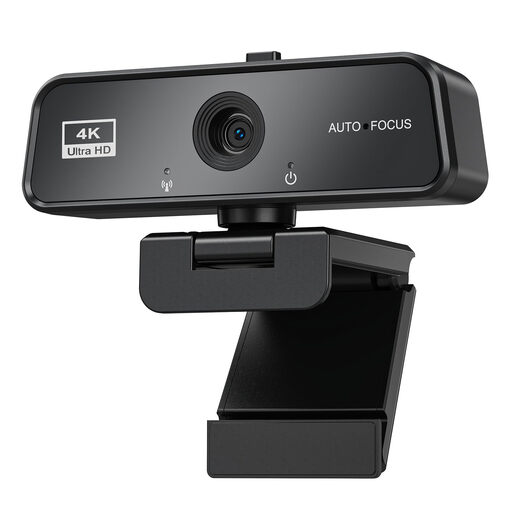
For video calls if you're considering a 4K webcam with autofocus and a cover.
4K; Sony IMX363 sensor; PDAF autofocus.
Two microphones and lens cover; 75° viewing angle.
USB-A/USB-C; desk tripod listed.
 No image available
For video calls if you want to consider a webcam with a cover and automatic light correction.
4K at 30 FPS; autofocus and automatic light correction.
Microphone and cover; rotating mount.
USB 3.0 plug-and-play.
No, not if your existing camera gives you the framing you need. Zoom lists a built-in webcam as a possible camera; test the picture and sound in the video-conferencing service you actually use before buying.
No. The streaming resolution also depends on the service and your computer's capabilities. Google Meet lists a suitable camera and enough processing power as requirements; Zoom Support limits 1080p in group meetings to Business and Enterprise plans.
Select your camera and microphone in the video-conferencing service, then check the preview before joining. Position the camera to keep housemates and personal belongings out of shot as far as possible; cover the lens after use if your model has a privacy cover.
No. A lens cover blocks the picture, not the audio source. The Data Protection Conference notes that people in your household may also be visible or audible in the background. Check your microphone selection and mute function separately.
Before buying, compare the product number, technical specifications and contents for the specific version on offer. This is particularly important if the product name and contents differ, or if manufacturer websites in different countries list different resolutions for the same model.