Who films watch repairs?

Close-ups at the workbench

You want to show small parts and hand movements for extended periods from a fixed camera position. Working distance, focus and mounting matter more to you than convenience features. OBSBOT and Elgato provide focus specifications that vary by model.

Explaining repairs clearly

You switch between speaking to the camera and showing the watch briefly. The key question is whether a desk-view mode gives you the right framing from your screen's position. Logitech and Insta360 describe features for this purpose on selected models.

Recording in changing light

You film in a spare room at different times of day and want to adjust exposure or white balance to suit your workspace, rather than choosing on resolution alone. Elgato and Logitech describe these image settings for certain models.

What should you look for when buying?

Separately mounted webcam with close focus

A good fit if: The watch stays in shot for a while and you want the camera to sit independently of your screen, beside or above the work surface. OBSBOT gives the Meet 2 a focus range starting at 10 cm, AF/MF and a 1/4-20 thread.

Bear in mind: The stated focus range does not guarantee macro-level detail. You’ll need to plan for a suitable mount for your setup.

Webcam with a desk-view mode

A good fit if: You mostly speak to camera and only want to show the table occasionally. Logitech describes Show Mode for the MX Brio, while Insta360’s DeskView is designed for occasional desk shots.

Bear in mind: Your screen’s position and tilt determine the framing. The mode does not guarantee close focus on small watch parts.

Document camera

A good fit if: A permanently positioned view of the work surface matters more than having your face on screen. IPEVO describes the V4K as an autofocus document camera.

Bear in mind: Its design differs from a monitor-mounted webcam. Check the focus distance, space required and framing with the watch you’ll be filming.

Priority What to look for Who is this important to?
Close focus on the watch and tools Measure the distance from the lens to the work surface and compare it with the focus range of the exact model. For a fixed view, check whether the focus can be adjusted. If I want to show small parts clearly for an extended period, the actual distance matters more than a high pixel count. Around 36% of consumers name close focus as their main priority.
Camera position and clear workspace Decide in advance where the camera will go, how much room you need for the mount and your hands, and what you want in frame. If I want to show the watch and tools without my hands or the mount getting in the way, I plan the camera position first. Around 29% of consumers list camera position as their main priority.
Lighting and image settings Check whether you can adjust exposure and white balance in the camera software you plan to use, and take a test shot under your intended lighting. If I’m filming at different times of day, I want to be able to adjust the image to suit the light in my spare room. Around 21% of consumers put lighting control first.
Commentary and connectivity Check the connectivity and system requirements for the exact model. Test the picture and audio together at your intended recording spot. If I want to explain the repair as I film, I need a setup that works with my computer and clear audio. Around 14% of consumers list commentary and connectivity as their main priorities.

Common misconceptions

  • Assuming 4K means macro capability

    A higher resolution cannot make up for an unsuitable focus distance. Elgato’s model overview gives the Facecam Pro a different focus range from the original Facecam.

    Before considering resolution, compare the focus range for the full model name with the measured distance between the lens and the watch.

  • Assuming desk mode lets you position the camera freely

    With a view angled down from your screen, the framing and viewing angle depend on where it is positioned. Insta360 explicitly distinguishes DeskView from mounting a camera separately above the work surface.

    Sketch out the view you want, including your hands and tools, and check where a mount could fit.

    Depending on your setup, you may need a separate mount or a differently designed camera.

  • Assuming a camera without a microphone can record spoken commentary

    Elgato lists no built-in microphone for the Facecam Pro. If you want to explain what you’re doing as you film, you’ll need a separate audio source.

    Test your microphone and recording computer together before settling on your recording setup.

Brands to consider

OBSBOT

The Meet 2 is worth considering for a separately positioned close-up, provided its focus distance and mounting options suit your setup.

  • OBSBOT lists AF/MF, a focus range from 10 cm to infinity and a 1/4-20 thread.
  • These specifications do not prove it can capture watch parts at macro quality, and the magnetic mount is not a complete overhead mounting solution.

Logitech

The MX Brio is an option if you want to combine explanations with occasional desk views.

  • Logitech describes Show Mode as tilting the webcam downwards and lists image settings available through its software.
  • You’ll need to check whether the viewing angle and focus work for your particular watch at your recording spot. The desk view is not a freely positioned overhead shot.

Elgato

The Facecam Pro has manufacturer-listed close-focus and manual adjustment options. Elgato now marks the model as Legacy/EOL.

  • Elgato lists a focus distance starting at 10 cm for the Facecam Pro, along with shutter speed, ISO and white balance settings.
  • This model requires USB 3.0 or better and has no built-in microphone. The Facecam Pro and other Facecam models have different focus ranges.

Insta360

The Link 2 and Link 2C are worth considering if you want to switch between a view of yourself and a desk view from your screen.

  • Insta360 describes DeskView as a mode for occasional desk shots.
  • A view created from your monitor does not necessarily replace a separately positioned close-up of small watch parts.

IPEVO

The V4K is a document camera with a different design, suited to keeping the work surface in view at all times.

  • IPEVO lists autofocus and Full HD live video at up to 30 frames per second.
  • These specifications do not confirm that it can focus closely enough for your watch or show the smallest parts clearly.

Webcams at Joybuy

This selection includes webcams for filming repair steps and talking through what you’re doing. For small watch parts, check the focus distance and framing with your actual setup.

Full HD webcam with microphone

Full HD 1080p webcam with microphone

Could suit filming repair steps with spoken explanations. Check at your planned camera position whether the focus distance works for small watch parts.

Listed in the product title: Full HD 1080p, USB Plug & Play and microphone.

View at Joybuy

AOC 4K webcam with 99° field of view

AOC 4K webcam with 99° field of view

The stated field of view may be useful for showing more of your work surface. Check whether the framing you want will make the watch large enough in the image.

Listed in the product title: 4K, 99° field of view, microphone and cover.

View at Joybuy

AOC 4K PRO webcam with Sony IMX363 and 75° field of view

AOC 4K PRO webcam with Sony IMX363

The PDAF autofocus mentioned in the title may be a useful consideration when filming repair steps, but it does not guarantee that tiny parts will look sharp from your working distance.

Listed in the product title: Sony IMX363, PDAF autofocus, two microphones, 75° field of view and USB-A/USB-C.

View at Joybuy
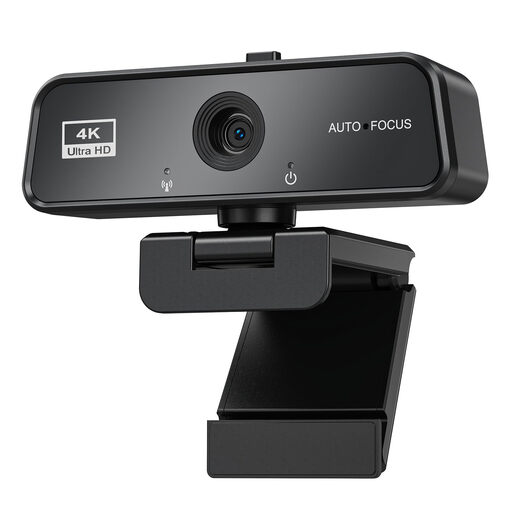
Maxineer 4K webcam with autofocus

Maxineer 4K webcam with autofocus

The video and autofocus specifications in the title are relevant for filming repair steps. Test the framing and focus from your actual working position.

Listed in the product title: 3840 × 2160 at 30 fps, USB 3.0, microphone and automatic light correction. The title lists Windows and Mac as compatible systems.

View at Joybuy

Insta360 Link 2C Standard Bundle, Graphite Black

Insta360 Link 2C Standard Bundle, Graphite Black

If you want to show your desk from your screen occasionally, the Link 2C is a model worth considering. Insta360 describes DeskView as a temporary desk view; it does not replace a separately positioned close-up.

Listed in the product title: 4K, 1/2-inch sensor, HDR and microphone with AI Noise Cancellation.

View at Joybuy

Frequently asked questions

Is 4K more important than focus distance?

For small watch parts, first compare the distance between the lens and the watch with the focus range of the exact model. Elgato lists a focus distance starting at 10 cm for the Facecam Pro, compared with 30–120 cm for the original Facecam. The resolution specification alone cannot make up for this difference.

Do I need an extra arm for filming?

Not necessarily for an occasional desk view: Insta360 describes DeskView for filming from a laptop or monitor. If you want the camera to sit above the watch, independently of your screen, during longer recordings, you’ll need to plan a suitable position and mount. The 1/4-20 thread on the OBSBOT Meet 2 does not mean an overhead arm is included.

What should I bear in mind when setting up and cleaning the camera?

Before a longer recording, test the framing, focus and audio in your actual workspace, and check the model’s connection requirements. Follow the instructions for the device you buy when cleaning it, as guidance varies by model.

What happens if a product develops a fault after purchase in Germany?

When buying from a business seller, consumers are generally entitled to at least two years of statutory legal protection under EU rules, starting from receipt of the goods. This right is against the seller and is separate from any additional manufacturer’s guarantee. The same rules do not apply in the same way to purchases from private individuals.

Can I simply publish a repair video if people can be recognised in it?

Filming in your own spare room does not automatically mean that every kind of publication is allowed. The Data Protection Conference describes an exception for data processing that is exclusively personal or domestic and has no professional or commercial connection. The Rhineland-Palatinate State Commissioner for Data Protection and Freedom of Information explains that filming identifiable people generally requires consent or another legal basis. Whether a particular use is permitted depends on the content and purpose.