Students speaking on their own
If you’re sitting close to your computer, check that your speech is clear from your actual seat. Don’t focus on the number of microphones alone. CHIP’s webcam test considers both picture and sound quality.


If you’re the only person at your computer, a personal USB webcam may be enough, provided your voice is clear and you’re framed correctly from your usual seat during a test call. If several students are in the room, check the picture and sound from every seat. Logitech describes the MeetUp as a conference camera with a 120° field of view and integrated room audio. A higher stated resolution alone doesn’t guarantee that the video service will transmit the picture at that quality: Zoom has additional requirements.
If you’re sitting close to your computer, check that your speech is clear from your actual seat. Don’t focus on the number of microphones alone. CHIP’s webcam test considers both picture and sound quality.
If several people are speaking from the same room, you’ll need to consider the seats at the edges of the frame and voices coming from different distances. Logitech lists a 120° field of view and integrated room audio for the MeetUp, but you should still check the coverage at your table.
If you sometimes want to show notes or objects as well as your face, test the camera position and focus. For digital materials, screen sharing may be a better option. Zoom notes that HD video must be enabled for meetings.
First, work out whether one person or several will be taking part. Then check the framing and sound from the actual seats to decide whether a personal webcam will do, or whether a conference camera or separate audio device would be more suitable.
| What to consider | What to look for | Who it matters most to |
|---|---|---|
| Clear speech | Make a test call from the seat you’ll be using. If several people will speak, test from every seat. | If you’re speaking on your own at a computer, your speech needs to be clear from your actual seat. Around 36% of consumers would rank speech clarity as their top buying priority. |
| Everyone in frame | Decide on the seating arrangement and camera position, then check the whole frame. | If several people are sitting at the table, make sure those at either end remain in frame. Around 28% of consumers would put framing for the group first. |
| Setting it up with your computer | Check the connections and features of the specific model variant, then test the webcam before your lesson. | If you want to use the camera easily with your existing computer, make sure it has the right connection. Around 18% of consumers would rank easy set-up as their top buying priority. |
| What’s visible in the background | Check the camera preview before the lesson and be mindful of other people in the room. | If you want to control what the camera shows of the room, check the framing and any privacy cover. Around 18% of consumers would put control over what’s shown first. |
A wide frame may show everyone, but that doesn’t mean their voices will be transmitted clearly from all the different seats.
Check the picture and speech separately, and make a test call from every seat you plan to use.
Depending on the results, you may need an additional audio device placed closer to the speakers, or another room set-up.
The camera’s resolution alone doesn’t determine the picture quality transmitted by the video service. With Zoom, HD and Full HD video depend on additional requirements and settings.
Check the requirements of the service you’ll use for your lessons before choosing a camera based on its stated resolution alone.
Connections and available features vary by model, so setting up the camera with your computer may not be as straightforward as you expect.
Check the exact model variant against your computer’s connections and test the camera in good time. Depending on the connection, you may need a suitable adapter or extra time to set it up.
The Brio 505 is a personal webcam, while the MeetUp is designed as a conference camera for small rooms.
The Taxon QHD is a USB webcam with autofocus, two microphones and a privacy cover.
The C-600 Pro is a Full HD webcam with USB-A, designed for a computer on the table.
The SmartCam C960 2K is a personal webcam with a manufacturer-stated 73° field of view.
The PowerConf C200 is a personal webcam with a field of view you can adjust in the software.
This selection includes personal USB webcams for language lessons on a PC or laptop. If several people will be taking part, pay particular attention to whether the framing and audio are suitable from every seat.
 No image available
For joining lessons on a PC or laptop if you’re looking for a personal webcam with a built-in microphone.
Full HD 1080P; 120° lens; built-in omnidirectional microphone; physical camera shutter; USB plug and play.
 No image available
For joining a lesson at your computer if you’re looking for a personal webcam with a privacy cover.
Full HD 1080p; 60 FPS; 80° field of view; autofocus; built-in microphone; USB connection and plug and play.
 No image available
For a wider frame when joining a lesson on a PC. Check in advance that the viewing angle suits your room.
4K video; 99° wide-angle lens; built-in microphone with noise reduction; integrated lens cover; USB plug and play; compatible with Windows and macOS.
 No image available
For one person at a computer who prefers a tighter frame than a wide-angle webcam offers.
4K; Sony IMX363 sensor; PDAF autofocus; two microphones with noise reduction; 75° field of view; privacy cover; USB-A/USB-C.
 No image available
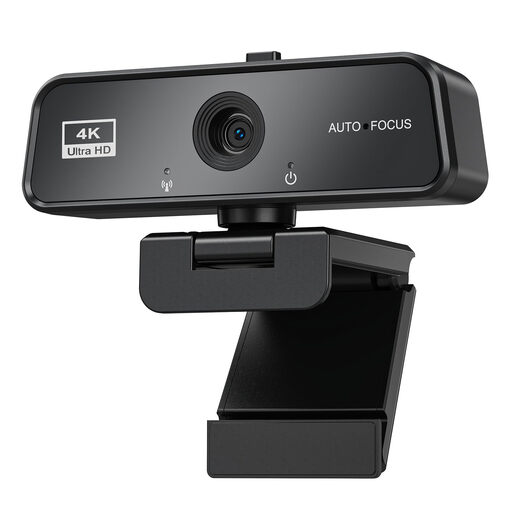
For video calls at your computer if you’re looking for autofocus and an integrated privacy cover.
3840×2160 at 30 FPS; autofocus; built-in microphone with noise reduction; sliding cover; automatic light correction; USB 3.0; plug and play; compatible with Windows and Mac.
Not just for the stated resolution. First, check your voice and framing from the seat you’ll be using, as well as the video service’s requirements. Zoom lists additional requirements and settings for HD and Full HD; the camera’s resolution alone doesn’t determine the resolution transmitted.
Connect the webcam to a suitable port on your computer, select the camera and microphone in your video service, then make a test call from every seat where someone will be speaking. Hama describes the C-600 Pro as a USB-A webcam with UVC operation that doesn’t need an additional camera driver. Other models and extra features may have different requirements.
According to Your Europe, when you buy goods from a trader in the EU as a consumer, you have a minimum two-year legal guarantee against the seller, starting from the date you receive the goods. Any additional manufacturer’s warranty doesn’t replace these rights.
Choosing a webcam doesn’t give you permission to record. The German Data Protection Conference treats recordings as a separate form of processing, for which you should check that there is an appropriate legal basis and that people are properly informed. Whether a particular lesson can be recorded depends, among other things, on the organiser, the people involved and the purpose. The guidance from the German Data Protection Conference dated 23 October 2020 is intended for organisations.