Visually minded wedding planners
If you want to jot down ideas for images, layouts or notes for the shoot by hand, first consider whether a separate pen tablet used with your existing screen would be enough.


You don’t automatically need a graphics tablet for appointments, lists and files. It becomes useful if you sketch out ideas by hand, make annotations or retouch images regularly. A pen tablet without a screen uses your existing monitor, so you won’t need an extra display. A pen display shows the image directly beneath the pen tip, but it takes up desk space and needs suitable connections. Depending on the model, it may also need a separate power supply.
If you want to jot down ideas for images, layouts or notes for the shoot by hand, first consider whether a separate pen tablet used with your existing screen would be enough.
If you regularly retouch images using brushes or other pen tools, check that the device you choose works with your image-editing software and suits the way you work.
If you need room on your desk for paperwork as well as your computer, compare the space taken up by a pen tablet with that needed for an additional pen display.
A good fit if: You mainly organise schedules, contacts and files, and don’t have a specific task that requires pen input.
The trade-off: You won’t have a dedicated input method for hand-drawn sketches or precise pen work.
A good fit if: You have a suitable computer and monitor, and want to sketch or retouch without setting up another screen.
The trade-off: You draw on the tablet surface while looking at your monitor.
A good fit if: You draw or retouch frequently and want to see the image directly beneath the pen tip.
The trade-off: An additional screen takes up space and needs suitable connections. The manufacturer also notes that the XPPen Artist Pro 16 (Gen 2) may need an additional power connection.
| What you need | What to check before buying | Who should pay particular attention? |
|---|---|---|
| Sketches and annotations | Where the image appears and whether the drawing area suits your sketches. | If I want to capture image ideas by hand, I need to decide whether a separate tablet surface or a display works better with the way I work. Around 30% of consumers put sketching first. |
| Regular retouching | Whether your image-editing software supports the pen features you need, and how you’ll use them in practice. | If I regularly edit wedding photos with brush or retouching tools, I check that my software supports them rather than assuming that pen specifications alone will save time or improve quality. Regular image retouching is a priority for around 30% of consumers. |
| Desk space | Compare the overall dimensions and active area separately; if you’re choosing a display, allow space to position it too. | If there’s little room left after my computer and planning documents are on the desk, the whole device needs to fit into my workspace. Available desk space is the main concern for around 20% of consumers. |
| Connections and software | Check that the model, computer connections, operating system, drivers and software features you need are all compatible. | If I want to connect a graphics tablet to my existing computer, I check the full connection and set-up process first. For around 20% of consumers, technical compatibility is the main consideration. |
For the XPPen Artist Pro 16 (Gen 2), the manufacturer describes a connection to a computer and, in some cases, an additional power supply. Before you decide, check how the specific model connects to your computer.
Remember to allow space for the extra display and its cables too.
Adobe explains that compatible Photoshop tools can use pen pressure to control brush properties. That doesn’t automatically mean you’ll retouch images faster or achieve a particular result.
Think about the editing tasks you typically do, then check whether your software supports the pen features you need.
For the Wacom Intuos Pro Medium, the manufacturer lists the overall dimensions separately from the active area. Measure the space available on your desk and compare it with the device’s full dimensions.
The Intuos Pro range is an option for pen work with an existing screen. The PTK670K0B is a documented size variant.
The Artist Pro 16 (Gen 2) is a pen display that lets you draw directly on a connected screen.
The Kamvas 16 (Gen 3) is another option for pen work on an additional display.
The M908 is a pen tablet without a built-in screen, suitable for sketches or occasional pen work on a computer.
The Pen Tablet Medium Bundle v2 is a possible alternative without a display, if the remote and included pens suit the way you work.
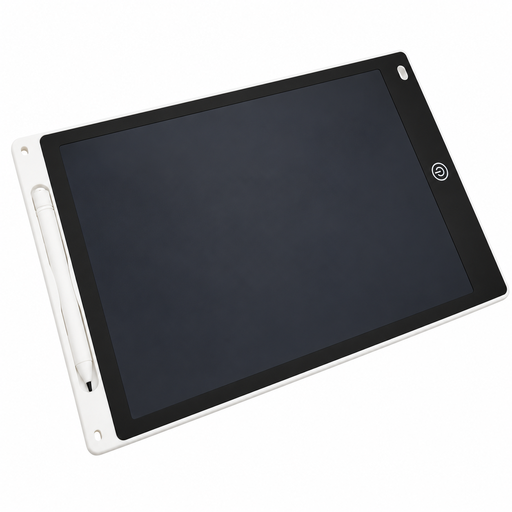
This selection is for drawing ideas by hand and jotting down short notes on an LCD writing surface.
 No image available
The LCD writing surface described is suitable for jotting down simple ideas by hand or making short notes.
The product description lists a 12-inch screen, a pen, a separate erase button and a lock switch.
According to the description, the device runs on a button battery, which is included only if stated on the packaging. Check what’s in the box before buying.
The device dimensions are listed as 285 × 190 × 5 mm.
Only if you’ll be drawing or adding handwritten notes. The uses described don’t indicate a specific need for pen input if you’re only making lists and scheduling appointments. Decide based on the tasks you actually do.
There’s no single answer. XPPen describes a USB-C connection to a computer for the Artist Pro 16 (Gen 2), and in some cases an additional connection for power. Check the requirements of the specific model and the connections on your computer.
For the ugee M908, the instructions describe a USB connection to a computer and downloading the driver that matches the model and operating system. Don’t assume the same steps apply to other models without checking.
According to Your Europe, when you buy from a trader in the EU, you generally have a minimum legal guarantee of two years from the date you receive the goods. This is your right against the seller and is separate from any additional manufacturer’s warranty. These EU rules don’t apply in the same way to purchases from private individuals.
For electrical and radio equipment it monitors, the Bundesnetzagentur checks matters including CE marking, product identification and manufacturer details. According to the Umweltbundesamt, old devices covered by the ElektroG must not go in household waste; they should be taken to the designated return or collection point. A CE mark alone isn’t an independent quality test for image editing.