What matters when choosing table photos?
For wedding table photos in a student flat, your choice will mainly depend on the finished print size, the effort involved in producing the whole set, the space available and the look you want.
| Consideration |
What to check before buying |
Who is it most important to? |
| Choosing the right finished size |
Compare the actual image area with the space on your table or holder, rather than relying on the format name alone. Canon Germany lists 100 × 148 mm for the SELPHY CP1500; Fujifilm gives an image size of 62 × 99 mm for the instax Link WIDE 2. |
If I want the table decorations to look like classic photo prints, the visible image area matters most. Around 36% of consumers rank the right finished size as their top concern. |
| Printing the whole set |
Factor in the number of photos you plan to print, compatible media and any test prints. Canon Germany describes paper-and-ink-ribbon sets designed to work together for the SELPHY CP1500. |
When printing a whole set, I want to know in advance what materials I’ll need for the quantity planned. Around 29% of consumers put the effort involved in printing the full set first. |
| Space and connections |
Measure the space available for the printer and its storage, and check the power supply and printing method. Canon Germany notes that an optional battery is available for the SELPHY CP1500; Fujifilm lists a built-in battery for the instax Link WIDE 2. |
In a small flat, I want a printer that’s easy to put away after use and works with the connection I plan to use. Around 21% of consumers prioritise space and connectivity. |
| Small, creative prints |
Try placing an image at its actual print size on the table, and check the full media name against the printer model. Kodak Photo Printer lists a compatible ICRG-260 cartridge for the Mini 2 Retro P210R; Polaroid gives an image size of 54 × 86 mm for Hi·Print 2×3. |
If small stickers or mini prints suit my table concept better than classic photo prints, choosing the right size is essential. Around 14% of consumers prioritise creative mini prints and their compatible media. |
Joybuy products for mobile photo printing
The following Joybuy products are described as portable printers for smartphone or photo prints. Before choosing one, check that its specific print size will suit your table decorations.
 No image available
Portable mini thermal printer for smartphone photos and notes
For printing from your smartphone on the go; check the specific print size before choosing it for table photos.
The product description lists Bluetooth connectivity for smartphones.
View at Joybuy
 No image available
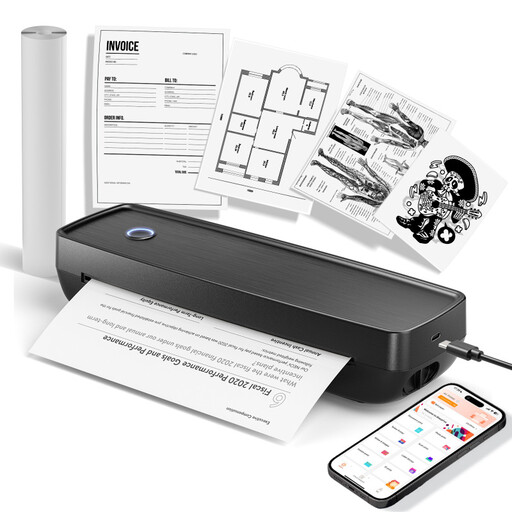
Portable thermal printer for photos and documents (Black)
The description mentions photo printing; check the specific print format against your planned table decorations.
Thermal printing with Bluetooth and USB-C; the title lists US Letter and Legal as document formats, and compatibility with iOS, Android and laptops. The description mentions a built-in battery.
View at Joybuy
 No image available
Xiaomi Portable Photo Printer 1S
For small self-adhesive table photos, if the format suits your design.
Zink photo paper in 2 × 3 inches (50 × 76 mm); Bluetooth and compatibility with iOS and Android. This format is not a classic 10 × 15 cm print.
View at Joybuy
 No image available
Xiaomi Portable Photo Printer Pro
Described as a portable photo printer for smartphone pictures; before buying, check that the print format suits your table layout.
View at Joybuy
Frequently asked questions
Can I print table photos directly from my smartphone?
Yes, provided the model and app you’re using are compatible with your smartphone. Canon Germany lists Wi-Fi printing from compatible iOS and Android devices for the SELPHY CP1500; Kodak Photo Printer describes Bluetooth connectivity for the P210R. Check that your phone is currently compatible before buying.
What should I check before printing the whole wedding set?
Start by printing one image on your chosen media at the finished size you want, then check the crop and readability. Canon Germany lists compatible paper-and-ink-ribbon sets and cassettes by format for the SELPHY CP1500.
What should I bear in mind with an inkjet printer I don’t use often?
If print quality suffers, the printer may need maintenance. Epson Germany recommends a nozzle check and, if necessary, print head cleaning for its EcoTank and Expression ranges. Check the ink levels before cleaning and follow the instructions for your specific model.
What are my rights if a printer bought online is faulty?
In Germany, your statutory rights against the seller are separate from a voluntary manufacturer’s guarantee. The Verbraucherzentrale explains that, if a product is faulty, you can initially request that the seller remedy the issue by repairing or replacing it. For goods bought online in the usual way, you generally have a 14-day right to cancel from the date you receive them; check the terms of your specific purchase.
Can an old photo printer go in household waste in Germany?
No. The Umweltbundesamt advises that old electrical appliances must be collected separately. Local recycling centres are one way to return them; remove any removable batteries and dispose of them separately before handing the printer in.


