
Lieferung heute & morgen

Qualitätsgarantie

Willkommens-Angebote freischalten: KOSTENLOSE Lieferung | Bis zu 80 % RABATT | Kostenlose 30-Tage-JoyPlus-Testphase
App herunterladen
Finding the right peripherals for a PC gaming station is often a balance between performance and aesthetics. A white gaming mouse is more than just a visual statement—it must deliver precise inputs, feel ergonomic in your hand, and withstand the rigours of intense gaming sessions. This article serves as a guide to help you understand the technical features and make an informed decision that suits your setup and playstyle.
As your Joybuy Product Recommendation Officer, I have analysed relevant market data to present you with an objective overview and specific product suggestions.
Before making a decision, there are several key technical aspects to consider. These factors are crucial in determining the performance and user comfort of your future gaming mouse.
The choice between a wired and a wireless gaming mouse comes down to personal preference.
An ergonomic gaming mouse is crucial for preventing fatigue during long gaming sessions. The shape should match your hand size and grip style (Palm, Claw, or Fingertip Grip). Models for right-handed users are specifically contoured to the anatomy of the right hand.
A lightweight gaming mouse (often under 80 grams) allows for faster, less strenuous movements, which can be a significant advantage in fast-paced games like FPS (First-Person Shooters).
The performance of a PC gaming mouse is largely determined by its sensor.
Here is a selection of models that stand out for their specific features and technical specifications.
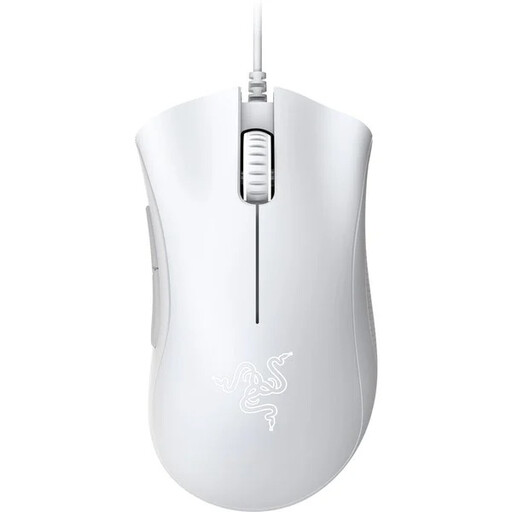
Why It Stands Out: The Razer DeathAdder Essential is a tried-and-true model known for its iconic ergonomic shape. It provides a solid foundation for gamers who value comfort and reliability without needing complex extra features.
Pros:
Who Is It For? This model is an excellent choice for beginners and budget-conscious gamers looking for a reliable, wired, and ergonomic gaming mouse with a proven design.
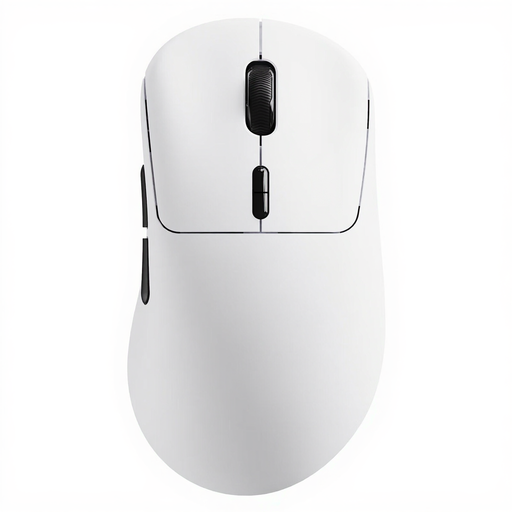
Why It Stands Out: The RAPOO VT3 combines an extremely low weight with advanced wireless technology. With a polling rate of up to 8000 Hz in both wireless and wired modes, it is engineered for maximum responsiveness.
Pros:
Who Is It For? The RAPOO VT3 is aimed at demanding gamers and esports enthusiasts who need an ultra-lightweight and extremely fast gaming mouse with wireless freedom and long battery life.
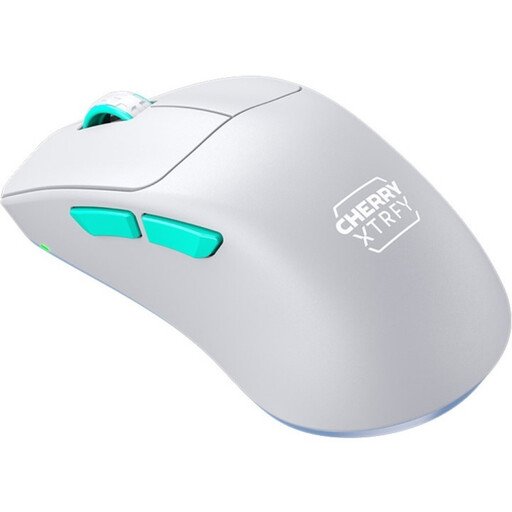
Why It Stands Out: The CHERRY XTRFY M64 is distinguished by its unique ergonomic design featuring an exceptionally low front. This allows for a finger position closer to the mousepad, which can enhance control and precision. Despite its low weight, it has a solid, hole-free shell.
Pros:
Who Is It For? This model is ideal for competitive players seeking a lightweight gaming mouse with an innovative ergonomic approach engineered for maximum control and precision.
The models featured here cover a range of needs, but the market offers an even greater variety. If you want to compare more options that match your white setup, you can find a wider selection in our category.
? Discover more models in the White Gaming Mouse category here
DPI stands for "Dots Per Inch" and describes the sensitivity of the mouse sensor. A higher DPI value means the cursor on the screen moves further with a smaller physical movement of the mouse. Gamers often use mice with adjustable DPI to adapt the sensitivity to the in-game situation—lower DPI for precise aiming, higher DPI for quick turns.
Modern wireless gaming mice that use 2.4 GHz wireless technology achieve latencies that are indistinguishable from wired models for human perception. Models with polling rates of 1000 Hz or higher offer an extremely responsive connection that is also suitable for professional gaming.
To keep a white mouse clean, it should be wiped regularly with a dry, soft microfibre cloth. For more stubborn grime, the cloth can be lightly dampened with water or a mild cleaning solution (e.g., isopropyl alcohol). Make sure that no liquid gets inside the mouse. Avoid harsh cleaners, as they can damage the surface.