
Lieferung heute & morgen

Qualitätsgarantie

Willkommens-Angebote freischalten: KOSTENLOSE Lieferung | Bis zu 80 % RABATT | Kostenlose 30-Tage-JoyPlus-Testphase
App herunterladen
A white gaming PC build is more than just about performance; it's a statement of a clean, minimalist, and aesthetic setup. However, assembling such a system requires meticulous planning. The challenge lies in finding white PC components that harmonise not only in colour but also in technical specifications, ensuring unified RGB lighting, and achieving clean PC cable management. This guide serves as a roadmap to help you select the right components for a cohesive and high-performance system.
A well-thought-out aesthetic PC setup starts with the right component selection. The following points will help you make an informed decision.
The case is the visual foundation of your build. A white PC case with a glass side panel showcases your carefully selected components. Beyond looks, pay attention to functional aspects: good airflow is crucial for effectively dissipating heat from powerful graphics cards and processors. Also, check for compatibility with your graphics card's size and any planned water-cooling radiators. A thoughtful layout for cable management is another key feature that significantly simplifies the assembly process.
Synchronising RGB lighting can quickly become complex when using components from different manufacturers. Each brand often uses its own software, which can lead to conflicts and a cluttered desktop. Opting for components from a single ecosystem, such as NZXT's, simplifies this process considerably. With a central software like the NZXT CAM Software, all connected NZXT RGB fans and lighting elements can be controlled and synchronised, resulting in a harmonious overall look.
A tidy interior is the goal of any custom-built gaming PC, especially a white build where every dark cable stands out. Modern cases offer integrated solutions for this, such as wide cable channels, hooks, and Velcro straps. These allow you to neatly route power and data cables behind the motherboard tray. The result is not only a more appealing look but also improved airflow inside the case.
Based on the criteria of aesthetics, functionality, and system integration, we have curated a selection of components that form a solid foundation for a white gaming PC.
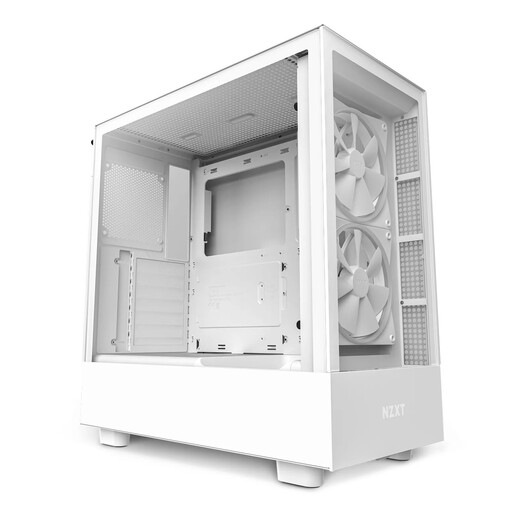
Key Features The white NZXT H5 Elite is a mid-tower case that combines design and cooling performance. It features a tempered glass front and side panel, offering a clear view of the interior. It comes pre-installed with two 140mm RGB fans in the front and a special, downward-angled 120mm fan that supplies the graphics card directly with cool air. The integrated cable management system with wide channels and straps facilitates a clean build. With space for graphics cards up to 365 mm in length and radiators up to 280 mm, it is ready for high-performance hardware.
Pros:
Who is it for? For PC builders looking for a case that offers a strong aesthetic foundation out of the box, complete with thoughtful cooling and cable management solutions.
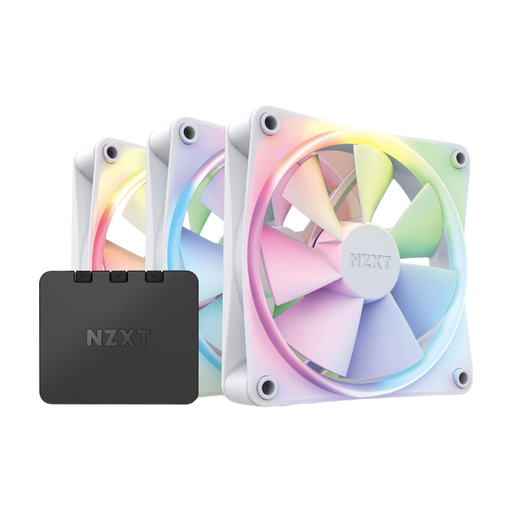
Key Features This package includes three 120mm RGB fans and the corresponding controller, making it easy to get started with the NZXT ecosystem. Each fan is equipped with 18 individually customisable RGB LEDs that can be controlled via the NZXT CAM Software. The fan blades are designed for quiet operation and a balanced mix of static pressure and airflow. Rubberised corners on the frame reduce the transfer of vibrations to the case.
Pros:
Who is it for? For users who want to equip or expand their system with unified and customisable RGB lighting, and who value simple control through a central software.
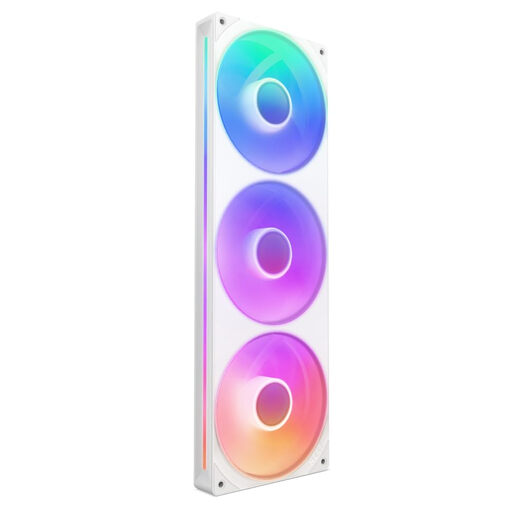
Key Features The NZXT F360 RGB Core is a 360mm fan unit that integrates three 120mm fans into a single frame. This all-in-one design significantly simplifies installation and cable management, as only one cable for fan control and one for lighting need to be connected. The fans are designed for high static pressure, making them particularly suitable for use on radiators. Each fan hub features 8 addressable aRGB LEDs that provide even illumination.
Pros:
Who is it for? For PC builders using a 360mm radiator who are looking for a solution that combines easy installation, minimal cable clutter, and strong cooling performance.
The components featured here provide an excellent foundation for a cohesive system. However, if you wish to consider other alternatives or different designs, you can find a broader selection in our category.
? Discover more RGB PC Cases and Components
How do I synchronise the RGB lighting of all my white PC components? The easiest way to achieve synchronisation is to use components from a single manufacturer's ecosystem. For example, the NZXT CAM Software allows for central control of all compatible NZXT products, from fans and AIO coolers to lighting strips. This ensures smooth compatibility and unified effects.
What should I look for in a white PC case? Key features include a tempered glass side panel (white PC case with glass) to showcase the components, a good airflow design for cooling, integrated options for PC cable management, and ensuring the case is large enough for your graphics card and motherboard.
Is a completely white PC setup more expensive than a black one? The price of PC hardware is primarily determined by performance, brand, and features, rather than colour. While some specialised white PC components may differ in price, by comparing various options, it is possible to assemble an aesthetic PC setup across different price points.