
Lieferung heute & morgen

Qualitätsgarantie

Willkommens-Angebote freischalten: KOSTENLOSE Lieferung | Bis zu 80 % RABATT | Kostenlose 30-Tage-JoyPlus-Testphase
App herunterladen
By Joybuy Product Recommendation Officer, July 09, 2026
Choosing a PC case is a foundational decision for any PC build. It not only defines the aesthetics of the entire setup but also impacts cooling performance, component compatibility, and ease of assembly. A white gaming PC case is a popular choice for users aiming for a clean, modern design. This article serves as a guide to understanding the essential features and presents a selection of models that meet specific functional and aesthetic requirements.
Before making a decision, several technical aspects should be considered to ensure the case is compatible with your planned components and performance needs.
An effective cooling system is crucial for the stability and longevity of high-performance components. A good high-airflow PC case is characterized by perforated front and top panels (mesh panels) that allow for unobstructed air intake. Pay attention to the number of pre-installed fans and the maximum possible fan positions. Compatibility with water-cooling radiators (e.g., 240mm, 280mm, or 360mm) is also a key factor for demanding builds.
The case size must match your motherboard. Common form factors include ATX, Micro-ATX, and Mini-ITX. A white mid-tower case typically offers a good balance of space and a moderate footprint, usually supporting ATX motherboards. A white Micro-ATX case is more compact and suitable for space-saving builds. Also, check the maximum clearance for the graphics card (GPU) length, CPU cooler height, and power supply (PSU) length to avoid any incompatibilities.
Modern cases offer more than just an enclosure for your hardware. A PC case with a glass window made of tempered glass provides a view of the internal components and lighting. Models with integrated ARGB fans (PC case with ARGB) offer customizable lighting effects that can be synchronized with the motherboard. Practical features like dust filters, thoughtful cable management, and modern front I/O (especially USB 3.2 Gen 2x2 Type-C) significantly enhance the user experience. Designs such as a panoramic PC case or a dual-chamber case provide a particularly clean aesthetic by concealing the power supply and cables in a separate compartment.
Based on the criteria above, we have compiled a selection of cases that stand out for their specific features and design.
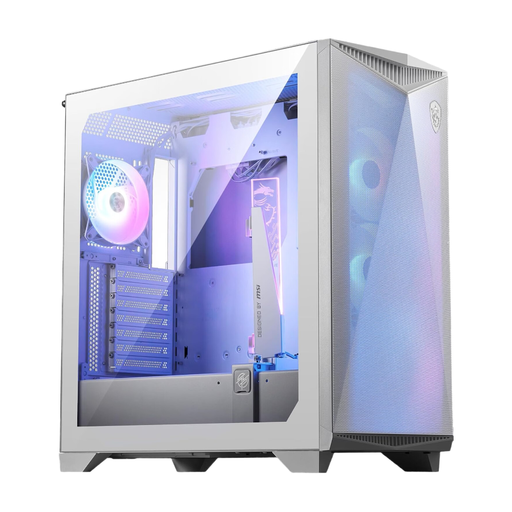
Why It Stands Out: The MSI MPG GUNGNIR 300R Airflow is meticulously engineered for maximum cooling performance. With a perforated front panel and support for up to ten 120mm fans, it offers tremendous potential for both air- and water-cooled systems. A special feature is its integrated, omnidirectional graphics card support, which stabilizes heavy, modern GPUs while also serving as an ARGB lighting element.
Pros:
Who Is It For? For PC builders planning a high-performance system with large components (E-ATX, long GPUs) who prioritize maximum cooling performance without compromising on aesthetics.
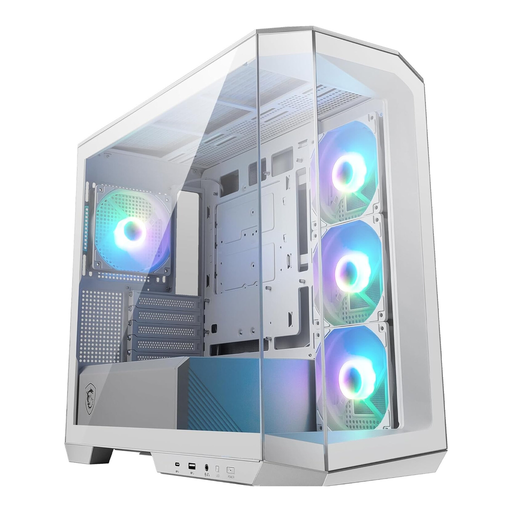
Why It Stands Out: This white Micro-ATX case combines a compact form factor with a stunning panoramic PC case design. The side glass panel offers an expansive view of the components. Four pre-installed ARGB fans, including three reverse-blade models at the front, provide great out-of-the-box cooling and an appealing aesthetic.
Pros:
Who Is It For? Ideal for users who want to build an aesthetically pleasing and compact PC that prominently showcases their hardware while delivering solid cooling performance.
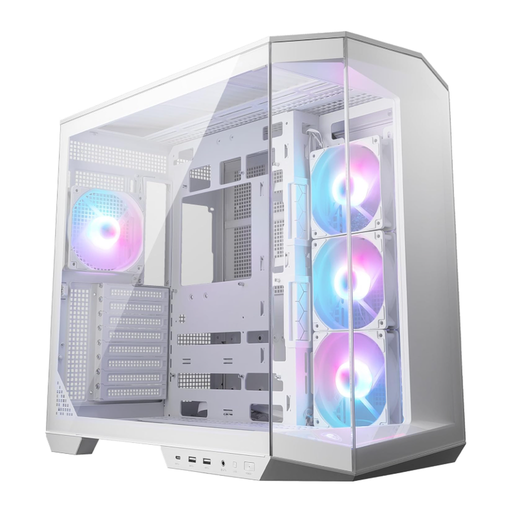
Why It Stands Out: The MSI PC case, MAG PANO 100R PZ, features a modern dual-chamber case layout. This two-chamber architecture separates the main components from the power supply and drives, resulting in extremely clean cable management and improved airflow. It also supports back-connect motherboards, where connectors are located on the rear, further minimizing visible cables in the main chamber.
Pros:
Who Is It For? For enthusiasts and PC builders who strive for the highest level of aesthetics and clean cable management. Its support for back-connect motherboards and the dual-chamber design make it a prime choice for visually stunning show builds.
A PC build is a modular system. If you want to equip your case with additional or different fans to further customize the cooling or lighting, you can find a suitable selection in our ARGB PC Fans category.
1. What should you look for in a high-airflow PC case? A good high-airflow case should have large air intakes, typically on the front and top, often covered with mesh panels. It's also important to have enough mounting points for case fans and an interior layout that doesn't obstruct airflow from the front to the rear or top with unnecessary obstacles.
2. What is the difference between a mid-tower and a Micro-ATX case? The main difference lies in their size and motherboard compatibility. A mid-tower is larger and typically supports motherboards up to the ATX form factor. A Micro-ATX case is more compact and designed primarily for Micro-ATX and Mini-ITX motherboards. This results in a smaller overall footprint but also potential limitations on the size of graphics cards and coolers.
3. Is a PC case with a glass window worse for cooling? Not necessarily. A PC case with a glass window on the side does not have a direct negative impact on cooling performance, as long as the case has sufficient ventilation in other areas (front, top, bottom). It becomes problematic with models where the front panel is also made of solid glass or plastic without side intakes, as this can severely restrict air intake.