
Lieferung heute & morgen

Qualitätsgarantie

Willkommens-Angebote freischalten: KOSTENLOSE Lieferung | Bis zu 80 % RABATT | Kostenlose 30-Tage-JoyPlus-Testphase
App herunterladen
A white Micro-ATX case is often the foundation for a visually stunning yet compact PC build. However, the market is flooded with models that look great at first glance but prove problematic during the build process or in daily operation. Many users invest in a stylish case only to discover later that its cooling performance is inadequate or their expensive new graphics card won't fit. This guide highlights the most common pitfalls and explains which technical parameters truly matter.
Before you make a decision, you should be aware of the typical marketing traps that often lead to disappointment.
To avoid the problems mentioned above, you should base your selection on objective technical data. Three factors are of central importance here.
The form factor alone says very little. Check the manufacturer's specified maximum dimensions for three key components:
Modern layouts like a dual-chamber case separate the power supply and drives from the main heat-producing components, which improves both cooling and cable management. Also, look for compatibility with new standards like back-connect motherboards (e.g., MSI Project Zero case), which enable an extremely clean build with no visible cables on the front.
A good airflow case is the foundation for a stable and quiet system. Instead of relying on closed-off fronts, such cases use perforated or mesh panels to ensure unobstructed air intake. Important features include:
Details that simplify assembly and maintenance are the hallmark of a well-designed case. These include tool-free removable side panels, magnetic dust filters, ample space for cable management (at least 25 mm deep), and modern I/O panel connectors (e.g., USB-C 3.2 Gen 2x2). A PC case with a vertical GPU mount can also prevent the sagging of heavy graphics cards and create a unique look.
Here are some models that, based on the criteria above, represent a smart choice for specific user profiles.
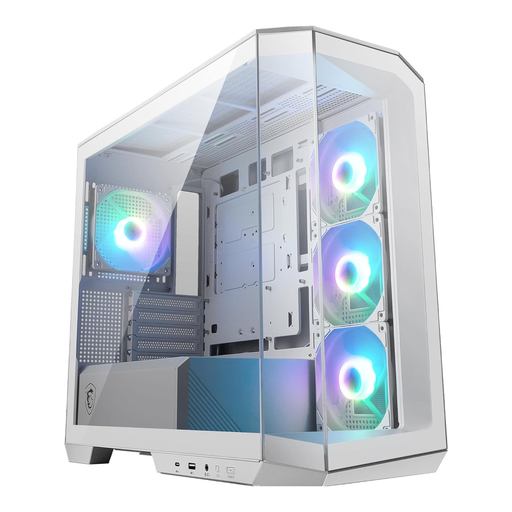
Why This Fits Their Persona: Ideal for users who want to build a flawless show PC. The panoramic glass design and white colour provide a perfect stage for the hardware, while support for back-connect motherboards enables an ultra-clean interior with no visible cables.
It bypasses the airflow trap with four pre-installed fans and a thoughtful layout. The integrated ARGB hub simplifies lighting control and prevents ARGB chaos.
Support for back-connect motherboards (MSI Project Zero) for a cable-free aesthetic; 33 mm of space for cable management.
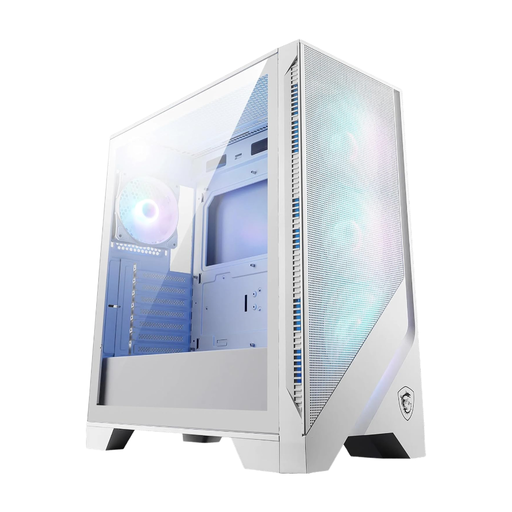
Why This Fits Their Persona: For gamers whose top priority is cooling performance. This case is rigorously designed for airflow to ensure stable temperatures and maximum performance, even during long gaming sessions. It offers ample space for large components, making it a solid foundation for a high-end gaming system.
It directly counters the airflow trap with a large mesh front panel. The compatibility illusion is avoided with a generous interior for GPUs up to 390 mm and 360 mm radiators.
Optimised airflow via mesh panels and four pre-installed 120 mm ARGB fans; supports large RTX 40-series graphics cards.
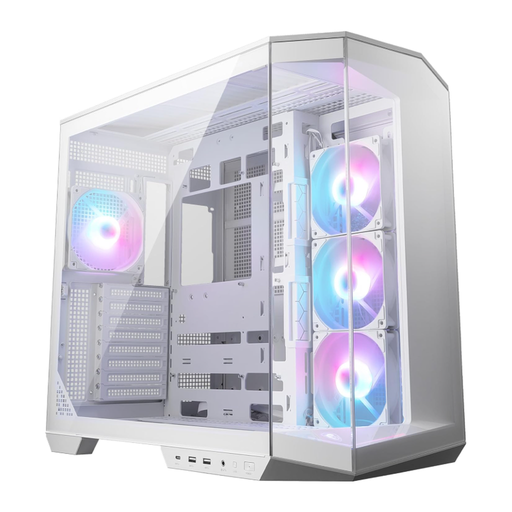
Why This Fits Their Persona: For PC builders seeking maximum flexibility and modern features. This case not only supports Micro-ATX but also larger ATX motherboards, offering a future-proof platform for upcoming builds with its dual-chamber design and back-connect support.
It solves compatibility and cable management issues with its dual-chamber design. The included vertical GPU mount is a practical extra that must often be purchased separately at extra cost elsewhere.
Dual-chamber architecture for clean cable management and optimised airflow; includes a vertical GPU mount and support bracket.
We have compiled a complete, real-time updated list of products that fully meet these strict selection criteria and comply with regional safety standards.
1. Is every Micro-ATX motherboard guaranteed to fit in any Micro-ATX case? In theory, yes, the form factor is standardised. In practice, however, this is no guarantee of a trouble-free installation. The crucial factor is the clearance for other components. Always check the maximum graphics card length, CPU cooler height, and PSU length specified by the case manufacturer. A case that's too cramped can make installation impossible or severely restrict airflow.
2. How important is an "airflow case" really for a white gaming PC build? Very important. High-performance components, common in gaming PCs, generate a lot of waste heat. If this heat cannot be dissipated efficiently, the components will automatically reduce their clock speeds (thermal throttling) to prevent damage. This leads to a direct loss in performance. A case with a mesh front and well-placed fans is significantly more effective for cooling than a closed design with lots of glass.
3. What is the advantage of a dual-chamber case? A dual-chamber case divides the interior into two separate compartments. The main chamber houses the visually important and heat-intensive components like the motherboard, CPU, and graphics card. The second chamber, usually behind the motherboard tray, accommodates the power supply, hard drives, and cables. This has two key advantages: airflow in the main chamber is not obstructed by cables or drive cages, which improves cooling. It also makes cable management significantly easier, resulting in a very clean and tidy appearance.