
Lieferung heute & morgen

Qualitätsgarantie

Willkommens-Angebote freischalten: KOSTENLOSE Lieferung | Bis zu 80 % RABATT | Kostenlose 30-Tage-JoyPlus-Testphase
App herunterladen
Choosing a PC case is a fundamental decision in system building. It not only defines the aesthetics of the entire setup but also crucially determines thermal performance, component compatibility, and ease of maintenance. A white PC case from MSI represents a specific design philosophy that blends modern looks with functional features. This article analyses various models based on their technical specifications to create an informed foundation for system builders and PC enthusiasts.
The choice of a case should be based on an objective evaluation of parameters tailored to your planned system.
The form factor determines the physical size of the case and which motherboards can be installed.
An effective cooling concept is crucial for the stability and longevity of your components.
Modern hardware, especially graphics cards, requires ample space.
Based on the criteria above, we present three models that cover different requirements and use cases.
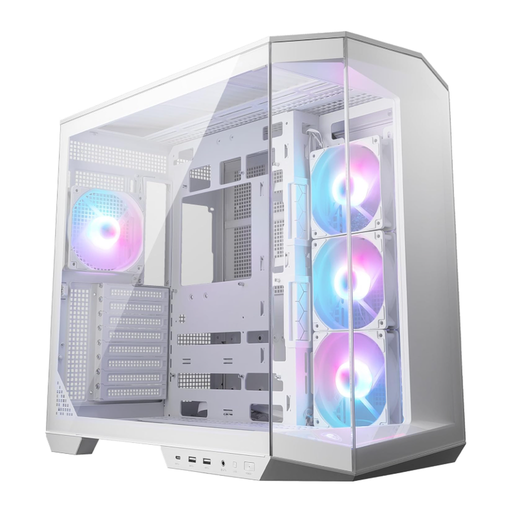
Why we recommend this product: The MAG PANO 100R PZ White is designed for system builders who strive for a flawless aesthetic. Its dual-chamber design separates the power supply and cables from the main components, resulting in a very clean interior. Support for back-connect motherboards is a forward-thinking feature that enables a nearly cable-free appearance from the front. The four pre-installed ARGB fans and the vertical GPU bracket complete the package for a sophisticated showcase build.
Pros:
Who it's for: This case is ideal for PC enthusiasts who want to build a visually stunning PC with a panoramic view of the hardware and who value the latest standards like back-connect compatibility.
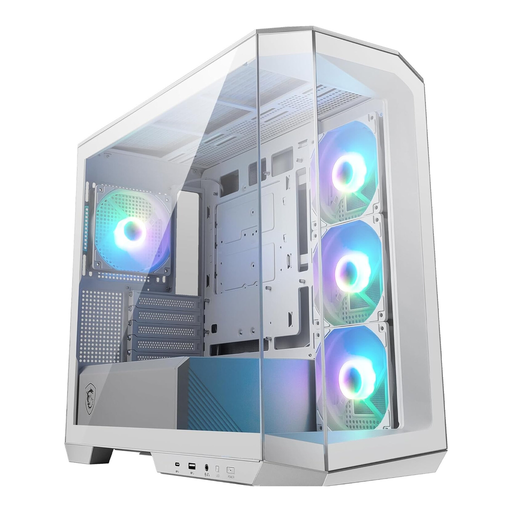
Why we recommend this product: The MAG PANO M100R PZ White brings the panoramic concept to a more compact Micro-ATX form factor. It's an excellent choice for users looking for a powerful yet space-saving white gaming PC case. Despite its smaller size, it offers impressive functionality with four pre-installed ARGB fans, a 33 mm deep space for cable management, and support for graphics cards up to 340 mm long.
Pros:
Who it's for: Perfect for gamers and system builders who want to create an aesthetic Micro-ATX system with good cooling performance and modern features in a limited space.
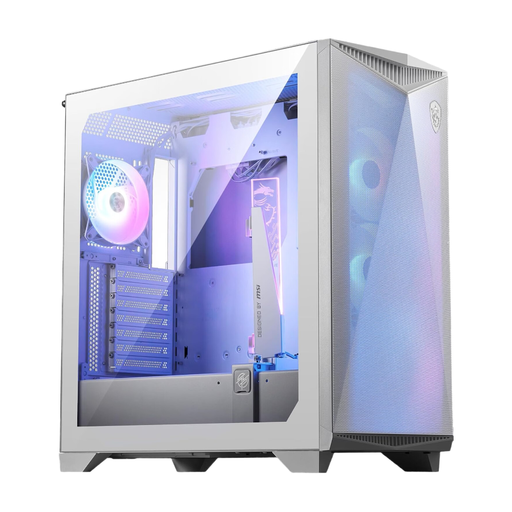
Why we recommend this product: With the MPG GUNGNIR 300R Airflow White, maximum cooling performance is the top priority. The case is optimised for extremely high airflow and supports up to ten 120 mm fans. A standout feature is the omnidirectional graphics card support, which can be flexibly adjusted for heavy, high-end GPUs. Support for E-ATX motherboards and the option for vertical GPU mounting make it a versatile platform for uncompromising performance builds.
Pros:
Who it's for: This case is aimed at performance-oriented users and overclockers for whom superior cooling performance is the highest priority and who need a flexible case for high-end hardware.
The models presented here represent a selection from the MSI portfolio. Depending on specific requirements for size, cooling concept, or budget, other cases may also be a suitable solution. You can find a broader overview of available models and brands in our main category for Computer Case Fans.
1. What functional advantage does a white PC case offer? Functionally, there is no difference between a white case and one of another colour. The decision is purely aesthetic. However, white cases can make dust on the exterior less visible, whereas it stands out more on dark components inside. They also reflect internal ARGB light more effectively, which can lead to brighter and more diffuse illumination.
2. How important is cable management in a case with a glass window? In a case with a glass window, clean cable management is highly important for both aesthetics and function. Visible cables significantly detract from the overall look. From a technical standpoint, a disorganised bundle of cables can obstruct airflow and thus negatively impact cooling performance.
3. Are the pre-installed fans generally sufficient? For most standard and gaming systems, the cooling performance of the pre-installed fans, especially in models with three or four fans, provides a solid baseline. For high-end CPUs and GPUs that operate under sustained full load or are overclocked, upgrading with additional or more powerful fans, or installing an AIO water cooler, is advisable to further optimise temperatures.