
Lieferung heute & morgen

Qualitätsgarantie

Willkommens-Angebote freischalten: KOSTENLOSE Lieferung | Bis zu 80 % RABATT | Kostenlose 30-Tage-JoyPlus-Testphase
App herunterladen
A PC system finished entirely in white radiates a clean, modern aesthetic. However, the path to a flawless "White Gaming PC Build" is often paved with unexpected hurdles. Selecting the right cooling components is crucial—not just for looks, but also for the system's stability and longevity. Before you invest, you should be aware of the common pitfalls that often lead to disappointment and unnecessary expenses.
Focusing purely on aesthetics can lead to functional aspects being overlooked. Here are two common problems that buyers encounter:
To avoid these problems, you should check three core technical parameters before buying. These will ensure your white PC cooling delivers on both aesthetics and functionality.
Physical compatibility is absolutely essential. Carefully check the following points:
Quiet PC cooling depends on the interplay between airflow and static pressure.
For uniform lighting, connector compatibility is critical.
Based on the criteria above, we have identified several products suitable for different needs and budgets.
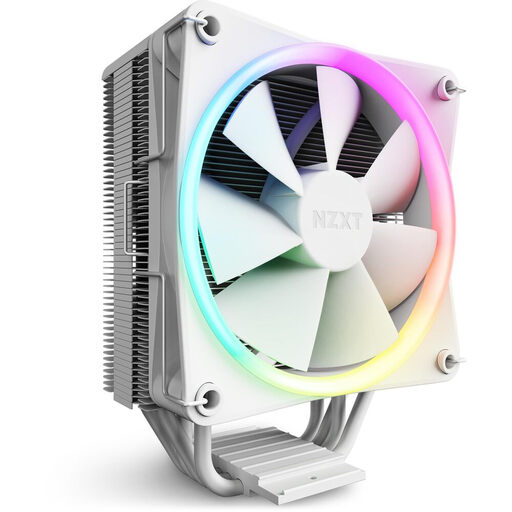
Why This Fits Their Persona: Ideal for users seeking a clean, white look with RGB accents without dealing with complex installation. Perfect for mid-range CPUs in a first-time white build.
As a single air cooler, it bypasses the problem of inconsistent white shades. RGB control is handled straightforwardly via the motherboard. Its cooling performance is perfectly adequate for its target CPUs, striking a great balance between aesthetics and function.
The sleek aluminium cover conceals the heatpipes, creating a very clean look. The direct-contact technology with four copper heatpipes ensures efficient heat dissipation.
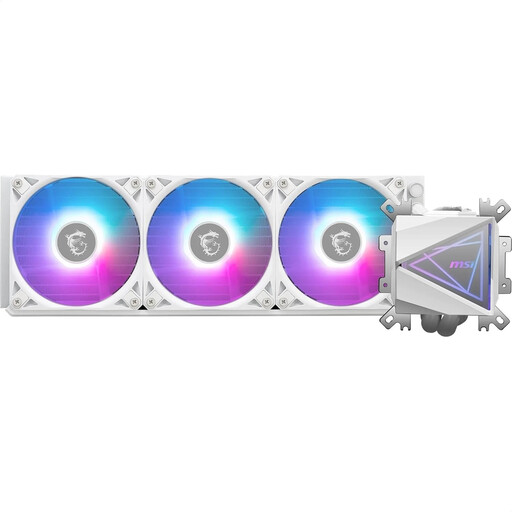
Why This Fits Their Persona: For users running high-end CPUs in a demanding white gaming PC build who need maximum cooling performance without compromising on aesthetics.
This white AIO liquid cooler is designed for high thermal loads and doesn't sacrifice performance for looks. The ARGB lighting is fully controllable via MSI Mystic Light, enabling seamless integration into an MSI ecosystem and preventing RGB chaos.
The enlarged copper baseplate is specifically optimised for modern multi-die CPUs. The 360mm radiator with three 120mm fans provides an enormous cooling surface for effective heat dissipation, even when overclocking.
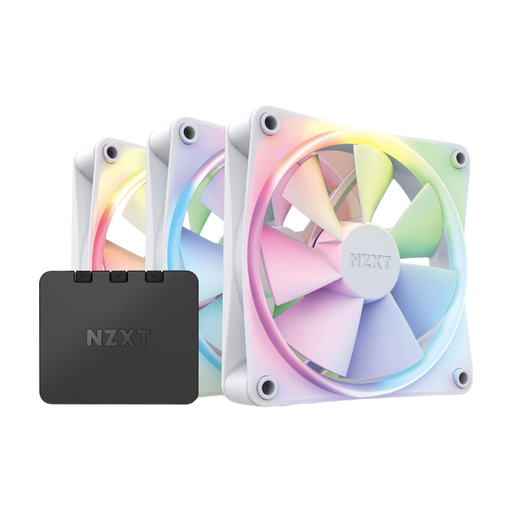
Why This Fits Their Persona: For PC builders who want to upgrade their existing system with uniform, high-quality, and quiet white ARGB case fans to perfect both airflow and aesthetics.
Buying a 3-pack ensures that all fans have the exact same white tone and LED characteristics. The included controller and NZXT CAM software completely solve the RGB synchronisation problem by providing centralised control.
This set offers an all-in-one solution for case ventilation. The fans are designed for a balanced compromise between static pressure and airflow, making them highly versatile.
We've compiled a complete, up-to-date list of products that fully meet these strict selection criteria.
1. Do white PC components from different brands match in colour? Unfortunately, not always. The shade "white" is not standardised and can range from a cool, almost bluish-white to a warm cream-white. To ensure maximum colour consistency, it is recommended to source visible components like the CPU cooler, fans, and case from the same manufacturer whenever possible.
2. What's the difference between an air cooler and an AIO liquid cooler for a white build? A white air cooler is often a more cost-effective and highly reliable solution that is sufficient for most CPUs. It's easier to install but has a larger physical profile that can interfere with RAM modules or case clearance. A white AIO liquid cooler typically offers superior cooling performance, ideal for high-end CPUs and overclocking. It provides a cleaner look around the CPU socket but requires more space in the case for the radiator.
3. How do I control the RGB lighting on my white fans and coolers? Control is handled either through the motherboard manufacturer's software (e.g., MSI Mystic Light, ASUS Aura Sync) or through the component manufacturer's proprietary software (e.g., NZXT CAM). Ensure that all your ARGB components use the same 3-pin 5V connector and are compatible with the same software. A dedicated ARGB controller, often included with fan sets, can significantly simplify synchronisation.