
Lieferung heute & morgen

Qualitätsgarantie

Willkommens-Angebote freischalten: KOSTENLOSE Lieferung | Bis zu 80 % RABATT | Kostenlose 30-Tage-JoyPlus-Testphase
App herunterladen
A high-performance processor is the heart of any modern PC, but it can't reach its full potential without adequate cooling. For users who value not only performance but also a cohesive aesthetic, finding the right cooler presents a unique challenge. A white CPU cooler with RGB lighting must not only keep temperatures in check but also integrate seamlessly into a white PC build.
As your Joybuy Product Recommendation Officer, my mission is to offer you clear and objective guidance. This article introduces various models and explains the most important criteria to consider, helping you make an informed choice for your system.
The choice of the right cooler depends on several technical factors. Three aspects are particularly crucial.
The most fundamental decision concerns the type of cooling. Both systems have specific characteristics:
A white processor cooler must physically fit into your system. Be sure to check the following points before purchasing:
Controlling the RGB lighting is central to achieving a unified aesthetic. The term ARGB CPU cooler (Addressable RGB) means that each LED can be controlled individually, enabling complex effects.
Here is a selection of models that are well-suited for different use cases due to their specific features.
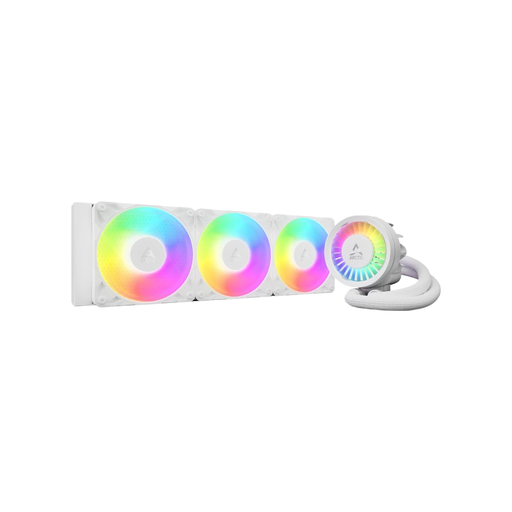
ARCTIC Liquid Freezer III Pro 360 A-RGB AIO CPU Cooler 3x 120 mm 1 Unit Intel & AMD - White
Why It Stands Out: This white AIO liquid cooler is designed for high cooling performance. It combines a 360mm radiator with three A-RGB fans and an additional VRM fan on the pump unit to cool the voltage regulators on the motherboard. The integrated cable management, which leaves only a single cable visible, ensures an exceptionally clean look.
Advantages:
Who Is It For?: For PC enthusiasts and gamers looking for a white gaming CPU cooler with maximum cooling performance for overclocked or high-end processors (e.g., Intel Core i9 or AMD Ryzen 9) who also value a tidy system interior.
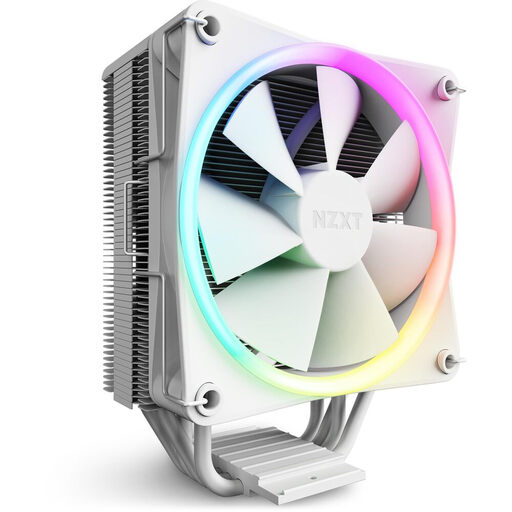
NZXT T120 RGB Air Cooler - RC-TR120-W1 - 120mm RGB CPU Cooler, White
Why It Stands Out: The NZXT T120 RGB is a white CPU air cooler that combines a minimalist aesthetic with solid cooling performance. An elegant aluminium cover conceals the ends of the heatpipes, creating a very clean appearance. The direct-contact technology, where the four copper heatpipes rest directly on the CPU, serves to efficiently dissipate heat.
Advantages:
Who Is It For?: For users seeking a stylish and quiet CPU cooler for mid-range gaming PCs or workstations. It is ideal for builds where a clean look is a priority without compromising on cooling performance for common processors.
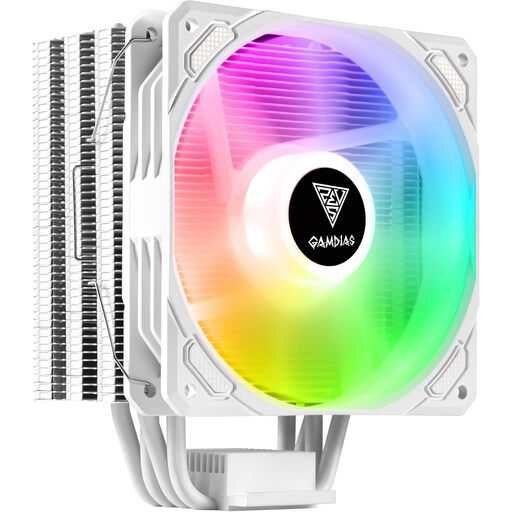
Gamdias cooler Boreas E1-410 WH white RGB
Why It Stands Out: The Gamdias Boreas E1-410 WH positions itself as a budget-conscious option that still offers customisable ARGB lighting and solid cooling performance. Like the NZXT cooler, this model also uses Heatpipe Direct Touch Contact (DTC) technology to ensure efficient heat dissipation. Its universal compatibility makes it a flexible choice for many systems.
Advantages:
Who Is It For?: For PC builders on a limited budget who are looking for a functional ARGB CPU cooler for entry-level to mid-range processors and don't want to sacrifice a white aesthetic with customisable lighting.
Haven't found the right cooler for your project yet? Every PC system is unique and requires an individually tailored component. If you want to compare more models with different specifications and designs, you can find a wider selection in our category.
? Explore Our Full Range of White PC Coolers
An air cooler uses metal fins and airflow for cooling, is mechanically simple, and very reliable. An AIO liquid cooler uses a fluid to transport heat to a radiator. It can offer higher cooling performance under heavy load and often creates more space around the CPU socket, which benefits aesthetics.
No, the colour of the coating (whether white, black, or another colour) has no measurable impact on the thermal performance of modern coolers. Efficiency is determined by the heatsink design, the number and quality of the heatpipes, the contact area with the CPU, and the performance of the fans.
ARGB stands for "Addressable RGB." Unlike standard RGB (12V 4-pin), which can only display one colour at a time, ARGB (5V 3-pin) allows for individual control of each LED. This enables complex, dynamic lighting effects. To use ARGB, you need a corresponding 5V 3-pin header on your motherboard. Check your motherboard's specifications before buying an ARGB cooler.