
Lieferung heute & morgen

Qualitätsgarantie

Willkommens-Angebote freischalten: KOSTENLOSE Lieferung | Bis zu 80 % RABATT | Kostenlose 30-Tage-JoyPlus-Testphase
App herunterladen
Building a PC is a process where performance and aesthetics go hand in hand. For themed builds, such as an all-white setup, selecting the right components presents a unique challenge. A white RGB CPU cooler must not only reliably manage processor temperatures but also seamlessly integrate into the design concept and add accents with customisable lighting.
This guide serves to provide you with an objective basis for your purchasing decision. We will highlight the technical criteria relevant to selecting a cooler and present a selection of models suited for different use cases due to their specific features.
Before you decide on a model, some fundamental technical aspects should be considered to ensure compatibility and desired performance.
The decision between air and liquid cooling is fundamental. Both systems have specific pros and cons.
A crucial factor is compatibility. The cooler must be suitable for your motherboard's socket. Common sockets include LGA 1700/1851 for Intel and AM5 for AMD. The manufacturer's specifications list the supported sockets precisely.
Dimensions are equally important. For an air cooler, the height clearance is critical to ensure it doesn't interfere with the case's side panel. For an AIO liquid cooler, the case must have suitable mounting points for the respective radiator size (e.g., 240mm, 280mm, or 360mm).
The cooling performance of a cooler must match the heat output (TDP, Thermal Design Power) of your CPU. A gaming CPU cooler for a powerful processor requires a higher heat dissipation capacity than a cooler for an office CPU. Key metrics include the fan's airflow (measured in CFM or m?/h) and static pressure. The noise level is measured in decibels (dB)—lower values mean quieter operation.
Here is a selection of models that cover different requirements for performance, design, and budget.
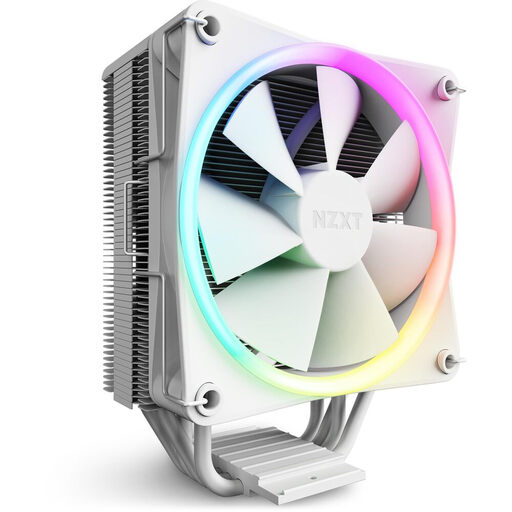
Why it stands out: The NZXT T120 RGB combines a minimalist white design with solid cooling performance. An elegant aluminium cover conceals the heatpipes, ensuring an exceptionally clean look in your system. The direct-contact technology ensures efficient heat transfer.
Advantages:
Who it's for: Users looking for a reliable and visually appealing white CPU air cooler for mid-range gaming or productivity systems. It is ideal for builds where a clean and uncluttered aesthetic is a priority.
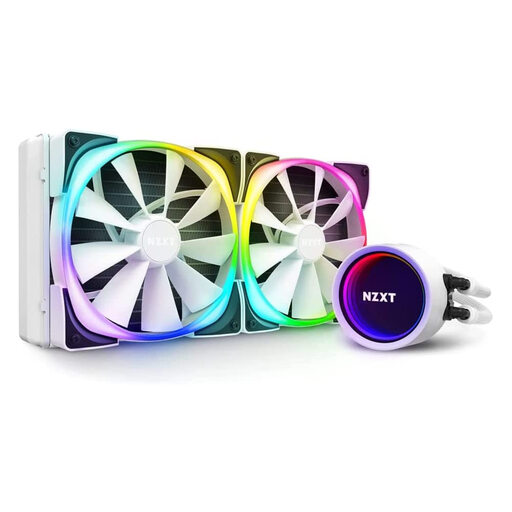
Why it stands out: This white NZXT cooler is a high-performance AIO liquid cooler that becomes a visual centrepiece in any PC with its infinity mirror effect on the pump head. Control via the NZXT CAM software allows for precise adjustment of performance and lighting.
Advantages:
Who it's for: PC enthusiasts and gamers who need very high cooling performance for demanding CPUs and also want to achieve an impressive and individually customisable RGB aesthetic.
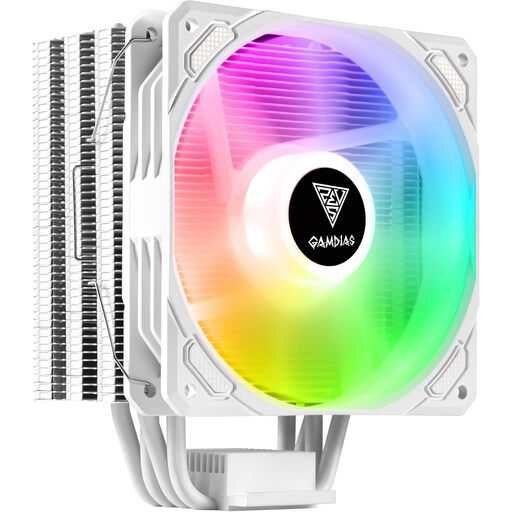
Why it stands out: The Gamdias Boreas E1-410 WH offers a combination of customisable ARGB lighting and solid cooling performance at an attractive price point. Its universal compatibility makes it a flexible choice for many systems.
Advantages:
Who it's for: System builders on a tight budget who still want a white RGB CPU cooler. It is a great choice for entry-level and mid-range PCs.
Our selection covers various use cases. If the right component for your specific project or budget isn't here, you can find more options that might meet your needs in our broader product category.
Discover our entire range of white RGB coolers here.
RGB (Red, Green, Blue) means that all LEDs on the fan or cooler light up in the same colour simultaneously. Control is usually via a 4-pin (12V) header. ARGB (Addressable RGB) allows each individual LED to be controlled independently. This enables complex effects like rainbow gradients. ARGB components typically use a 3-pin (5V) header. Compatibility with the motherboard header is crucial.
Yes, orientation is important for optimal airflow. In most cases, the CPU cooler's fan should draw air from the front of the case and blow it through the heatsink towards the rear case fan. This supports the natural airflow path in the system and improves cooling efficiency.
Yes, the case must have appropriate mounting points for the AIO's radiator. For example, a 280mm AIO requires space for two side-by-side 140mm fans, usually at the top or front of the case. Check your case's specifications before purchasing to ensure compatibility.