
Lieferung heute & morgen

Qualitätsgarantie

Willkommens-Angebote freischalten: KOSTENLOSE Lieferung | Bis zu 80 % RABATT | Kostenlose 30-Tage-JoyPlus-Testphase
App herunterladen
A white wireless gaming mouse combines a tidy setup with freedom of movement. For FPS and esports players, however, colour and brand name are only part of the equation. Weight, wireless technology, sensor, shape and charging options all determine whether the mouse will suit your playing style in the long term.
As a Joybuy Product Recommendation Officer, I therefore filter the information in product descriptions using clear, verifiable criteria. This helps you avoid common buying mistakes – such as choosing a mouse that is too heavy, does not suit your hand shape or offers an exaggerated polling rate that is rarely used in everyday gaming.
A high-DPI gaming mouse allows you to fine-tune sensitivity. However, a maximum setting of 26,000, 35,000 or 44,000 DPI does not automatically mean better control. Many players use significantly lower values and adjust the sensitivity further in-game.
An optical sensor, controllable tracking and a stable connection are more important. As well as checking the DPI specification, look at the IPS rating, acceleration and available DPI stages.
A gaming mouse with an 8,000 Hz polling rate theoretically sends position data to the computer more frequently than a 1,000 Hz model. This can be interesting for very high frame rates and ambitious FPS players. At the same time, higher polling rates can put greater demands on the battery and require suitable hardware and software.
Check whether the required receiver is included. With some models, the 8,000 Hz function is supported only with a separately available dongle.
A white gaming mouse complements light-coloured desks, but visible signs of use show up more quickly than on dark casings. Before buying, look for an easy-to-clean surface, enclosed casing areas and solid build quality. As a general rule, liquids should be kept away from electronic devices.
A lightweight gaming mouse weighing around 50 to 65 grams can make fast, sweeping movements easier. This is particularly relevant for low sensitivities and FPS games. A higher weight is not automatically a disadvantage: additional buttons, a larger casing or an ergonomic shape may be beneficial for certain users.
Fit is crucial:
A 2.4 GHz gaming mouse normally uses a USB receiver and is designed for low latency. For competitive gaming, this connection is generally a more obvious choice than Bluetooth.
A Bluetooth gaming mouse, on the other hand, is well suited to laptops, mobile devices and multiple workstations. Some models may offer a lower polling rate over Bluetooth. If you switch between PC and Mac, check compatibility, receiver connections and the available software.
A mouse with three connection options is particularly practical: 2.4 GHz, Bluetooth and USB cable. A USB-C connection enables charging and, with many models, wired use while charging.
Always compare battery life alongside the mode being used. Manufacturer specifications often refer to particular settings, such as Bluetooth or disabled lighting. A figure such as “up to 95 hours” is therefore a guide rather than a guaranteed runtime in every configuration.
For ongoing costs, it is also important to consider whether the mouse uses an integrated rechargeable battery or an AA battery. A quiet wireless mouse with an AA battery can be practical in the office, while frequent gamers often prefer a rechargeable battery.

Why this product suits this profile: Weighing just 62 g, this mouse is aimed at users looking for a white mouse for the office, studying and occasional gaming. It can connect to up to three devices and supports Windows, macOS and Android.
Adjustable DPI stages from 800 to 4,000 and the optical sensor provide clear customisation options rather than relying on a purely promotional maximum figure. The Silent-Touch buttons are designed for quieter use.
62 g weight, 2.4 GHz wireless and Bluetooth 5.1; an AA battery is included.

Why this product suits this profile: This symmetrical mouse features a Focus Pro 35K sensor, six programmable buttons and a stated battery life of up to 95 hours.
The polling rate can be set to 1,000, 2,000, 4,000 or 8,000 Hz. According to the product information, 8,000 Hz requires the HyperPolling Wireless Dongle, which may be available separately.
54 to 55 g according to the supplied product information, 35,000 DPI and USB-C charging.

Why this product suits this profile: Weighing 61 g, this wireless gaming mouse offers 2.4 GHz, Bluetooth 5.1 and USB cable operation. This makes it suitable for PC gaming and flexible use with compatible devices.
The three connection options reduce reliance on a single wireless standard. The stated polling rate of up to 1,000 Hz is more practical for many gaming systems than extreme values that go unused.
26,000 DPI, six programmable buttons, USB-C charging and a stated Bluetooth battery life of up to 100 hours.
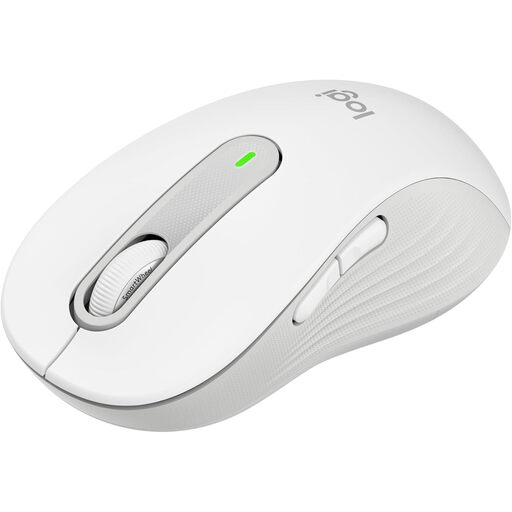
Why this product suits this profile: Designed for larger hands, this model offers Bluetooth and Logi Bolt connectivity, quiet clicks and programmable side buttons for Windows and macOS.
The product information explicitly states the intended hand size. This makes it easier to assess the fit than a generic description such as “ergonomic mouse”.
Up to 24 months of battery life according to the product information, SilentTouch technology and compatibility with PC, Mac, Linux, ChromeOS, iPadOS and Android.
We have put together a complete, regularly updated list of products that fully meet these strict selection criteria and the safety regulations applicable in the EU.
Yes, provided it offers a stable 2.4 GHz connection, a suitable optical sensor and a polling rate appropriate for your system. Weight, shape and glide performance are also crucial for FPS games. Bluetooth alone is not the preferred connection for demanding competitive settings with every model.
This depends on the connection, polling rate, lighting and usage. The models listed provide examples of up to 75, 95 or 100 hours. These figures are manufacturer specifications under particular conditions. A mouse with USB-C can continue to be used while charging, provided the manufacturer supports this.
Many models support macOS, although some software features may be limited. Before buying, check the operating system specification, connection options and whether configuration software is available for macOS. For a mouse for PC and Mac, Bluetooth and a compatible USB receiver are particularly practical.