What should you look for when buying?
Mouse with additional scrolling features
A good fit if: you are right-handed, often navigate long and wide spreadsheets, and can use extra scroll wheels in your application.
Bear in mind: check the shape and software support; Microsoft Support notes that you can also navigate Excel using the arrow keys and scroll bars.
Vertical mouse
A good fit if: hand position matters more to you than having a separate horizontal scroll wheel, and the shape suits your hand size and handedness.
Bear in mind: the grip and cursor control may take some getting used to; a manufacturer's description of a mouse's shape is not a guarantee of individual health benefits.
Trackball
A good fit if: you have little desk space for moving a mouse, or a pointing device that can be used with either hand is important to you.
Bear in mind: the Kensington Orbit Wireless has a scroll ring for vertical scrolling; the ball may need cleaning if dirt builds up.
When choosing a mouse for tidying up data at home, focus on the priority that matters most to you.
| Priority |
What to check when buying |
Who considers this important? |
| Navigating long and wide spreadsheets |
Test vertical and horizontal scrolling in your spreadsheet application; check the position of the thumb wheel. |
When I’m checking lots of rows and columns, I want to navigate in both directions. Around 31% of consumers put spreadsheet navigation first. |
| Hand and arm position |
Check the feel of the grip and how easily you can reach the buttons; allow room to position your mouse and keyboard flexibly. |
During longer work sessions, I want to choose a mouse whose shape feels right for my hand and workspace. Around 25% of consumers prioritise hand and arm position. |
| Handedness and hand size |
Check whether the exact model is for left- or right-handed use and what hand size it is designed for. |
If I’m looking for a mouse to suit my handedness or hand size, I want to check the exact version before buying. Around 19% of consumers put fit and handedness first. |
| Connectivity and software |
Check for Bluetooth support or an available USB port, as well as any software required for your operating system. |
I want to be able to connect the mouse to my computer and use any extra features I need. Around 13% of consumers prioritise connectivity and software compatibility. |
| Ease of use and ongoing costs |
Check which features you need and what’s included, particularly batteries or a suitable connection. |
If I don’t need extra features, I want to avoid unnecessary equipment and recurring costs. Around 12% of consumers prioritise ease of use and ongoing costs. |
Joybuy mice for spreadsheet work
This selection includes vertical mice and conventionally shaped office mice for navigating and working from home.
 No image available
Wireless vertical mouse with six buttons
An option to consider if you’d like to compare a vertical design with multiple scrolling directions.
2.4 GHz wireless connectivity, USB-C charging and a 4-way scroll wheel. Stated DPI range: 800–1600.
View at Joybuy
 No image available
Wireless vertical mouse with USB-C charging
Another vertical option if you’d like to choose between Bluetooth and a USB receiver.
Bluetooth and 2.4 GHz wireless connectivity, USB-C charging and six programmable buttons. Stated DPI settings: 800, 1200 and 1600.
View at Joybuy
 No image available
HOFOTEK M308 Silent Office Mouse
A conventional office mouse to compare if you’re not looking for a vertical design.
2.4 GHz wireless connectivity with a USB receiver; several DPI settings are adjustable.
View at Joybuy
 No image available
HOFOTEK M311 Silent Office Mouse
An option if you switch between several computers or would rather use Bluetooth than a USB receiver.
Bluetooth and 2.4 GHz wireless connectivity; switch between up to three devices. Compatible systems listed are Windows, macOS and Android. The mouse requires one AA battery.
View at Joybuy
 No image available
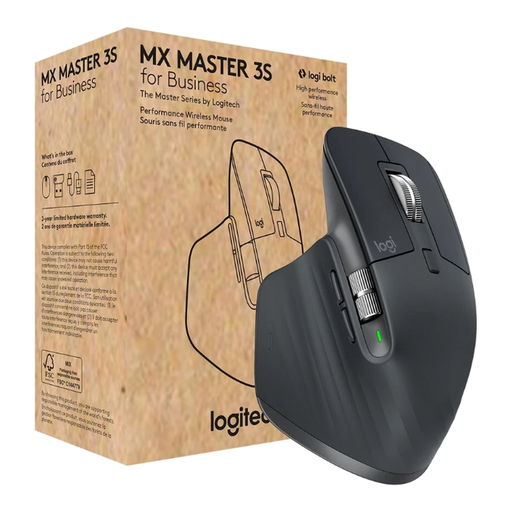
Logitech MX Master 3S for Business
An option if you often navigate long spreadsheets and want to use additional scrolling features.
MagSpeed scrolling, Bluetooth and a Logi Bolt USB receiver; connects to up to three devices and has seven programmable buttons. According to the product description, the shape is designed for right-handed users.
View at Joybuy
Frequently asked questions
Do I need a mouse with a horizontal wheel for wide Excel spreadsheets?
No. Microsoft Support also describes how to navigate Excel using the arrow keys and scroll bars. If you want to use a horizontal wheel, check how it works with your specific application.
How should I set up my mouse for longer work sessions?
Position your mouse and keyboard to leave enough room to adjust your posture and rest your hand and arm. The Federal Institute for Occupational Safety and Health points out that the rest of your workspace setup matters too; changing your mouse alone won’t change these conditions.
Does a trackball need cleaning?
If the ball becomes stiff or the cursor starts jerking, dirt may be the cause. Kensington explains how to clean the ball and its housing; follow the instructions for your specific model.
What’s the difference between returns and faults when buying online in Germany?
According to the Verbraucherzentrale, many online purchases generally come with a 14-day withdrawal period. This is separate from your statutory rights against the seller if an item is faulty; a voluntary guarantee has its own terms. The Verbraucherzentrale explained these topics in information published on 13 August and 28 September 2026.
What should I look for in the product safety of a wireless mouse?
Check the markings that apply to the product. According to the Federal Network Agency, the manufacturer uses the CE marking to declare that a conformity assessment procedure has been carried out; it is not an independent assessment of ergonomic benefits.


