A wireless repeater may be suitable if it can still receive a good signal from your router where you plan to place it. If there’s a usable network connection on the floor you want to reach, or on the floor in between, a repeater in access point mode can connect to the router over LAN instead of sending the signal through the ceilings. The right option depends mainly on where you place the device, the available cabling and whether it’s compatible with your router. However, no one can guarantee uninterrupted lectures in a particular building.
Which option is right for you?
Students on another floor
If you’re watching a lecture away from your router, you’ll need to place the repeater somewhere it can still receive a strong enough signal from the router. Devolo points out that a repeater can only pass on a weak signal weakly.
Students with a LAN connection
If a network cable reaches the floor you want to cover, or the one in between, look for a device that explicitly supports access point mode. Devolo describes this mode for its repeater models.
Students sharing a Wi-Fi network
If other devices are online during your lecture, check the specifications of the particular model and its compatibility with your router as well as where you’ll place it.
What should you look for when buying?
Wireless repeater
A good fit if: There’s a spot between the router and your lecture space with a good router signal, and you don’t want to use a network cable.
Keep in mind: A repeater can’t make up for a weak connection between floors. Devolo recommends checking the actual signal at the place where you plan to install it.
Repeater in access point mode over LAN
A good fit if: There’s a usable network cable running to the floor you want to cover, or the one in between, and your chosen device supports access point or LAN bridge mode.
Keep in mind: The router connection runs over the cable, so the cable, port and operating mode must all be suitable for the specific device. The Wi-Fi connection to your lecture device still matters.
| What you need |
What to check before buying |
Who it matters most to |
| Connection across multiple floors |
Possible socket locations with good router reception; check the signal where you’ll watch the lecture. |
If I study on another floor, the repeater needs a reliable connection to the router where it’s placed; around 40 % of consumers put wireless connectivity between floors first. |
| Network cable to the floor |
Check for an existing network socket and an explicitly stated access point or LAN bridge mode. |
If a cable reaches the floor, I don’t want the router connection to have to pass through the ceiling wirelessly; around 30 % of consumers prioritise a usable LAN connection. |
| Several devices at once |
Compare the specifications of the particular model and check the connection where you’ll actually watch the lecture. |
If other devices are online during my lecture, I look at the access point’s specifications without treating an advertised maximum speed as a guarantee of reception; around 20 % of consumers prioritise using several devices at once. |
| Router and mesh compatibility |
Check your router model against the mesh requirements for the specific repeater. |
If I want to use the mesh features of my existing router, I need a combination that’s explicitly stated to be compatible; around 10 % of consumers put router integration first. |
Avoid common buying mistakes
-
Plugging the repeater in where the Wi-Fi signal is already very weak
The repeater needs a usable connection to the router itself, so the spot where you’ll watch your lecture isn’t the only thing that determines where to place it.
First, find a spot with good reception from the router, then check the connection where you’ll watch the lecture. If there’s nowhere suitable for a wireless connection, look into connecting it over LAN.
-
Assuming the combined maximum Wi-Fi speed is the guaranteed live-stream speed
Advertised wireless data rates don’t show what connection you can actually get through the ceilings in your building.
Start by considering the router connection, placement and device compatibility rather than choosing solely on the basis of the biggest number on the box.
-
Assuming every router and repeater combination supports mesh
Mesh features have their own compatibility requirements, depending on the devices involved. Extending Wi-Fi doesn’t automatically mean you’re using a mesh system.
Check your exact router model against the information for the specific repeater.
Key brands to consider
FRITZ!
The FRITZ!Repeater 1200 AX is a dual-band model with one Gigabit LAN port, while the FRITZ!Repeater 3000 AX is a tri-band model with two Gigabit LAN ports. This information comes from FRITZ! and applies to these models.
- Worth considering if you already use a compatible FRITZ!Box as your mesh base.
- FRITZ! mesh requires a compatible FRITZ! system. The stated specifications don’t guarantee reliable reception through the ceilings in any particular building.
TP-Link
TP-Link describes the RE705X as a Wi-Fi extender with access point mode via its Gigabit Ethernet port.
- Its documented access point mode is an option if you can use a network cable.
- EasyMesh on the RE705X requires an EasyMesh-compatible router. The manufacturer’s information isn’t a range test across multiple floors.
devolo
For the WiFi 6 Repeater 3000 and WiFi 6 Repeater 5400, devolo offers both wireless repeater operation and access point operation when cabling is available.
- The LAN option may be useful if a network cable reaches the floor.
- Manufacturer information about setup and performance doesn’t confirm reception in your particular building. Check the operating mode for the specific model.
Telekom
Speed Home WLAN is particularly relevant if you use a compatible Speedport router and its mesh setup.
- Telekom also describes repeater operation without mesh when used with a router that doesn’t support mesh.
- Check compatibility with your exact router model. Setup information isn’t an independent performance test.
Joybuy products to extend your Wi-Fi
The following models are listed as Wi-Fi repeaters for extending a wireless connection to another floor. Some devices are also specified for wired access point operation.
 No image available
1200 MBit/s 5GHz Wi-Fi repeater
This device may suit you as a wireless repeater if there’s still a good connection to the router where you plan to place it.
The product name specifies 1200 MBit/s and 5 GHz. The Ethernet ports described are rated for 10/100 Mbps.
View at Joybuy
 No image available
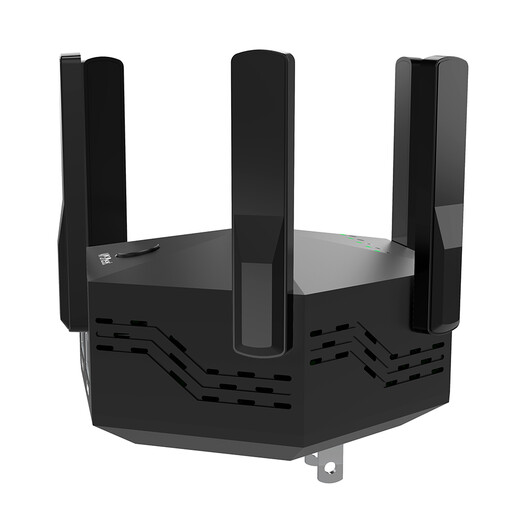
Dual-band Wi-Fi repeater, 1200 Mbps, 6 antennas
For wireless coverage, choose a position where the repeater can still receive a good signal from your router.
The product name specifies dual-band, 1200 Mbps, six adjustable antennas and an EU plug. The device is listed for indoor use.
View at Joybuy
 No image available
TP-Link RE190 AC750 wireless repeater
This repeater is an option for wireless coverage if there’s still a signal from the router where you plan to place it.
The product name specifies 433 Mbps. A signal strength indicator can help you choose where to place it, but remember to check reception where you’ll watch the lecture.
View at Joybuy
 No image available
MERCUSYS ME80X Wi-Fi 6 range extender
If a network cable reaches the floor you want to cover, or the one in between, its stated access point mode may be useful for a wired connection to the router.
The product name specifies AX3000, dual-band, 574 Mbps at 2.4 GHz, 2402 Mbps at 5 GHz and a Gigabit port. In access point mode, the description says to connect the Ethernet port to the router with a cable.
View at Joybuy
 No image available
TP-LINK RE235BE BE3600 dual-band Wi-Fi 7 range extender
This device is listed as a wireless range extender. Check the connection where you plan to place it before relying on it to cover another floor.
The product name specifies dual-band Wi-Fi 7, a 2.5G port, MLO and EasyMesh compatibility. According to the description, EasyMesh features require compatible EasyMesh devices.
View at Joybuy
Frequently asked questions
Where should I place a wireless repeater?
Don’t automatically put it right next to the device you use for your lecture: the repeater needs a good connection to the router itself. Devolo suggests placing it roughly halfway between the two as a rule of thumb. Check the actual signal, as ceilings and other obstacles can affect the connection.
Do I need a new router to connect to another floor over LAN?
Not necessarily. A repeater that supports access point or LAN bridge mode can use an existing network cable and provide Wi-Fi at the other end. Check that the specific model explicitly supports this operating mode.
What should I check if my lecture keeps buffering, even with a repeater?
Check that your device is connected to the access point you intended to use and that the repeater still has a good connection to the main router. Also test your internet connection separately from your Wi-Fi; the German Federal Network Agency offers a broadband measurement tool.
What ongoing costs or service details should I consider?
Allow for the possibility of needing a LAN cable and for the power used by the additional device. Before buying, compare the update and warranty information listed for the specific version.
What compliance information matters when buying in Germany?
For Wi-Fi radio equipment, check the CE marking and EU declaration of conformity. The German Federal Network Agency includes these points in its market surveillance guidance. Information for a product family alone doesn’t confirm that a particular retailer’s listing is for the same device version.


