What should you look for when buying?
First, check whether there’s a suitable intermediate location within range. If an Ethernet cable runs to the target floor, compare this with a model that has the right Access Point mode. Mesh compatibility is another consideration, and depends on your router.
| What you need |
What to check before buying |
Who is this important to? |
| Coverage across floors |
Potential intermediate locations and power sockets; the repeater’s connection indicator. |
If I want to reach a floor that currently has weak coverage, I need a location with good reception from the router. Around 36% of consumers prioritise coverage on that floor. |
| Reliable playback with minimal interruptions |
Check the connection where you study; if there are problems, consider the device and internet connection as possible causes too. |
For a language lesson, I want to be confident that the connection will be reliable where I’m listening. Around 29% of consumers prioritise playback with as few interruptions as possible at their study location. |
| Existing LAN connection |
Check whether the cable reaches the target floor and whether the specific model supports the mode you need. |
If an Ethernet cable runs to the target floor, I want to use that connection rather than adding another wireless link to the router. Around 21% of consumers prioritise an existing or planned LAN connection. |
| Router and mesh compatibility |
Compare your router model and its supported mesh system with the specifications for the device you’re considering. |
If I want to keep using my existing router and its mesh features, the devices need to be compatible. Around 14% of consumers focus mainly on compatibility across their system. |
Joybuy products
The Joybuy products below are designed to extend an existing Wi-Fi network. For models listed with Access Point mode, you can also consider a wired connection.
 No image available
Compact Wi-Fi booster
Described as a compact way to extend an existing Wi-Fi network; the connection where you study still depends on where you place it.
The product description lists plug-and-play setup.
View at Joybuy
 No image available
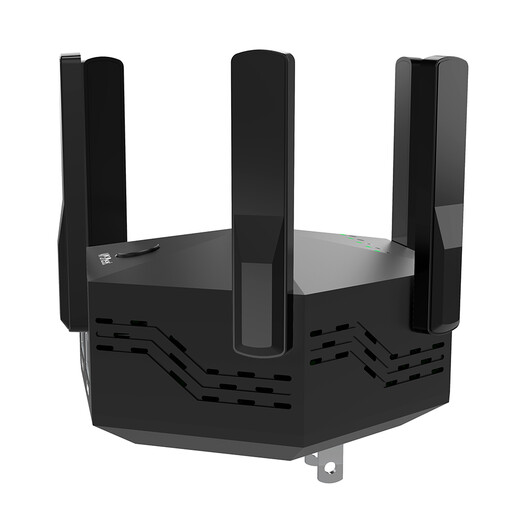
Dual-band Wi-Fi repeater, 1,200 Mbit/s, 6 antennas
Designed to extend an existing Wi-Fi network; check the actual connection across several floors where you study.
Listed in the product name: dual-band, 1,200 Mbit/s, six adjustable antennas and an EU plug. The description lists WPS setup.
View at Joybuy
 No image available
TP-Link RE190 AC750 Wireless Repeater, 433 Mbit/s
Designed for a Wi-Fi dead zone on another floor; the signal-strength indicator can help you find a suitable intermediate location.
Listed in the product name: dual-band and 433 Mbit/s. The product details also list WPS and a signal-strength indicator.
View at Joybuy
 No image available
MERCUSYS ME80X Wi-Fi 6 Range Extender, AX3000
Can be considered for Wi-Fi extension or, with a suitable LAN connection, in Access Point mode. The connection where you study depends on how the device is connected and positioned.
Listed in the product name: dual-band with 574 Mbit/s at 2.4 GHz and 2,402 Mbit/s at 5 GHz, Gigabit LAN and Access Point mode. The product details also list a signal-strength indicator.
View at Joybuy
 No image available
TP-LINK RE235BE BE3600 Dual-Band Wi-Fi 7 Range Extender
Designed to extend an existing Wi-Fi network. According to the product details, EasyMesh requires compatible routers and extenders.
The product details list a 2.5 Gigabit Ethernet port, MLO, Smart Roaming and EasyMesh compatibility.
View at Joybuy
Frequently asked questions
Where should I place a repeater for a language lesson on another floor?
Start by placing it somewhere that still gets a good connection from the router, then check the connection indicator. Deutsche Telekom recommends moving it closer to the router or another booster if the signal is weak.
Can I connect a repeater using an Ethernet cable instead of Wi-Fi?
Yes, if the specific device has the right operating mode and there’s a LAN connection to the floor you want to cover. TP-Link documents an Access Point mode via the Ethernet port on the RE705X; Gigabit LAN is listed for the FRITZ!Repeater 1200 AX. Before buying, check the cable route and the mode supported by your chosen model.
What should I check after setup and if problems crop up later?
Check that the playback device is connected to the intended access point and that the repeater has a good connection to the base station. Keep the firmware up to date too: Deutsche Telekom notes that missed updates can cause malfunctions and security vulnerabilities.
Do I need to register my home Wi-Fi with the Federal Network Agency?
For the ordinary private Wi-Fi use described here, the frequency bands generally allocated by the Federal Network Agency don’t require an individual frequency allocation. The registration requirement under Section 5 of the TKG described by the Agency applies to commercial public networks or certain commercially provided public services, not the private use described here. The conditions of the applicable general allocation still apply.
What should I look for in the product information for Wi-Fi devices?
Look for an identifiable device, correct CE marking and clear manufacturer and conformity information. The Federal Network Agency lists product identification, the CE mark and accurate manufacturer details as checks to make; the CE mark alone doesn’t indicate Wi-Fi performance where you study.


