A household with one area of weak Wi-Fi
You mainly want to watch a theatre recording in one place and can find a spot in between with a usable signal from the router.


If Wi-Fi is weak in just one viewing area, and there’s a spot in between where the router signal is still usable, a wireless repeater chosen to work with your router may be a good option. If several floors are affected, consider using multiple compatible Wi-Fi points. If you have a usable network cable, a suitable access point can bypass the wireless link between floors. The advertised headline Wi-Fi speed alone won’t tell you whether playback will be stable on your device. If the signal is weak, Telekom recommends placing the repeater closer to the router or the upstream extender.
You mainly want to watch a theatre recording in one place and can find a spot in between with a usable signal from the router.
You want to use Wi-Fi in several areas of your home. Both router compatibility and the connection between Wi-Fi points need to be right.
You have a usable network cable near the floor with weak Wi-Fi coverage and are looking for a device with a suitable access point or LAN bridge mode.
First, check whether the problem affects one viewing area or several floors, and whether you have a usable LAN cable. This will help you decide between a single wireless repeater, multiple Wi-Fi points or a wired access point.
Suitable if: Wi-Fi is mainly needed in one viewing area and you can find a spot in between with a usable signal from the router.
Consider: The repeater itself needs a usable wireless connection to the router.
Suitable if: You need coverage in several rooms or across multiple floors, and your router and additional devices support the mesh setup you have in mind.
Consider: More devices can mean additional purchase and setup costs.
Suitable if: A usable network cable runs to a compatible device on the affected floor.
Consider: The cable and connection need to be in place, and setup must be practical.
| What matters | What to check before buying | Who is this important to? |
|---|---|---|
| Stable playback | Compare the connection in your viewing area with the one near the router; check the requirements of the service or file you’re using. | If I want to watch a theatre recording in a particular spot, a stable connection there matters more to me than a high advertised Wi-Fi speed. Around 36% of consumers put playback stability in their viewing area first. |
| Coverage across multiple floors | Check the signal on every affected floor and the connection between the Wi-Fi points. | If I need Wi-Fi in several rooms or across multiple floors, I don’t want to cover just one viewing area. Around 29% of consumers prioritise coverage across multiple floors. |
| Making use of existing LAN | Check that the network cable actually runs back to the router and that the specific device supports a suitable access point or LAN bridge mode. | If there’s already a usable cable between floors, I want to use it to provide Wi-Fi on the floor with weak coverage. Around 21% of consumers prioritise making use of existing network cabling. |
| Mesh compatibility | Check that your router model, supported mesh technology and device model are compatible with one another. | If I want to expand my existing router system, it’s important that the devices actually work together. Around 14% of consumers prioritise integration with their existing router and mesh setup. |
A wireless repeater needs a usable connection to the router itself. If there’s no signal where you place it, it won’t have a reliable connection to carry playback.
First, try a spot in between. For Speed Home WLAN, Telekom describes an indicator that shows when the connection is weak or unavailable, and recommends moving the device closer to the router or the upstream extender. If the wireless link isn’t usable, check whether LAN is available.
The stated Wi-Fi data rate isn’t a measurement taken at your playback device, and it won’t fix a bottleneck with your internet connection.
Measure the connection in your viewing area and compare it with a measurement near the router. Also check the requirements of the service or file you’re actually using.
Mesh integration can depend on the specific router and device combination. For example, TP-Link requires an EasyMesh-compatible router for EasyMesh with the RE705X; Telekom lists compatible Speedport models.
Check your router model, repeater model and, where relevant, hardware version against the relevant compatibility information. Don’t choose a device based on the word ‘mesh’ alone.
According to TP-Link, the RE705X can be used to extend Wi-Fi or, with the right setup, as an access point.
According to devolo, the WiFi 6 Repeater 5400 can also be used in wired access point mode.
This selection includes Wi-Fi repeaters for a single viewing area and mesh systems with multiple Wi-Fi points. Before buying, check which option suits your router and the area you need to cover.
 No image available
Could be worth considering if you’re looking at several Wi-Fi points rather than a single wireless repeater.
Wi-Fi 7, dual-band and Gigabit Ethernet; 2-pack.
 No image available
Designed to extend an existing Wi-Fi network. Check that the device is compatible with your router and suitable for the spot where you plan to place it.
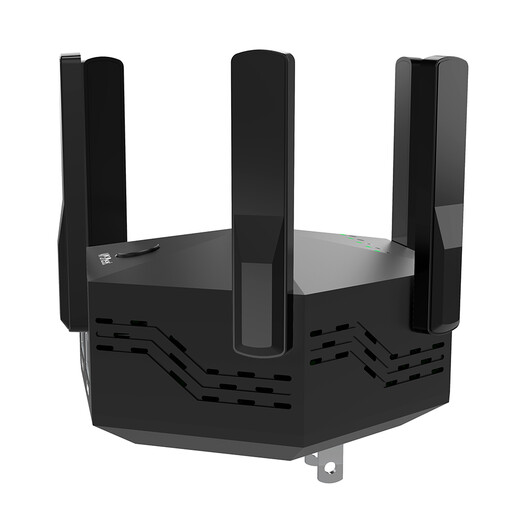 No image available
Described as a Wi-Fi repeater for extending an existing network. The best spot in between depends on the signal from your router.
Dual-band; 1200 Mbps; 6 adjustable antennas; EU plug.
 No image available
May suit a single viewing area if the repeater still gets a signal from the router at a spot in between.
AC750; 433 Mbps according to the product name.
 No image available
Could be worth considering if you need Wi-Fi points for several areas of your home.
AC1200, dual-band and Gigabit ports; 3-pack.
First, choose a spot in between where the repeater can still get a usable signal from the router. If the Speed Home WLAN connection is weak or unavailable, Telekom recommends moving the device closer to the router or the upstream extender.
Yes, as long as the cable is usable and the model you choose supports a suitable access point or LAN bridge mode. An access point mode is documented for the TP-Link RE705X and the devolo WiFi 6 Repeater 5400.
Compare the connection in your viewing area with a measurement near the router, and check your internet access under suitable conditions. The broadband measurement desktop app provided by the Bundesnetzagentur also allows individual measurements of internet access. A repeater can’t fix a bottleneck with your connection.
No. The mesh features available depend on the specific combination of devices. For example, TP-Link requires an EasyMesh-compatible router for EasyMesh with the RE705X. For Speed Home WLAN, check Telekom’s compatibility list.
Check the details of the specific product rather than assuming that a general product category guarantees an individual device is compliant. In its market surveillance guidance, the Bundesnetzagentur lists correct CE marking and German-language instructions among the points to check. This doesn’t confirm anything about a particular product listing.