A wireless repeater is an option if there is still a usable Wi-Fi connection between your router and the kitchen. If the signal is too weak to pass through the floor, a wired access point connected via Ethernet is a more targeted alternative. Powerline may work without installing a new network cable, but you should test it using the sockets you plan to use. Also check that your router supports the mesh mode you want.
Which solution do you need for your cookery class?
Cookery class viewers with a Wi-Fi dead spot
If you watch in a kitchen on another floor, first find a spot where the repeater itself can still receive a usable Wi-Fi signal. devolo points out that a repeater can only pass on the connection it receives.
Homes with Ethernet between floors
If an Ethernet cable reaches the other floor, you can connect an additional Wi-Fi access point there. FRITZ! explains that connecting a repeater to a FRITZ!Box via Ethernet is one way to set up an additional Wi-Fi access point.
Homes without a usable wireless or wired connection
If you have neither usable Wi-Fi nor a practical Ethernet connection at the destination, you can try Powerline using the sockets you actually plan to use. devolo lists electrical appliances and socket position as possible factors affecting data transmission.
What to look for when buying
If you watch a cookery class across several floors, the key things to consider before buying are how the signal will travel, whether the device has the right operating mode, and how well the connection works where you will actually use it.
Wireless repeater
A good fit if: There is still a usable Wi-Fi signal between the router and the kitchen.
Bear in mind: A repeater cannot improve a weak connection at its own location.
Ethernet access point or mesh node
A good fit if: An Ethernet cable is available or can be run to the other floor.
Bear in mind: The device and its connection must support the right Ethernet or access point mode.
Powerline with Wi-Fi
A good fit if: Neither a usable wireless connection nor an Ethernet cable that can be installed is an option.
Bear in mind: The connection depends, among other things, on the electrical wiring and the sockets at the destination.
| Requirement |
What to check before buying |
Who it matters most to |
| Stable wireless connection between floors |
Check possible intermediate locations, then test the connection and video playback in the kitchen once everything is set up. |
If I want to watch a cookery class in the kitchen on another floor, I need a usable Wi-Fi signal where the repeater is placed. For around 36% of consumers, this stable wireless connection is the top priority. |
| Wired connection between floors |
Check for an Ethernet port, a supported access point or Ethernet bridge mode, and a suitable route for the cable. |
If there is a cable running to the other floor, I want to be able to connect an access point there rather than relying on the floor as a wireless link. Around 29% of consumers prioritise a wired connection. |
| Compatibility with the router |
Check your router model against the explicitly supported mesh technology and the setup mode you want to use. |
I want to keep using my existing router and know in advance whether it will work with the repeater or mesh mode. The right router compatibility is the main concern for around 21% of consumers. |
| An alternative to running Ethernet |
Check what is included and whether you need any additional adapters; test the kit using the wall sockets you actually plan to use. |
If neither Wi-Fi nor an Ethernet cable can reliably reach the destination, I want to try Powerline using the sockets I plan to use. An alternative to running Ethernet is the main consideration for around 14% of consumers. |
Common planning mistakes
-
Putting the repeater straight in the Wi-Fi dead spot
A repeater cannot pass on a better connection to the router than the one it receives where it is placed. If it is in the kitchen with no usable signal, the Wi-Fi it broadcasts there may not be suitable for streaming a cookery class either.
Try placing it somewhere between the router and the kitchen, then check the connection where you plan to use it.
-
Assuming “mesh” guarantees compatibility
The mesh feature you want may require a compatible router. A device that also works as a repeater will not automatically connect to the mesh system of any router.
Check your router and device models against the combinations explicitly listed as supported.
-
Planning to use Powerline without testing the sockets
The electrical wiring, socket location and electrical appliances can all affect data transmission, as devolo explains in its Powerline guidance.
Test the adapters in the sockets you plan to use for the router and the destination area.
Relevant brands at a glance
FRITZ!
FRITZ! offers repeaters to extend an existing Wi-Fi network; some models are designed to work as part of a FRITZ!Box mesh.
- FRITZ! lists Gigabit LAN for the FRITZ!Repeater 1200 AX and describes connecting it to a FRITZ!Box via Ethernet as a way to add another Wi-Fi access point.
- Mesh, Ethernet and update specifications apply to the individual models. A wireless repeater also needs a usable connection where it is placed.
TP-Link
The range includes the RE705X repeater and the multi-unit Deco X50 mesh system; their connection and mesh features differ.
- TP-Link lists an access point mode and Gigabit Ethernet for the RE705X, and optional Ethernet backhaul for the Deco X50.
- According to TP-Link, the RE705X’s advertised EasyMesh feature requires a compatible router. A Deco system will not automatically join the mesh network of an existing router.
devolo
Magic Powerline kits extend Wi-Fi using your existing electrical wiring, offering an alternative to a wireless connection between floors.
- devolo describes the Magic 2 WiFi 6 next Starter Kit as a Powerline set with two adapters.
- devolo notes that socket placement and electrical appliances can affect data transmission. Streaming claims do not guarantee a particular connection in any specific home.
Telekom
Speed Home WLAN is particularly worth considering if you want to extend your network using a compatible Speedport router.
- Telekom lists Wi-Fi 6, Ethernet and mesh features for Speed Home WLAN.
- According to Telekom, whether mesh is active depends on router compatibility; without mesh support, the device is set up as a repeater.
Joybuy product selection
This selection includes wireless repeaters, wired access points and mesh systems. The key question is whether Wi-Fi reaches the destination, or whether a suitable Ethernet connection and, where necessary, PoE are available.
 No image available
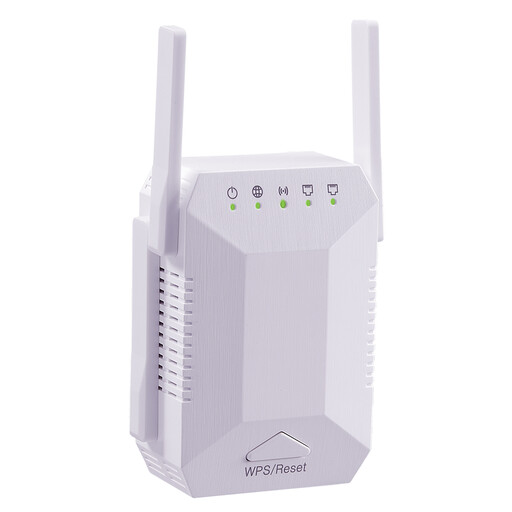
Dual-band Wi-Fi signal booster, 1,200 Mbit/s
For anyone looking to extend their existing Wi-Fi wirelessly; the repeater needs to receive a usable connection to the router where it is placed.
The product name mentions 5G Wi-Fi, four adjustable antennas and an EU plug; it is specified for indoor use.
View at Joybuy
 No image available
TP-Link Deco BE22, 2-pack, Wi-Fi 7
For anyone considering a two-unit mesh system to provide Wi-Fi coverage in several areas.
Dual-band Wi-Fi 7 and Gigabit Ethernet.
View at Joybuy
 No image available
Ubiquiti UniFi U7 Pro WiFi 7 access point
For anyone planning a wired access point for another floor.
Tri-band, 2.5 GbE and PoE+. Requires an Ethernet connection and PoE+ power; set-up is managed through UniFi Network.
View at Joybuy
 No image available
Ubiquiti UniFi U7 Lite WiFi 7 access point
For anyone considering a Wi-Fi access point connected via Ethernet.
Dual-band, 2.5 GbE and PoE+. Requires an Ethernet connection and PoE+ power; set-up is managed through UniFi Network.
View at Joybuy
 No image available
Ubiquiti UniFi U6+ WiFi 6 access point
For anyone looking to connect a wired Wi-Fi access point to a network switch.
Dual-band Wi-Fi 6 and Gigabit Ethernet. Requires an Ethernet connection to a switch and PoE power; set-up is managed through UniFi Network.
View at Joybuy
Frequently asked questions
Where should I place a wireless repeater?
Don’t put it straight in a Wi-Fi dead spot. Place it somewhere the connection to the router is still usable. Then check the connection and cookery class playback in the kitchen.
Will a faster repeater help if the router’s internet connection drops out?
No. A repeater extends the Wi-Fi signal it receives, but it cannot fix an internet outage. First check whether the router itself is still online.
What speed do I need for a cookery class video?
It depends on the platform and video quality. Google recommends a sustained download speed of 5 Mbit/s for YouTube at 1080p; this is not a general minimum requirement for every cookery class, nor does it guarantee a particular repeater performance.
What should I look for in a Wi-Fi device for use in Germany?
As the Federal Network Agency explains, radio equipment covered by EU harmonisation legislation and placed on the EU market must carry the CE mark. This is not an independent guarantee of a particular Wi-Fi range, so check the specific device version and its accompanying documentation.


