Which approach is right for you?

Learners behind solid walls

If your study space is a long way from the router, what matters most is the connection right there. Deutsche Telekom recommends placing your router as close as possible to the areas where you need Wi-Fi. Also check whether there’s a suitable spot for an extender, or whether you can run a cable to one.

People taking live language classes

For live conversations and video, the usable connection at your study space matters more than the advertised Wi-Fi data rate alone. The German Federal Office for Information Security notes that Wi-Fi coverage can be problematic in larger or multi-storey buildings.

Households considering a new router

If you want to improve coverage, first check that the new device is compatible with your connection, existing modem and any extender you may use. A separate mesh system doesn’t automatically replace a modem for your internet connection.

What should you look for when buying?

Keep your existing router

A good option if: The connection works near the router and you can first try moving it to a better position.

Things to consider: Solid walls or an inconvenient connection point may limit any improvement. Deutsche Telekom recommends checking reception where you actually use Wi-Fi.

Extend your existing Wi-Fi

A good option if: The study room is the main area with poor coverage and you can place a compatible node somewhere it still gets a usable connection.

Things to consider: A wireless repeater needs a good connection to the rest of your network. Placing it somewhere with no usable signal won’t solve the problem.

Mesh or LAN-connected access point

A good option if: You can run a cable to your study area or to a suitable access point.

Things to consider: A LAN connection can avoid relying on a wireless backhaul, but you’ll need a cable route and suitable ports. A separate mesh system still needs a connection to your modem or modem-router.

Replace your router

A good option if: Your current router isn’t suitable for your connection or the extender you need.

Things to consider: Check whether you have DSL, cable or fibre, and whether you already have a modem. A higher advertised Wi-Fi data rate doesn’t guarantee reception behind thick walls.

What matters What to check before buying Who should pay particular attention?
Reception where you study Check the connection at your study space, along with possible positions for the router, an intermediate node and an access point. If I take my language class behind a solid wall, I need a usable signal there. Around 31% of consumers focus on reception where they study.
A stable connection during class Compare streaming performance at your study space and near the router; if possible, try a LAN connection. If my class keeps freezing during a conversation, what matters to me is the connection while I’m actually using it. Around 25% of consumers prioritise avoiding interruptions during a class.
Connection compatibility Check your connection type, existing modem or ONT, operating mode and any login details you’ll need. When replacing my router, I want to know whether the device is compatible with my connection and existing modem. Around 19% of consumers prioritise connection compatibility.
Setting up an extender Check the cable route, power sockets, compatible mesh components and the device’s operating mode. If I’m setting up an extender myself, I need to be able to use a suitable intermediate position or run a cable in practice. Around 13% of consumers prioritise ease of setup.
Ongoing costs and maintenance Consider the equipment you’ll need, rental or purchase terms, and available firmware support. If I buy my own equipment, I also want to factor in setup and firmware maintenance after purchase. Around 12% of consumers prioritise ongoing costs and maintenance.

Which buying mistakes should you avoid?

  • Assuming a high Wi-Fi data rate means good reception behind thick walls

    The advertised data rate doesn’t automatically tell you what the connection will be like where you study. Building materials and obstacles can affect the wireless signal.

    Check the connection where you’ll actually take your language class, and factor possible router and node locations into your plans.

    Depending on the layout, you may need extra Wi-Fi stations or a cable route.

  • Putting a wireless repeater directly in a dead spot

    A repeater also needs a usable connection to the rest of your network. If its own reception is poor, it won’t reliably cover your study area.

    Try an intermediate position where the signal is strong enough. If the wireless connection is still unreliable there, consider a LAN-connected access point.

    Running a cable may involve extra installation work.

  • Buying a mesh system without checking whether it can replace your modem

    Distributing Wi-Fi around your home and connecting to a DSL, cable or fibre service are two different jobs.

    Before buying, check your connection type, existing modem and whether you’ll need router or access point mode.

    Depending on your connection, you may also need a compatible modem.

Useful brands to consider

FRITZ!

The FRITZ!Box 7690 is worth considering if you also want to replace your DSL router as well as improve your Wi-Fi.

  • According to FRITZ!’s technical specifications, the 7690 supports DSL and can be used with a fibre modem. Wi-Fi 7 operates on 2.4 and 5 GHz.
  • The product specifications don’t show how well reception will work through the walls in a particular home.

TP-Link

The Deco BE25 is a separate mesh system for households looking to add Wi-Fi coverage in more places.

  • TP-Link lists two 2.5-Gbit/s ports per unit, as well as wired and wireless backhaul.
  • According to the manufacturer, the device offers dual-band Wi-Fi on 2.4 and 5 GHz. Check how it will connect to your existing modem or modem-router.

Telekom

The Speedport Smart 4 is a relevant router option if you’re planning to extend your network with compatible Speed Home devices.

  • Deutsche Telekom lists DSL support, fibre use with an external modem, and mesh expansion.
  • Check that the specific router and extender combination is compatible.

ASUS

The ZenWiFi BD4 is a separate mesh system with router, access point and AiMesh node modes.

  • The German model specifications list Wi-Fi on 2.4 and 5 GHz, plus two automatically assigned 2.5-Gbit/s WAN/LAN ports.
  • ASUS notes that specifications may vary by country. Check the operating mode and pack contents before buying.

NETGEAR

Orbi systems are a mesh option if you want to distribute Wi-Fi stations around your home and, if needed, connect them via Ethernet.

  • NETGEAR says Ethernet backhaul can help when long distances or the building’s construction affect the wireless connection.
  • Check the ports and features of the specific set you’re considering. General claims about Orbi support don’t necessarily apply to every version.

Suitable products at Joybuy

The Joybuy products below include mesh systems for adding Wi-Fi coverage in several locations, as well as router and gateway options. Before buying, check your connection type and whether you’ll use the device as a router or an access point.

TP-Link Deco BE22 (2-pack) Whole Home Mesh Wi-Fi 7, dual-band, Gigabit Ethernet, white

TP-Link Deco BE22 (2-pack)

Could suit households looking to extend Wi-Fi coverage to several locations.

Wi-Fi 7, dual-band and Gigabit Ethernet; two mesh units. Router and access point modes are listed.

View at Joybuy
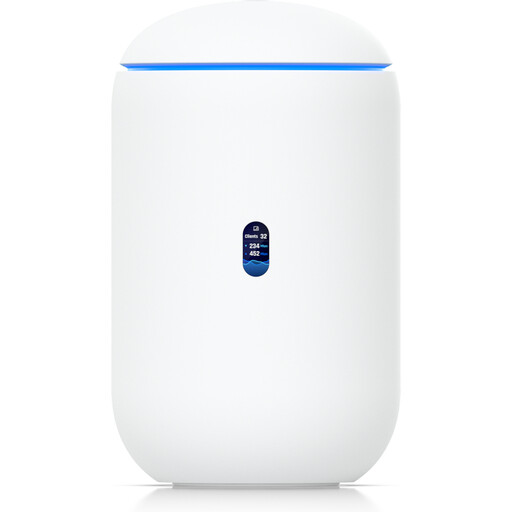
Ubiquiti UniFi Dream Router 7 Wi-Fi 7 Cloud Gateway, 10G SFP+, 2.5 GbE PoE, 64 GB microSD, white

Ubiquiti UniFi Dream Router 7

Could suit a setup that combines Wi-Fi and router functions in one device. Check that its connection requirements are compatible with your existing network.

Tri-band Wi-Fi 7, 2.5 GbE ports, PoE output, 10G SFP+ and a listed 64 GB microSD slot.

View at Joybuy

TP-Link Deco M4 AC1200 Mesh Wi-Fi System, 3-pack

TP-Link Deco M4 AC1200 (3-pack)

Could help extend Wi-Fi to several rooms. Check whether router or access point mode will work with your existing network.

Dual-band Wi-Fi, three mesh units and Gigabit LAN/WAN ports on each unit; app setup is listed.

View at Joybuy

TP-Link Deco X1500 AX1500 Mesh Wi-Fi 6, 2-pack, dual-band, Gigabit ports, white

TP-Link Deco X1500 AX1500 (2-pack)

Could suit households looking to provide Wi-Fi in different locations using two mesh units.

Wi-Fi 6, dual-band and two Gigabit Ethernet ports per unit; app setup is listed.

View at Joybuy

MERCUSYS Halo H25BE BE3600 Mesh Wi-Fi set with Wi-Fi 7, 2-pack

MERCUSYS Halo H25BE BE3600 (2-pack)

Could be useful for extending Wi-Fi coverage with two mesh units. Check the intended router setup and where you can place the second unit.

Dual-band Wi-Fi 7 and three Gigabit ports per unit; the product description lists app setup.

View at Joybuy

Frequently asked questions

Do I need to buy a new router straight away if my language class keeps freezing?

No. First check the connection where you study and the position of your existing router. Building materials can affect the signal. If only your study room has poor coverage, a well-placed access point may be a more targeted solution than replacing a router that otherwise meets your needs.

Where should I place a wireless mesh node?

Place it somewhere it can still get a usable connection to your existing Wi-Fi while also reaching your study area. Deutsche Telekom recommends moving a Speed Home WLAN closer to the Speedport or another extender if the connection is weak.

What ongoing tasks come with owning your own router?

With your own hardware, you’re responsible for setup and firmware maintenance, although you may avoid rental fees depending on your contract. Whether buying or renting works out cheaper for you depends on the terms of your contract and any extra Wi-Fi equipment you need.

Can I use my own router in Germany?

Yes, in general you can choose a retail router that’s suitable for your connection. The German Federal Network Agency explains the right to choose your own router. However, this doesn’t mean every model can connect to every type of service without a suitable modem.

What should I check to make sure a Wi-Fi device complies with regulations in Germany?

Check the details for the specific device rather than assuming a Wi-Fi label proves it complies. The German Federal Network Agency lists CE marking, product identification, German-language instructions and a declaration of conformity among the checks used when monitoring radio equipment on the market.