A wireless repeater can work for a single download spot, but only if it still has a stable connection to your router. The advertised wireless data rate tells you nothing about the signal at your reading spot. If there’s an Ethernet socket on the floor in question, you could use a wired access point or a LAN bridge. For several reading spots, compatible mesh nodes or a powerline connection may be suitable. Telekom notes that the number and position of devices also depend on walls, ceilings and floors.
Which solution suits you?
Readers with a Wi-Fi dead spot on one floor
If you usually download magazines in one particular spot, a wireless repeater may be suitable, provided you can place it somewhere with a stable connection to your router. FRITZ! emphasises that the connection to the router is just as important as the connection to your Wi-Fi device.
Households with a LAN connection upstairs
An existing network socket on a floor with poor coverage lets you set up a wired Wi-Fi access point there. FRITZ! and TP-Link list wired operating modes for their respective models; check that the specific device supports the mode you need.
Readers in several places across multiple floors
If you move between several areas with poor coverage, check how many additional nodes you need, where to place them and whether they’re compatible with your router. Telekom notes that walls, ceilings and multiple floors all affect what’s required.
What to look for when buying
| What matters |
What to check before buying |
Who should pay particular attention |
| A stable connection to the repeater |
Check the connection to the router at a potential position for the repeater, as well as reception at your reading spot. |
If I mostly download magazines in one fixed spot, I also need a stable connection to the router where the repeater will be placed. Around 36% of consumers put this first. |
| Making use of existing cabling between floors |
Check for an Ethernet socket and confirm that the specific device supports LAN bridge or access point mode. |
If an Ethernet cable reaches the floor with poor coverage, I want to provide Wi-Fi there without a wireless backhaul. Around 29% of consumers prioritise an existing or practical LAN connection. |
| Covering several reading spots |
Check your router model, supported mesh technology, and the number and position of the nodes. |
If I download magazines in several places across different floors, the solution needs to work with my router and cover the areas I need. Around 21% of consumers prioritise having several reading spots and compatibility with their router. |
| Keeping the set-up simple |
Try a single device in the planned location; don’t assume that easy set-up means it will cover every floor. |
If I only need to cover one download spot, I don’t want an unnecessarily complex set-up. Around 14% of consumers prioritise keeping the number of devices and the set-up effort to a minimum. |
Avoid common buying mistakes
-
Placing the repeater directly in the dead spot
The repeater also needs a stable connection to the router. If its own signal is weak where you place it, it won’t reliably provide coverage at your download spot.
Try possible positions between the router and the dead spot. If none are suitable, consider a wired access point or a different way of connecting back to the router.
-
Assuming advertised wireless data rates equal download speeds across three floors
Figures for wireless bands or data rates don’t tell you what the connection will be like at your actual reading spot. Ceilings and the repeater’s position affect the wireless signal.
Check the connection where you plan to place the repeater and at your reading spot, rather than relying on the data rate printed on the box.
-
Assuming mesh compatibility
Mesh features depend on a compatible device at the other end and a supported operating mode. A repeater won’t automatically form a centrally managed mesh with every router.
Check your router model against the mesh technology explicitly supported by the specific device.
-
Relying on powerline for a guaranteed connection between floors
Powerline transmission can be affected by the socket and electrical interference. devolo notes that performance may be limited at some sockets.
Test powerline at the sockets you plan to use before relying on it as your connection between floors.
Brands to consider
FRITZ!
The FRITZ!Repeater 1200 AX is a specific example of a Wi-Fi 6 repeater with Gigabit LAN, suitable for use with an existing FRITZ!Box or a wired connection.
- According to FRITZ!, this model supports Wi-Fi Mesh and wired networking.
- This doesn’t guarantee coverage across all three floors or mean that other FRITZ! models have the same features.
TP-Link
According to TP-Link, the RE705X can be used either as a wireless repeater or a wired access point.
- TP-Link lists Gigabit Ethernet, AP mode and EasyMesh compatibility for the RE705X.
- Mesh requires a compatible router; advertised wireless data rates aren’t measurements taken at your reading spot.
devolo
According to devolo, the WiFi 6 Repeater 3000 has an access point mode. Powerline products offer a separate way to connect back to your router through your home’s electrical wiring.
- devolo lists Gigabit LAN and access point mode for the repeater.
- devolo notes that sockets and electrical interference can affect powerline transmission. Powerline and a repeater use different connection methods.
Telekom
Speed Home WLAN is an option for extending a suitably configured home network, provided you check that it’s compatible with your router.
- Telekom describes setting it up with a mesh-capable router.
- According to Telekom, walls, ceilings and multiple floors affect how many devices you need. A three-storey house doesn’t automatically call for a fixed number.
Joybuy products
The Joybuy products below include wireless repeaters, a mesh extension, wired access points and a powerline kit. The right solution for you depends on factors such as your router, cabling and the reading spots you need to cover.
 No image available
TP-Link RE190 AC750 Wireless Repeater, 433Mbps, White
For a single download spot, provided you can place the repeater within range of your router.
Dual-band Wi-Fi; signal strength indicator; set-up via WPS; 433Mbps according to the product name.
View at Joybuy
 No image available
TP-Link RE235BE BE3600 Dual-Band Wi-Fi 7 Range Extender, 2.5G Multi-Gigabit Port
For a wireless repeater set-up, provided there’s still a connection to the router at the planned location and the device at the other end supports the mesh feature you want.
Wi-Fi 7; EasyMesh compatibility; Smart Roaming; set-up via WPS or the Tether app.
View at Joybuy
 No image available
TP-Link Deco X10 Mesh Wi-Fi unit (1 pack), Wi-Fi 6 AX1500, 2 × Gigabit ports
For extending an existing Deco mesh, provided you can complete the set-up using the Deco app.
Wi-Fi 6 AX1500; two Gigabit ports. The product description says that an existing Deco mesh and the Deco app are required for extension and set-up.
View at Joybuy
 No image available
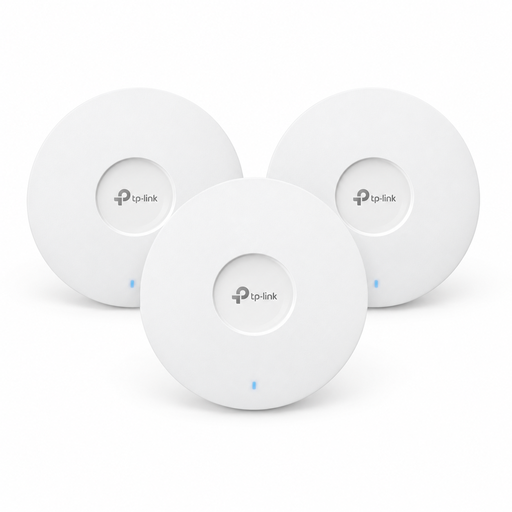
TP-Link Omada EAP653 AX3000 ceiling-mounted access point, Wi-Fi 6, 3-pack
For several wired Wi-Fi access points, provided you can integrate them into an Omada system and supply power to them as required.
Three Wi-Fi 6 access points; Omada Mesh; powered via PoE+ or a separately available 12-V DC power supply. The description says they can be integrated into the Omada SDN system.
View at Joybuy
 No image available
MERCUSYS MP300 KIT AV600 Powerline adapter kit, Wi-Fi 600 Mbps, Gigabit port
For a connection back to your router via your home’s electrical wiring, provided it works through the sockets you plan to use.
HomePlug AV/AV2; Gigabit Ethernet; plug-and-play set-up. According to the product description, actual performance depends on the electrical installation and network environment; direct wall sockets are recommended for set-up.
View at Joybuy
Frequently asked questions
Will one repeater cover all three floors?
Not necessarily. Check which reading spots have poor coverage and whether the repeater will still have a stable connection to the router at a possible position between the two. Telekom notes that walls, ceilings and multiple floors affect the number and position of additional devices.
What should I check after set-up?
Check the repeater’s connection to the router in its final position, then test downloads at your actual reading spot. FRITZ! describes a location assessment using the FRITZ!App WLAN for FRITZ! devices; make sure you meet the app and device requirements.
Do I need to register a personal Wi-Fi repeater for wireless use in Germany?
As the Bundesnetzagentur explains, you don’t need to apply for an individual frequency assignment to use a compliant device within the applicable general Wi-Fi frequency allocation. Separately, products covered by the relevant EU harmonisation legislation must meet the corresponding product requirements and labelling obligations.


