A Wi-Fi extender can help when you’re uploading photos during a video call if the bottleneck is the wireless connection between your router and workspace. It can’t increase the upload speed of an internet connection that’s too slow. So, first check your internet connection and Wi-Fi reception where you make calls. If you have an Ethernet cable available, you may be able to use access point or LAN bridge mode, provided the device supports it.
Who might benefit from an extender in this situation?
Households with a Wi-Fi dead spot where they make calls
If your workspace only gets a weak Wi-Fi signal, the connection between the router, the extender and the place you make calls matters. FRITZ! points out that both the extender’s connection to the router and its connection to the devices using it are important.
Households uploading and making calls at the same time
Uploading photos and sending video both use your upload bandwidth. The Bundesnetzagentur offers a way to measure your fixed broadband connection’s data transfer rate, while Zoom sets its own requirements for video calls, depending on the video mode.
Households with a cable running to the workspace
If an Ethernet cable reaches the spot where you want Wi-Fi, a device with access point or LAN bridge mode may be suitable. FRITZ! and TP-Link list these features for certain models, so check the operating mode supported by the specific device.
What should you check before buying?
| What you need |
What to check before buying |
Who this matters most to |
| Signal where you’ll place it |
Choose a spot where the extender still gets a good signal from the router, then check the connection where you make calls. |
If I get weak Wi-Fi at my workspace, I need to place the extender somewhere it can still get a good signal from the router. For around 33% of consumers, bridging a Wi-Fi dead spot is the most important buying consideration. |
| Internet connection upload speed |
Where possible, test your internet connection separately from the Wi-Fi link in question, and see how your video call performs while you upload photos. |
If I’m sending a photo album and video at the same time, I want to know whether my internet connection has enough upload speed before buying an extender. For around 27% of consumers, the upload speed available from their internet connection is the main consideration. |
| Wired connection |
Check whether the Ethernet cable reaches the spot you want to use and whether the model supports the access point or LAN bridge mode you need. |
If there’s an Ethernet cable at my workspace, I want to avoid relying on a wireless connection to the router and use the right operating mode. For around 20% of consumers, a wired connection is the most important buying consideration. |
| Router and mesh |
Check that your router model and mesh system are compatible with the specific extender. General Wi-Fi compatibility doesn’t automatically mean they’ll work together as a mesh system. |
If I want to keep using my existing router system, I want to know in advance which features will actually work together. For around 20% of consumers, compatibility with their router or mesh system is the most important buying consideration. |
Common misconceptions when buying a Wi-Fi extender
-
Confusing maximum Wi-Fi speed with internet upload speed
A stated Wi-Fi data rate doesn’t tell you how well your internet connection can handle uploading photos and making a video call at the same time. FRITZ! lists Wi-Fi performance for its models, not a measured upload speed for this particular use.
First, measure your connection’s upload speed, then see how your video call performs while you upload photos.
-
Placing the extender right in the dead spot
A wirelessly connected extender needs a decent connection to the router itself. FRITZ! explains that an extender repeats the existing wireless signal rather than simply boosting it.
Choose a spot with good reception from the router. If there’s an Ethernet cable available there, check whether the device supports access point or LAN bridge mode instead.
-
Confusing Wi-Fi compatibility with mesh compatibility
An extender can extend a Wi-Fi network without offering the same mesh features with every router. For example, EasyMesh on the TP-Link RE705X requires an EasyMesh-compatible router.
Check your router model and supported mesh system separately from the extender’s basic Wi-Fi capabilities.
Brands to consider
FRITZ!
FRITZ! lists dual-band Wi-Fi, Gigabit LAN or multiple wireless bands for selected models. FRITZ! mesh features are especially relevant if you have a compatible FRITZ!Box.
- According to FRITZ!, the FRITZ!Repeater 1200 AX has a Gigabit LAN port, while the FRITZ!Repeater 3000 AX uses three wireless bands and has two Gigabit LAN ports.
- The stated Wi-Fi performance figures aren’t measured photo upload speeds. Mesh benefits require a compatible FRITZ! setup.
TP-Link
According to TP-Link, the RE705X combines extender mode with Gigabit Ethernet and an access point mode.
- TP-Link lists EasyMesh for use with an EasyMesh-compatible router.
- EasyMesh isn’t available with every router, so check the specific model combination.
devolo
According to devolo, the WiFi 6 Repeater 5400 is a desktop device that can be placed anywhere to extend your Wi-Fi.
- devolo lists compatibility with Wi-Fi routers.
- The advertised data rate isn’t independently verified performance for uploading photos and making a video call at the same time.
Deutsche Telekom
Speed Home WLAN is worth considering if you want to use a compatible Speedport or Telekom mesh setup.
- Telekom describes several ways to set up Speed Home WLAN.
- For setup with a Speedport 7 or newer, the instructions specify a Telekom fixed-line connection, the MeinMagenta app, a Telekom login and a mobile device. These requirements apply to this setup method.
Joybuy products for extending Wi-Fi and connecting by cable
This selection includes Wi-Fi extenders and boosters for extending existing Wi-Fi networks, as well as an additional unit for an existing Deco mesh system. Some models also list an access point mode for a wired connection.
 No image available
1200 Mbit/s 5 GHz Wi-Fi extender
Could be suitable if you want to extend your Wi-Fi and use one of the operating modes listed.
Features listed include dual-band Wi-Fi, four aerials and two Ethernet ports. According to the description, the Ethernet ports support 10/100 Mbit/s. Repeater, access point and router modes are also listed.
Joybuy
 No image available
Dual-band Wi-Fi booster, 1200 Mbit/s
The product title describes this device as a booster for extending an indoor Wi-Fi network.
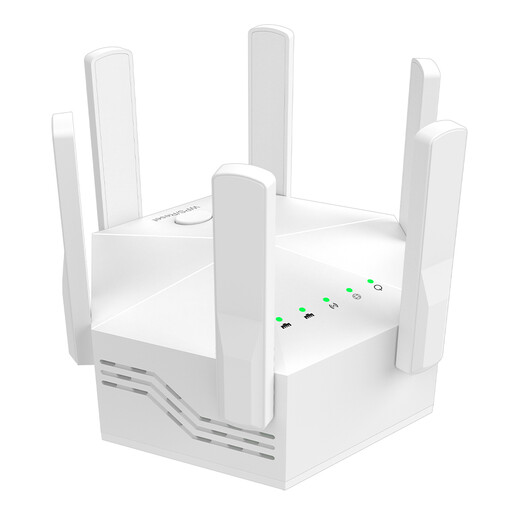
Features listed include dual-band Wi-Fi, six aerials and an EU plug.
Joybuy
 No image available
Compact Wi-Fi booster
Could be suitable for extending an existing indoor Wi-Fi network.
A compact design is listed as a feature; no further specific technical details are provided here.
Joybuy
 No image available
TP-Link Deco X10, 1-pack
This additional unit could be suitable if you want to extend an existing TP-Link Deco mesh system.
Features listed include Wi-Fi 6 AX1500, dual-band Wi-Fi and two Gigabit ports. The setup described requires an existing Deco mesh system.
Joybuy
 No image available
MERCUSYS ME80X Wi-Fi 6 Range Extender
Could be suitable for extending Wi-Fi or for a wired connection in access point mode.
Features listed include dual-band Wi-Fi, AX3000, 574 Mbit/s at 2.4 GHz, 2402 Mbit/s at 5 GHz, a Gigabit port and an access point mode.
Joybuy
Frequently asked questions
Will an extender help if uploading photos disrupts my video call even right next to the router?
Not if the bottleneck is your internet connection: an extender improves the Wi-Fi link, not your connection’s upload speed. Measure your connection and compare how the video call performs with and without a photo upload running at the same time.
Where should I place a wireless extender?
Place it somewhere it still gets a good signal from the router and can reach the area you want to cover, rather than right at the edge of the Wi-Fi dead spot. Once it’s set up, check the connection where you’ll be using it.
Do I need an individual frequency allocation for a standard Wi-Fi extender in Germany?
In Germany, Wi-Fi can use generally allocated frequency bands at 2.4 and 5 GHz. As the Bundesnetzagentur explains, you don’t need an individual frequency allocation as long as you comply with the conditions for the relevant allocation. If you’re buying a device for the German market, also check its product labelling and conformity information.
Is a manufacturer’s guarantee the same as your statutory rights?
No. If a product is faulty, the seller is generally responsible for putting things right. A manufacturer’s guarantee is subject to its own terms and conditions. Verbraucherzentrale explains the difference.


