Readers with a Wi-Fi dead zone
If you download magazines in a room behind thick internal walls, you need a connection that reaches your reading device via the extender from your router.


A wireless extender is a good option if it can still pick up a strong signal from your router at a suitable midway point and reach your reading device in the room you want to cover. If the router signal is already weak there, a wired extender connected via LAN and running in access point or LAN bridge mode is a better choice. Also check that it’s compatible with your router’s mesh system, and don’t base your decision on advertised Mbit/s alone.
If you download magazines in a room behind thick internal walls, you need a connection that reaches your reading device via the extender from your router.
An existing or newly installed LAN connection can bypass the wireless route to the room. Look for a device with a suitable access point or LAN bridge mode.
If you want to add the extender to your existing router system, check that the specific devices are compatible and support the mesh features you want.
| Buying priority | What to look for | Who is this important for? |
|---|---|---|
| Connection at the midway point | Check that the extender can still pick up a usable signal from your router there, then test reception at your reading spot. | If I download magazines behind thick internal walls, the extender itself still needs a usable connection to the router at the midway point. Around 36 % of consumers say reliable reception is their top buying priority. |
| LAN instead of a weak wireless connection | Check whether a LAN socket or cable route is available, and whether the specific device supports the right access point or LAN bridge mode. | If the router signal is too weak on the way to my reading room, I want to bypass the wall with a wired connection. Around 29 % of consumers put a LAN connection first. |
| Compatibility with your router | Check your exact router model against the manufacturer’s mesh information. Also check whether the extender will meet your needs without a shared mesh system. | If I want to add the extender to my existing router system, the mesh feature I want needs to work with that specific router. Around 21 % of consumers prioritise router integration. |
| The right features | Choose ports and operating modes to suit how you’ll use the device; advertised Wi-Fi data rates don’t prove how fast downloads will be on your reading device. | For occasional magazine downloads, I only want to consider features that suit my wireless setup and devices. Around 14 % of consumers make having the right features their main buying priority. |
An extender relays the connection it receives where it’s placed. If that connection is already weak, the device won’t fix the wireless link further upstream.
First, find a midway point with good reception from your router. If there isn’t a suitable spot, check whether you can use a LAN connection and the right operating mode.
Manufacturers’ figures for maximum Wi-Fi data rates don’t prove what speed you’ll get at your reading spot. The wireless route and the devices involved also affect the connection.
Start by considering the location and the connection back to your router. Then compare the ports and wireless features you actually need.
The word “mesh” on its own doesn’t tell you whether an extender will work with your router. Some features may only work with specific devices or routers.
Before buying, check the manufacturer’s details for your specific router and extender combination, and the operating mode you want to use.
FRITZ! lists the FRITZ!Repeater 1200 AX as a compact Wi-Fi 6 extender with one Gigabit LAN port, and the FRITZ!Repeater 3000 AX with three wireless units and two Gigabit LAN ports.
TP-Link describes the RE705X as a Wi-Fi 6 extender with Gigabit Ethernet and access point mode.
For its WiFi 6 Repeater 5400, devolo describes both extender and access point modes.
Speed Home WLAN is worth considering if you want to use the device with a Speedport that Deutsche Telekom explicitly lists as mesh-compatible.
This selection includes wireless Wi-Fi extenders, as well as devices whose product descriptions also mention an access point mode. In its market surveillance, the Federal Network Agency lists a correct CE marking and identifiable manufacturer details among the points to check. For the specific device, also check the EU declaration of conformity and any required German-language instructions and safety information.
 No image available
An option if there’s a LAN connection in the room you want to cover and access point mode suits your setup.
The product description lists two RJ45 Ethernet ports, plus extender and access point modes.
 No image available
For extending your wireless network when the router’s Wi-Fi still reaches the midway point you’ve chosen.
The product description lists a compact design and plug-and-play setup.
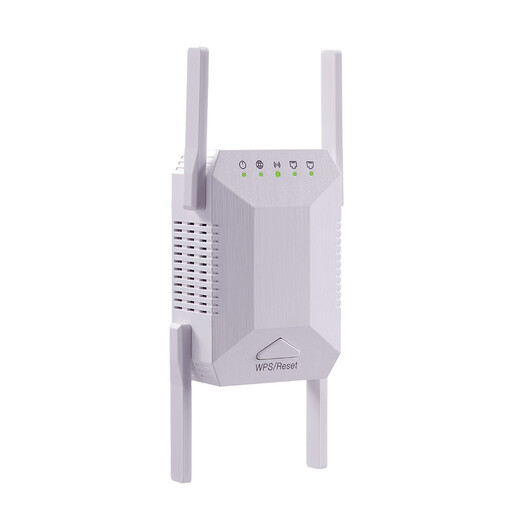 No image available
For extending your wireless network, provided you can find a spot with usable reception from your router.
The product title lists 1200 MBit/s, 5G and dual band; the description mentions WPS setup.
 No image available
For extending your wireless network if you can place the device within range of your router’s signal.
The description lists dual-band operation and a signal strength indicator to help you choose where to place it.
 No image available
An option if you want to choose between wireless extension and a LAN connection in access point mode.
The product description lists a Gigabit LAN port, a signal strength indicator and both operating modes. The product title lists 574 Mbit/s at 2.4 GHz and 2402 Mbit/s at 5 GHz; these figures don’t prove the actual speed you’ll get on your reading device.
Place it somewhere it can still receive a good Wi-Fi signal from your router, then check reception at your reading spot. FRITZ! points out that an extender relays an existing wireless connection; if the connection is already weak where you place it, the link back to the router will also be a problem.
Yes, if the specific model supports a suitable access point or LAN bridge mode and the network socket is connected to the router. devolo describes LAN as a way to bypass wireless obstacles between the router and the device; a cable connection is required for access point mode.
No. The word “mesh” alone doesn’t prove compatibility. Check your router model and the combinations listed by the manufacturer; for example, TP-Link specifies an EasyMesh-compatible router for the RE705X.
In its market surveillance, the Federal Network Agency lists a correct CE marking and identifiable manufacturer details among the points to check. For the specific device, also check the EU declaration of conformity and any required German-language instructions and safety information. A CE marking alone is not an independent test of Wi-Fi reception.