What should you look for when buying?
For a presentation behind thick walls, the key question is whether the extender can get a reliable signal from the router, or whether you can connect it to the room by LAN.
| Buying priority |
What to check |
Who is it particularly important to? |
| Signal at the extender’s location |
Try a socket position before the wall and test the connection through to the presentation room. |
If I want to extend the signal without cables, I need good reception from the router at the midway point. Around 36% of consumers say reception there is their top priority. |
| LAN when the wireless signal is weak |
Check the cable route or LAN socket, and confirm the device explicitly supports LAN bridge or access point mode. |
If an Ethernet cable reaches the meeting room, I can avoid the weak wireless link. Around 29% of consumers prioritise a wired connection. |
| Connecting to your existing router |
Check the router model and firmware against the instructions for mesh and LAN operation. |
If I want to keep using my existing system, the specific router and extender combination must support the features I need. Around 21% of consumers prioritise compatibility with their existing router. |
| Several devices during the presentation |
Check simultaneous use and the connection at the actual presentation location; don’t assume maximum speeds are the same as measured throughput. |
If the laptop and other devices share the connection, performance in that situation matters to me. Around 14% of consumers say using multiple devices is their top priority. |
Products for wireless and wired solutions
This selection includes wireless extenders for a suitable midway position, as well as wired Wi-Fi access points for the presentation room. When using a wireless connection, the extender still needs to be able to connect to the router.
 No image available
Ubiquiti UniFi U7 Lite WiFi 7 Access Point
For wired Wi-Fi coverage at the presentation location when Ethernet uplink and PoE+ are available.
Dual-band; 2.5GbE; PoE+; white. Requires an Ethernet uplink with PoE+, for example through a PoE switch or injector.
View at Joybuy
 No image available
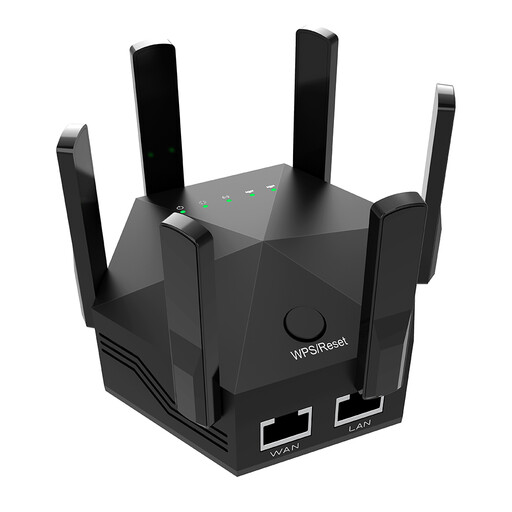
Dual-band Wi-Fi signal booster, 1200 Mbit/s
This device could work as a wireless extender if it can still receive the router’s Wi-Fi at the midway point.
Dual-band; 1200 Mbit/s; six adjustable antennas; for indoor and home use; EU plug.
View at Joybuy
 No image available
TP-Link RE190 AC750 Wi-Fi Repeater, 433Mbps
For a midway position where the existing router’s Wi-Fi signal still reaches.
AC750; 433Mbps; white. The repeater must be within range of the existing router’s Wi-Fi.
View at Joybuy
 No image available
MERCUSYS ME80X Wi-Fi 6 Range Extender AX3000
For extending a wireless signal where the router can still be reached from the midway point; the product description also lists an access point mode.
Dual-band; 574 Mbps at 2.4GHz and 2402 Mbps at 5GHz; Gigabit port; app control; signal strength indicator; AP mode.
View at Joybuy
 No image available
TP-LINK RE235BE BE3600 Dual-Band Wi-Fi 7 Range Extender
For use as a wireless repeater, the device must be within range of the existing router’s Wi-Fi.
2.5G Multi-Gigabit Port; MLO; Smart Roaming; EasyMesh compatible; white.
View at Joybuy
Frequently asked questions
Where should I place a wireless extender for the meeting room?
Place it somewhere it can still get a good signal from the router and reach the meeting room. If the connection is weak, Telekom recommends placing Speed Home WLAN closer to the Speedport router; then test the connection in the room.
Can I use an existing Ethernet cable instead of a wireless connection?
Yes, if the model you choose supports the operating mode you need. FRITZ! describes LAN setup for the 1200 AX, while devolo lists an Ethernet access point mode for the WiFi 6 Repeater 5400. A LAN port alone doesn’t confirm that another model supports the mode you need.
What should I check after setup before an important presentation?
Check which Wi-Fi node your device is connected to and test the connection where you’ll actually be presenting. For Speed Home WLAN, Telekom also recommends checking that your device is connected to the Speed Home device if you’re having problems. Follow the instructions for your specific model.
What extra work might a LAN solution involve?
If there isn’t a suitable cable route, installing an Ethernet cable may involve extra work. Also check the contents, warranty terms and update support for your specific device with the relevant supplier.
What should I bear in mind when using a Wi-Fi repeater in Germany?
Germany’s Federal Network Agency allocates Wi-Fi frequency bands for general use subject to certain conditions. For the specific device, check the CE marking, identification details, instructions and relevant declaration of conformity. General frequency allocation is not blanket approval for every device, or for modified devices.


