A wireless repeater can help if there’s still a usable connection to the router where you place it. If thick walls have already weakened the wireless connection at that point, a wired access point is the more suitable technical solution, provided you have an Ethernet cable available. Advertised Wi-Fi speeds are no substitute for testing a download where you listen.
Who is this solution for?
Audiobook fans with a Wi-Fi dead spot
If you download audiobooks where you listen, the connection at the potential repeater location matters – not just the Wi-Fi symbol where you’re listening. TP-Link and FRITZ! explain why it’s important to choose a suitable location with a usable connection to the router.
Households with a cable route to the listening spot
If thick internal walls weaken the connection even at potential repeater locations, an existing or installable Ethernet cable could be the deciding factor for you. TP-Link and devolo describe devices that can work as access points over a wired connection.
Users with an existing router mesh
If you want to extend your home network as you move between rooms, check that the repeater works with your router’s mesh system. FRITZ! and TP-Link specify that the mesh features they describe require compatible devices or routers.
What should you look for when buying?
A wireless repeater still needs a usable connection to the router where you place it. TP-Link recommends positioning it between the router and the dead spot; FRITZ! explains that a repeater extends the existing wireless connection.
Wireless repeater
A good fit if: You can find a midway spot with a usable signal from the router and don’t want to run an Ethernet cable.
Bear in mind: Thick walls can weaken the wireless connection to the repeater itself, so you’ll need to check the signal at the intended location.
Wired access point
A good fit if: You have a working Ethernet cable reaching close to where you listen, and the specific device supports access point or LAN bridge mode.
Bear in mind: You’ll need a suitable cable route and connection. Having an Ethernet port alone doesn’t confirm that the device supports the mode you want.
Powerline with Wi-Fi
A good fit if: There’s no suitable wireless location or practical Ethernet cable route, and you can test the intended sockets.
Bear in mind: Performance can depend on your home’s electrical wiring and sources of interference at the sockets you use.
| What matters |
What to check when buying |
Who is it important to? |
| Router signal at the location |
Check possible sockets between the router and listening spot, along with the signal or status indicator. |
If I want to use the repeater without a cable, I need a usable signal from the router at a midway socket within range. That’s why around 40 % of consumers put Wi-Fi coverage at the installation location first. |
| Wired connection |
Check that the specific model supports access point or LAN bridge mode and has the right Ethernet connection. |
If the wireless connection drops before it reaches my listening spot, I want to be able to bypass it with an Ethernet cable. That’s why around 30 % of consumers prioritise a wired access point. |
| Router mesh |
Compare your router model and supported mesh system with the repeater’s specifications. |
If I want to extend my existing home network, compatibility with my specific router matters. Around 20 % of consumers therefore prioritise mesh integration. |
| Downloads where you listen |
Test the actual download where you listen, taking the router’s location and your internet connection into account. |
If my main aim is downloading audiobooks, the result where I listen matters more to me than a high stated Wi-Fi speed. Around 10 % of consumers put sufficient download speed first. |
Common buying and setup mistakes
-
Placing the wireless repeater beyond all the thick walls
The repeater also needs a usable connection to the router where you place it. If the socket is already in a dead spot, the connection to the device may still be the bottleneck.
First, check the router signal at possible midway locations. If none are suitable, see whether a wired connection is an option.
-
Assuming the maximum stated Wi-Fi speed is the same as download speed
The maximum stated Wi-Fi speed doesn’t tell you how quickly an audiobook will download from the internet where you listen. The router’s location and shared internet bandwidth also play a part; Bitkom points out that devices in a household share the broadband speed you pay for.
Test a download where you listen before deciding based solely on a higher stated Wi-Fi speed.
-
Assuming Powerline is a guaranteed substitute for an Ethernet cable
devolo notes that transfer speeds can be low at some sockets and that electrical interference can cause problems.
Test the adapter pair at the sockets you plan to use. If a suitable Ethernet cable route is possible, compare both connections in your home.
Brands to consider
FRITZ!
For shoppers considering a device with FRITZ! mesh integration or a repeater with an Ethernet connection.
- According to FRITZ!, the 1200 AX supports Wi-Fi 6 and has a Gigabit LAN port; the 6000 also has a 2.5 Gigabit LAN port, according to the manufacturer.
- Mesh features require a compatible home network. Maximum Wi-Fi speeds don’t demonstrate download performance through thick walls.
TP-Link
The RE700X is worth considering if you want wireless operation as well as an explicitly documented access point mode.
- According to TP-Link, the RE700X has a Gigabit Ethernet port and supports access point mode. EasyMesh is designed to work with a compatible router.
- EasyMesh compatibility doesn’t mean mesh features are available with every router. In wireless mode, the device still needs a suitable location.
devolo
The WiFi 6 Repeater 3000 is worth considering if you want to check for access point mode as well as repeater functionality.
- devolo describes the Repeater 3000 as having a Gigabit LAN port and supporting access point mode.
- For Powerline, devolo notes that transfer speeds can be low at some sockets and that electrical interference can cause problems. This doesn’t automatically apply to every device from the brand.
Telekom
Speed Home WLAN could suit users with a Speedport router that Telekom lists as compatible and who want it integrated into their home network.
- According to Telekom, Speed Home WLAN supports Wi-Fi 6; compatibility depends on the router model.
- A higher stated Wi-Fi speed won’t fix a weak signal at the installation location. Telekom’s support information also recommends checking that your device is actually connected to Speed Home.
Joybuy products at a glance
This selection includes wired access points, wireless repeaters and a mesh system. The key factors are the available cable route, the router signal at the planned location and the network integration you need.
 No image available
Ubiquiti UniFi U6+ WiFi 6 Access Point
A good fit for a wired access point setup if PoE and the UniFi Network application are available for configuration.
Dual-band Wi-Fi 6; Gigabit Ethernet with PoE (802.3af). The product description specifies configuration through the UniFi Network application.
View at Joybuy
 No image available
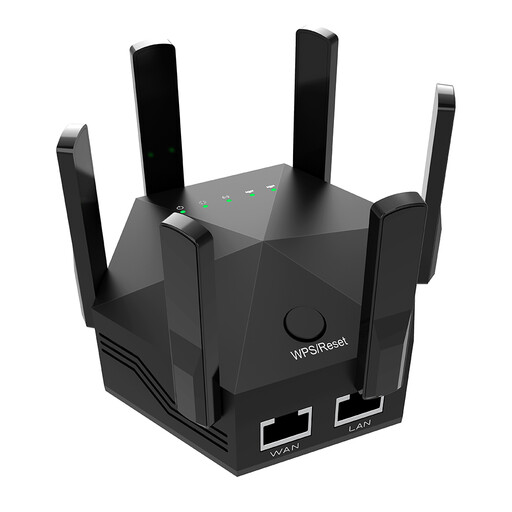
Dual-band Wi-Fi repeater, 1200 Mbit/s
For a midway wireless location that still receives a signal from the router; check the connection at the installation location.
The product specifications list six adjustable aerials and two 10/100 Mbit/s LAN ports.
View at Joybuy
 No image available
TP-Link Deco M4 AC1200, three-pack
An option if you want to provide Wi-Fi across several rooms with a mesh system or need a wired access point.
Three units with dual-band Wi-Fi; according to the product description, access point mode and two Gigabit LAN/WAN ports per unit. Mesh expansion is designed for Deco units; setup is through the Deco app.
View at Joybuy
 No image available
MERCUSYS ME80X Wi-Fi 6 Range Extender, AX3000 Dual Band
Can be used as a wireless repeater where there’s a signal from the router, or as a wired access point.
The product specifications list 574 Mbit/s at 2.4 GHz, 2402 Mbit/s at 5 GHz, a Gigabit port and a signal strength indicator. Access point mode requires an Ethernet connection to the router.
View at Joybuy
 No image available
TP-Link RE235BE BE3600 Dual-Band Wi-Fi 7 Range Extender
For wireless use if a midway location is still within range of your existing router; EasyMesh requires a compatible router.
The product specifications list a 2.5 Gigabit port and EasyMesh compatibility.
View at Joybuy
Frequently asked questions
Where should I place a wireless repeater for downloading audiobooks?
A spot between the router and the dead zone is a good place to start, provided the repeater still gets a signal from the router there. Check the connection indicator, then test a download where you listen. If the signal is weak, move the repeater closer to the router.
Is an Ethernet port on a repeater the same as access point mode?
No. An Ethernet port alone doesn’t confirm that access point mode is available. Check the specifications for the exact model: TP-Link specifically describes the RE700X, and devolo the WiFi 6 Repeater 3000, as supporting use as a wired access point.
Can I use a Wi-Fi repeater in Germany without an individual frequency allocation?
The Bundesnetzagentur has allocated the 2.4 GHz and 5 GHz Wi-Fi frequency bands specified in its general allocations for public use; the relevant conditions still apply. This isn’t a blanket approval for every device: check the labelling, product and manufacturer information, German instructions and declaration of conformity for the specific product.


