Who is a Wi-Fi extender for music across multiple floors for?

Music fans with a dead spot upstairs

If only one floor has poor coverage, an extender may be worth considering, as long as it still gets a usable connection to the router where it is placed. Telekom advises in its user guide that if the connection indicator is weak, you should move the device closer to the router or to an extender that is already connected.

Households with a local music library

If your music is stored on a computer or NAS, you need more than a good Wi-Fi signal: sharing and access to your storage, player and control device must all work too. Sonos Support explains these requirements for Sonos; for other music systems, follow the relevant manufacturer's guidance.

Households with several areas to cover

If you want to cover several areas that are far apart, take router compatibility and any existing network cables into account. Documentation from TP-Link, Telekom and devolo shows that mesh features may be limited to specific systems, while an access point can use an existing network connection.

What should you consider when choosing?

A single Wi-Fi extender

Suitable if: one area on another floor has poor coverage and the extender can still get a usable connection to the router there.

Bear in mind: The device can only relay the wireless signal it receives, so placing it right in the dead spot won't help.

Multiple mesh nodes

Suitable if: you need to cover several rooms or floors and your router and extensions support the mesh setup you want.

Bear in mind: A ‘mesh’ label alone doesn't guarantee that products from different brands will work together, and every wireless connection between nodes needs a strong enough signal.

A wired device in access point mode

Suitable if: there is already a network cable between floors, or a wireless connection through the ceilings is unreliable.

Bear in mind: You'll need a suitable cable and a device that supports the right operating mode.

Priority What to check before buying Who is this important to?
Wireless connection between floors Check the best position and the connection indicator; if the wireless link is unreliable, consider access point or LAN bridge mode. If I want to eliminate a dead spot on another floor, the extender itself must still have a usable connection to the router. This is the main priority for around 36% of consumers.
Access to the music library Check that the control device, player and storage are accessible, and that the sharing protocol and permissions work with your music system. If my music is stored locally, the player and control device need to be able to access the shared files. This is the main priority for around 29% of consumers.
Compatibility with your existing router Compare your router model and supported mesh system with the details for the specific extender. For example, EasyMesh on the TP-Link RE705X requires an EasyMesh-compatible router. If I want to use mesh features with my existing router, the specific combination must support them. Around 21% of consumers prioritise compatibility with their router.
Cabling and operation Check for existing network cables, access point mode and the Ethernet ports you need. If there is already a network cable on the floor, or you want to connect a device by cable, an access point may be the right option. Around 14% of consumers give this priority.

Common mistakes when choosing a Wi-Fi extender

  • Plugging in the extender where there is no router signal

    The device needs a usable connection of its own before it can extend the Wi-Fi.

    Check the connection indicator where you plan to put it. If the wireless link is too weak there, a wired connection may be an alternative.

  • Assuming ‘mesh’ means every brand works together

    General Wi-Fi compatibility and support for a particular mesh system are two different things. TP-Link requires an EasyMesh-compatible router for EasyMesh on the RE705X; other systems may have specific requirements too.

    Check your router model and the mesh features you want against the documentation for the specific device.

  • Relying on an isolated guest network to share local music

    A Wi-Fi signal alone won't give you access to shared files or connect devices on separate networks. Sonos Support says guest networks are not compatible with the Sonos system described.

    Check that your storage, player and control device are accessible on the local network they need, and that the sharing permissions are set correctly.

Key brands and product ranges at a glance

FRITZ!

The repeaters mentioned are aimed at households looking to add a device to a compatible FRITZ! home network.

  • According to FRITZ!, the 1200 AX has one Gigabit LAN port, while the 3000 AX has two.
  • The manufacturer lists three wireless units for the 3000 AX. These details do not guarantee coverage through any particular floor; you should check whether it is compatible with the mesh setup on your existing router.

TP-Link

The RE705X is described as a Wi-Fi extender with Gigabit Ethernet and access point mode.

  • TP-Link says it is generally compatible with routers for extending Wi-Fi coverage.
  • According to TP-Link, EasyMesh requires an EasyMesh-compatible router. Listed Wi-Fi data rates do not guarantee a connection through a floor.

devolo

The WiFi 6 Repeater 5400 is also described as an access point for households with existing network cabling.

  • devolo lists access point operation and mesh with other devolo Wi-Fi products.
  • This does not confirm that it will work with every third-party router in a mesh setup, nor does it guarantee coverage across several floors.

Telekom

Speed Home WLAN is designed to extend coverage with Speedport routers listed as compatible.

  • Telekom provides a compatibility list for individual models.
  • If the connection indicator is weak, Telekom's guide recommends moving the device closer to the router or another Wi-Fi extender.

Related products at Joybuy

The products below include individual Wi-Fi extenders, an extender with access point support and a mesh system. When checking a specific offer, look for device identification, CE marking, any required information in German and the declaration of conformity. The Bundesnetzagentur lists these as part of its market surveillance.

Compact Wi-Fi booster for extending your wireless network

Compact Wi-Fi booster

For a single Wi-Fi dead spot, provided there is still a usable connection to the router where you plan to place it; described as a compact plug-and-play booster.

View at Joybuy
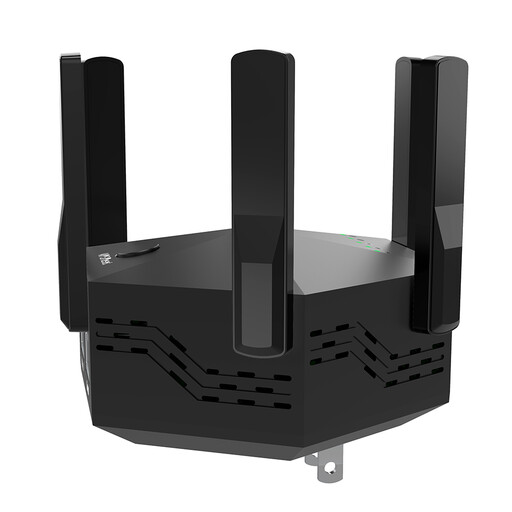
Dual-band Wi-Fi extender with six adjustable aerials and an EU plug

Dual-band Wi-Fi extender, 1200 Mbps

For households looking to extend their existing Wi-Fi wirelessly; the description mentions WPS pairing with the router.

Six adjustable aerials and two 10/100 Mbps LAN ports; EU plug.

View at Joybuy

TP-Link RE190 AC750 wireless repeater with 433 Mbps

TP-Link RE190 AC750 Wireless Repeater, 433 Mbps

For an area with poor coverage, if you can place the extender within range of the existing router signal.

Dual-band operation, WPS set-up and signal strength indicator.

View at Joybuy

MERCUSYS Halo H3000X mesh Wi-Fi system, two-pack

MERCUSYS Halo H3000X mesh Wi-Fi system, 2-pack

For households looking to cover several areas with a single, jointly configured mesh system.

Wi-Fi 6, AX3000 and three Gigabit ports per unit.

View at Joybuy

MERCUSYS ME80X Wi-Fi 6 range extender with Gigabit port and access point mode

MERCUSYS ME80X Wi-Fi 6 Range Extender AX3000

For extending Wi-Fi wirelessly or setting up an access point using an existing network cable.

Dual-band: 574 Mbps at 2.4 GHz and 2402 Mbps at 5 GHz; one Gigabit port. In access point mode, connect the port to the router with an Ethernet cable; in repeater mode, place the device within range of the router.

View at Joybuy

Frequently asked questions about Wi-Fi extenders and music libraries

Will an extender help if my music player can't find the library?

Only if the problem is with the network connection. With Sonos, files must be shared on the local network with the right permissions. Sonos Support also says the control app needs to be on the same Wi-Fi network and that guest networks are not supported for this purpose. For other players, follow the relevant manufacturer's guidance.

Does the computer need to stay on to access a Sonos music library on a NAS?

No, as long as the NAS itself is online. For the Sonos system described, Sonos Support specifies SMBv2 or SMBv3 for NAS sharing; older S1 systems have different requirements.

Where should I place a wireless extender?

Somewhere it can still get a strong enough connection to the router, rather than right in the middle of the dead spot. If the connection indicator is weak, Telekom recommends placing it closer to the Speedport router or to an extender that is already connected.

Will mesh work with any router I already have?

No. Mesh features depend on the specific router and extension device. For example, TP-Link expressly requires an EasyMesh-compatible router for EasyMesh on the RE705X; check the compatibility details for the combination you plan to use.

Do I need an individual frequency licence for a Wi-Fi extender in Germany?

You don't need to apply for an individual frequency allocation to use Wi-Fi within the conditions of the applicable general frequency allocations. The Bundesnetzagentur lists the 2.4 GHz general allocation in Notice 128/2023 and the relevant 5 GHz allocations; the applicable technical conditions and requirements for radio equipment still apply. For the specific device, also check the CE marking, product identification, any required information in German and the declaration of conformity.