Who is a Wi-Fi repeater suitable for?

Students in a Wi-Fi dead zone

If you regularly join lessons by audio or video, a reliable connection where you study is essential. devolo points out that thick walls and ceilings can significantly weaken Wi-Fi signals. So check whether there’s a suitable midway point for the repeater.

Households with an Ethernet connection to the study area

If an Ethernet cable reaches your study room, or you can run one there, you can avoid the problem of a wireless signal having to pass through walls. Check that the specific device supports access point or LAN bridge mode.

Households with an existing mesh router

If you want to cover several rooms, make sure the mesh feature you need is compatible with your router. TP-Link says EasyMesh requires a compatible router; Telekom also outlines router-dependent requirements for adding Speed Home WLAN.

What matters when you have thick walls?

Wireless repeater connection

Suitable if: There’s a spot between the router and your study area with a sufficiently good router signal, and you can’t use an Ethernet cable.

Bear in mind: The repeater still relies on its wireless connection to the router; placing it in a dead zone won’t solve the problem.

LAN bridge or access point

Suitable if: You can run an Ethernet cable from the router or home network to your study area.

Bear in mind: You’ll need to run the cable, and the specific device must have a documented access point or LAN bridge mode.

Criterion What to check before buying Who is this particularly important to?
Stable connection Choose a midway point where the router signal is still available. If the connection indicator is weak, Telekom recommends moving Speed Home WLAN closer to the router. Then test the connection during a lesson. If the sound or picture cuts out during my lesson, a stable connection where I study matters more than a high advertised maximum speed. Around 36% of consumers prioritise a reliable connection for lessons.
Bridging walls with a cable Check whether an Ethernet cable can reach your study area and whether the model offers Ethernet and an access point or LAN bridge mode. devolo describes this operating mode for the WiFi 6 Repeater 3000 and 5400. If I can run a cable to my study room, I want to avoid the wireless signal having to pass through the walls. Around 29% of consumers prioritise a wired connection between rooms.
Connecting to your router Check your exact router model against the mesh mode documented for it. TP-Link requires a compatible router for EasyMesh. If I want to keep using my existing router and cover several rooms, I’ll check compatibility with my specific model first. For around 21% of consumers, connecting to their existing router is their main concern.
Set-up and ongoing costs Check the power consumption and any accessories required for the specific model. If you’re calculating electricity costs, take your own tariff into account too. Test the connection for lessons once set up. If I want to keep set-up simple and ongoing costs manageable, I’ll first check that I can get a basic connection where I study. Around 14% of consumers put an easy purchase and ongoing costs first.

Common buying and set-up mistakes

  • Plugging the repeater straight into a Wi-Fi dead zone

    A repeater needs its own connection to the router. If there’s hardly any signal where you put it, it won’t be able to reliably pass that signal on to your study area.

    First, find a midway point where the router’s Wi-Fi signal is still strong enough. If there’s no suitable spot, consider a LAN bridge or an access point.

  • Assuming advertised Wi-Fi data rates guarantee a good lesson experience

    Maximum speeds don’t tell you how stable the connection will be in your particular study area, with walls in the way. Interruptions and packet loss can also affect video calls.

    Test the connection where you study, using the app you actually use for lessons, rather than just comparing product specifications.

  • Assuming ‘mesh-capable’ means full compatibility

    TP-Link requires a compatible router for EasyMesh. Telekom also sets out router-dependent requirements for Speed Home WLAN.

    Before ordering, check your exact router model and the mesh mode you want against the details for the specific device.

Key brands at a glance

FRITZ!

The FRITZ!Repeater 1200 AX is a compact Wi-Fi 6 option with Gigabit LAN and FRITZ! Mesh for compatible FRITZ!Box home networks.

  • FRITZ! quotes a maximum Wi-Fi rate of up to 3 GBit/s and documents a LAN port and mesh integration.
  • That maximum rate isn’t a measure of performance for lessons behind walls. COMPUTER BILD describes the tested model’s speed in the 2.4 GHz band as solid.

TP-Link

The RE705X is an option if you need Gigabit Ethernet and a documented access point mode.

  • TP-Link documents an access point mode and EasyMesh.
  • EasyMesh requires a compatible router. The documented features alone don’t tell you how well the signal will reach your particular study area.

devolo

According to the manufacturer, the WiFi 6 Repeater 3000 and 5400 can be used wirelessly or in access point mode with a LAN connection.

  • The documented access point mode is useful if an Ethernet cable reaches your study area.
  • For the Repeater 3000 it tested, COMPUTER BILD reports weak 2.4 GHz performance and a guest network available only in access point mode. This test finding applies to that model.

Telekom

Speed Home WLAN is an add-on option for households using a compatible Speedport router.

  • Telekom specifies Wi-Fi 6 and mesh integration that depends on the router.
  • Telekom lists additional requirements for set-up with a Speedport 7 or newer. If the connection indicator is weak, it recommends moving the device closer to the router.

Joybuy products for your study area

This selection includes wireless Wi-Fi repeaters for locations that still receive a router signal, as well as an extender that can also be used as an access point over Ethernet.

Compact Wi-Fi booster

Compact Wi-Fi booster

If the router’s Wi-Fi still reaches the midway point, this device is described as a compact way to extend an existing home network.

The description specifies plug-and-play set-up.

View at Joybuy
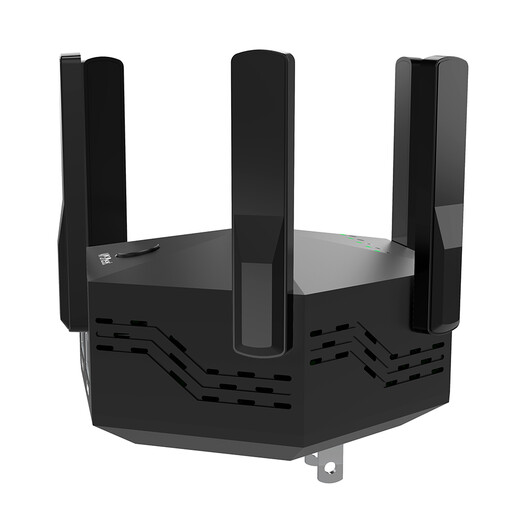
Dual-band signal booster with six adjustable antennas

Dual-band signal booster 1200 Mbps, 6 antennas, EU plug

If the router signal still reaches the intended location, this model is described as a wireless signal booster for indoor use.

Dual-band; 1200 Mbps; 6 adjustable antennas; WPS set-up; black casing with EU plug.

View at Joybuy

TP-Link RE190 AC750 Wi-Fi repeater

TP-Link RE190 AC750 Wi-Fi repeater

If you can place the repeater somewhere that receives the router signal, this model is described as a way to extend your home Wi-Fi wirelessly.

Dual-band; 433 Mbps; WPS set-up; signal strength indicator to help you choose a location.

View at Joybuy

MERCUSYS ME80X Wi-Fi 6 range extender

MERCUSYS ME80X Wi-Fi 6 AX3000

If an Ethernet cable reaches your study area, this model can also be used as an access point, according to the description.

Dual-band: 574 Mbps at 2.4 GHz and 2402 Mbps at 5 GHz; Gigabit LAN; access point mode; signal strength indicator.

To use access point mode, connect the Ethernet port to the router with a cable, then change the mode in the app.

View at Joybuy

TP-Link RE235BE BE3600 dual-band Wi-Fi 7 range extender

TP-Link RE235BE BE3600 Wi-Fi 7 range extender

If the router signal still reaches the location and you want a wired connection to your device, the description lists an Ethernet port.

Dual-band; 2.5 Gigabit Ethernet port; EasyMesh support.

An EasyMesh-compatible router is required to connect it using EasyMesh.

View at Joybuy

Frequently asked questions

Where should I place a wireless repeater?

Place it at a midway point where it can still get a good signal from the router, not right where reception is poor. If Speed Home WLAN shows a weak or no connection, Telekom recommends moving it closer to the router.

What should I check if my lesson still keeps freezing with a repeater?

Check the router and repeater locations, the connection between them, and your internet connection separately. If you use Microsoft Teams for lessons, you can check network and quality figures in the ‘Call health’ view during a call. These figures are specific to Teams and aren’t general buying advice for repeaters.

Can I use a repeater connected by Ethernet as a Wi-Fi access point?

Yes, if the specific model supports access point or LAN bridge mode. TP-Link documents this mode for the RE705X; devolo describes it for the WiFi 6 Repeater 3000 and 5400.

What costs and returns terms should I check when buying online?

Alongside the device, you may need to allow for an Ethernet cable, as well as checking the stated power consumption and your electricity tariff. The Verbraucherzentrale says online orders generally come with a 14-day cancellation period from delivery. Check the specific returns terms before buying.

What marking applies to Wi-Fi repeaters in Germany?

According to the Bundesnetzagentur, products covered by the relevant EU harmonisation legislation and placed on the EU market must carry CE marking. Check the marking and product documents for the specific offer; this does not indicate how well the signal will reach your study area.