Film fans with a Wi-Fi dead zone between floors
If you want to watch a film on another floor and can’t use an Ethernet cable there, look for a midway spot where the extender can still get a good signal from the router.


A wireless extender could be suitable if it still gets a usable connection to your router where you place it, and the signal reaches your TV. If there’s an Ethernet cable on the floor you want to cover, an extender with access point or LAN bridge mode is a good alternative, as the connection between the router and the device won’t need to be wireless. Once it’s set up, check playback on your TV: advertised Wi-Fi data rates don’t guarantee uninterrupted streaming through several ceilings.
If you want to watch a film on another floor and can’t use an Ethernet cable there, look for a midway spot where the extender can still get a good signal from the router.
If there’s a connected network socket or you can run a cable, you can avoid a wireless connection between the router and access point. Check that the socket is actually connected to your router’s network.
If you want to extend coverage across several floors and use mesh features, check that the specific extender is compatible with your router and any other nodes you may have.
Suitable if: there’s no Ethernet cable to the floor you want to cover, and a possible midway spot still gets a signal from the router.
Bear in mind: ceilings and other obstacles can weaken the wireless connection; test it on your TV once it’s set up.
Suitable if: an Ethernet cable connected to the router reaches the floor you want to cover, and the model supports the right operating mode.
Bear in mind: you’ll need cabling; the connection to your TV will still be wireless unless you connect that by cable too.
| Buying priority | What to check before buying | Who is this important to? |
|---|---|---|
| Stable connection across floors | Possible extender locations and power sockets; connection to the router and the TV. | If I want to stream a film on another floor, I need good reception from the router at a possible midway spot. Around 36% of consumers say the wireless connection is their main concern. |
| LAN instead of an extra wireless connection | Connection between the network socket and the router; the model’s access point or LAN bridge mode. | If there’s already a LAN connection on the floor I want to cover, or I can run a cable there, I want to use it to connect the access point. Around 29% of consumers prioritise an existing LAN connection. |
| Compatibility with your router and mesh system | Router model, required firmware and supported mesh system. | If I want to connect an existing router and other nodes, the specific combination must support the mesh features I need. Around 21% of consumers say mesh compatibility is their main concern. |
| Reliable performance without unnecessary devices | Resolution required and the actual connection on your TV; number of devices and power sockets needed. | If I only need to stream a film on my TV, I don’t want to add extra devices just because of a high advertised Wi-Fi data rate. Around 14% of consumers particularly value keeping the number of devices to a minimum. |
The internet speed you need also depends on the streaming service and the resolution you choose. As service-specific guidelines, Netflix recommends a stable internet speed of 5 Mbit/s for Full HD and 15 Mbit/s for 4K. These figures aren’t minimum data rates for an extender and don’t automatically apply to other services.
The connection between the router and the extender also needs to work. A strong signal between the extender and your TV won’t help if the extender itself only has a weak connection to the router.
Check for power sockets and possible midway spots. If there’s no usable router signal there, consider a LAN connection to the floor you want to cover.
The FRITZ!Repeater 1200 AX, 3000 AX and 6000 are worth considering for different Wi-Fi and LAN setups, especially if you already use a FRITZ!Box.
Speed Home WLAN is one option for homes with a Speedport listed as compatible.
According to TP-Link, the RE705X can extend your network wirelessly or operate as an access point through a wired connection.
According to devolo, the WiFi 6 Repeater 3000 and 5400 can extend a network wirelessly or operate as access points.
The following Joybuy products cover wireless Wi-Fi extension and models described as supporting access point mode. Before choosing, check that the cabling, connections and router link will work in your home.
 No image available
Worth considering if you want to choose between wireless extender and access point modes.
Dual-band Wi-Fi; two RJ45 ports with 10/100 Mbit/s. The description lists extender and access point modes.
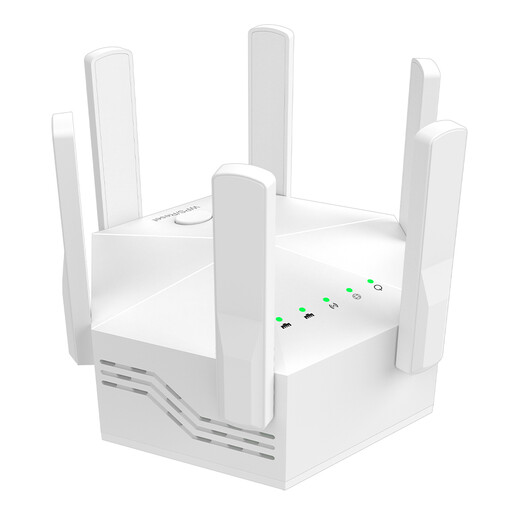 No image available
A wireless extension option for homes looking for an indoor extender.
Dual-band Wi-Fi with speeds of up to 1200 Mbit/s; six adjustable aerials. The description lists WPS setup.
 No image available
Worth considering if you’re looking for a compact Wi-Fi booster to extend your existing home network.
The description lists plug-and-play setup for home use.
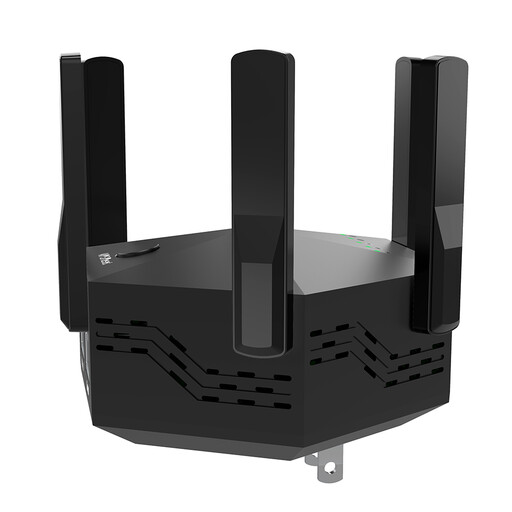 No image available
For wireless extension; the LAN ports may be useful if you want to connect a device by cable.
Dual-band operation, six adjustable aerials and two LAN ports with 10/100 Mbit/s. The description lists WPS setup.
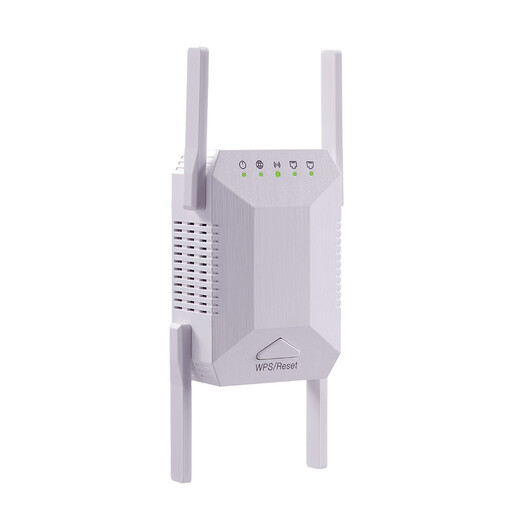 No image available
A wireless extension option for indoor use; check that the connection is strong enough for streaming at the planned location.
Dual-band operation with speeds of up to 1200 Mbit/s and two LAN ports with 10/100 Mbit/s. The description lists WPS setup.
First, test your internet connection and playback directly on your TV. Then check the connection to the router at the planned extender location, and test the stream on your TV again once it’s set up. An extender won’t fix a slow or failed internet connection. For example, Netflix recommends a stable internet speed of 5 Mbit/s for Full HD and 15 Mbit/s for 4K; these aren’t minimum extender data rates for all services.
Yes, if the socket is connected to your router’s network and the specific model supports access point or LAN bridge mode. This mode is documented for the FRITZ!Repeater 1200 AX, TP-Link RE705X and devolo WiFi 6 Repeaters; check the requirements for the model you’re considering.
Check for firmware updates and install them following the manufacturer’s instructions. Telekom notes that missed updates can cause malfunctions and security vulnerabilities; the update process varies by device.
Covering several floors may require additional devices and possibly LAN cabling; extra nodes also need power sockets and electricity. Before buying, check what’s included and the warranty and update terms documented for the specific model.
You don’t need an individual frequency allocation to use Wi-Fi within the generally allocated 2.4 and 5 GHz frequency bands. The Federal Network Agency lists these general frequency allocations; the applicable conditions and device conformity requirements still apply. The CE mark is not an independent quality seal.