Film fans dealing with a Wi-Fi dead spot
If you mainly want to stream in the TV room, find a spot where the extender still gets a good signal from the router and can reach your screen.


A single Wi-Fi extender may be suitable if it still receives a good signal from the router where you plan to place it and can reach the room with your TV. If the signal through the floors is too weak, a wired access point or an extender with a suitable LAN mode is a better option. Several suitable mesh nodes may be needed to cover multiple floors with weak signal. Check the connection at your playback device and make sure the extender is compatible with your router, rather than relying on advertised peak Wi-Fi speeds alone.
If you mainly want to stream in the TV room, find a spot where the extender still gets a good signal from the router and can reach your screen.
If you need Wi-Fi on several floors, take the floors, potential device locations and node compatibility into account when planning your setup.
If you can use a network cable on the relevant floor, look for an extender with a suitable LAN mode or a wired access point.
Suitable if: The TV room is the main Wi-Fi dead spot and the planned location still gets a good signal from the router.
Consider: Without a usable incoming signal, even a high stated data rate won’t reliably improve the connection where you watch films.
Suitable if: You need coverage on several floors, don’t have a network cable available and can find suitable locations for the nodes.
Consider: You’ll need extra devices and suitable locations. Mesh features and the number of nodes supported depend on your router and devices.
Suitable if: There’s a network cable on the relevant floor, or you can run one. This is particularly useful if the wireless signal through the floors is weak.
Consider: The device must support a suitable LAN bridge or access point mode, and the cable must be connected to your home network.
| Buying criterion | What to check before buying | Who does this matter more to? |
|---|---|---|
| Signal where you watch films | Check the router signal at possible extender locations, then test the connection by your screen. A socket right in the dead spot isn’t necessarily a suitable location. | If I mainly want to stream in the TV room, the extender needs to be able to reach the router from where it’s placed. Around 31% of consumers put signal where they watch films first. |
| Reliable streaming connection | If possible, measure the connection at your playback device and compare the result with your streaming service’s requirements. Netflix recommends 5 Mbit/s for FHD and 15 Mbit/s for 4K UHD on its service. | If I want to watch a film in my chosen picture quality without interruptions, the connection at my playback device matters most. Around 31% of consumers prioritise reliable playback. |
| Coverage across several floors | Identify which floors actually have weak coverage and check potential node locations before deciding how many you need. Floors can weaken the Wi-Fi signal. | If I need Wi-Fi not just by the TV but on several floors, I want to position the nodes appropriately. Around 23% of consumers prioritise coverage across several floors. |
| Router compatibility and setup | Check that your router model supports the mesh, LAN bridge or access point mode you need. For example, TP-Link’s RE705X requires an EasyMesh-compatible router for EasyMesh. For wireless devices, also check the applicable conformity requirements. | If I want to avoid extra setup or buying unsuitable devices, I check my router’s features before making a purchase. Around 15% of consumers prioritise easy setup and device costs. |
A wireless extender needs a usable connection to the router itself. A location with no signal may therefore fail to provide a reliable connection where you watch films, too.
Check the signal at several possible locations, then test the connection at your playback device.
The stated rate doesn’t automatically reflect the connection that reaches your TV. The router connection to the extender and your internet connection also affect streaming.
If possible, measure the connection at your playback device and compare the result with your streaming service’s requirements.
An extender can extend your Wi-Fi without offering the same mesh features with every router. For example, TP-Link’s RE705X needs an EasyMesh-compatible router to form an EasyMesh network.
Before buying, check your router and device models, as well as the mesh feature you want to use.
The FRITZ!Repeater 3000 AX is an option for households looking to extend their home network and match its mesh features to their router.
Speed Home WLAN is particularly relevant to households using a compatible Speedport as their mesh base.
The RE705X is an extender option for households weighing up wireless coverage against a possible wired connection.
The WiFi 6 Repeater 5400 is worth considering if you want to choose between extender and access point modes, depending on your existing wiring.
This selection includes individual wireless extenders for expanding Wi-Fi coverage, as well as an additional Deco X10 unit for extending an existing Deco mesh network.
 No image available
Listed as a standalone wireless extender for expanding an existing Wi-Fi network. The planned location still needs to receive a suitable signal from the router.
Product name specifications: 1200 MBit/s and 5GHz.
 No image available
Listed as a standalone Wi-Fi booster for an existing wireless network. Check the signal at the planned location and where you watch films.
 No image available
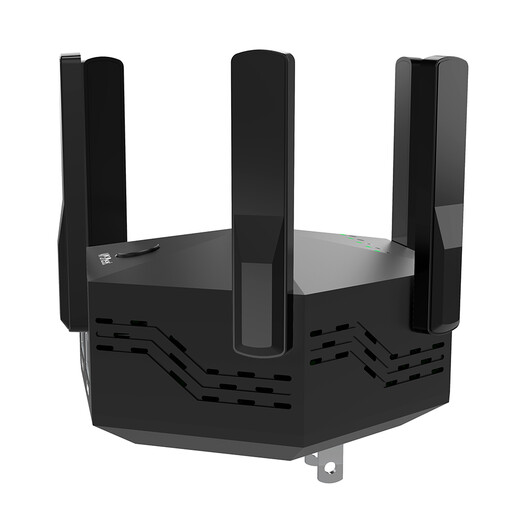
Listed as an indoor wireless signal booster. Check the connection at the planned extender location before setting it up.
Product name specifications: dual-band, 1200 Mbps, 6 adjustable antennas, EU plug, black.
 No image available
Listed as a standalone wireless extender for expanding an existing Wi-Fi network. Check that the planned location still gets a good signal from the router.
Product name specifications: AC750, 433Mbps, white.
 No image available
Listed as an additional Deco X10 unit for an existing Deco mesh network. Before buying, check that you want to expand this mesh system.
Product name specifications: Wi-Fi 6, AX1500, dual-band, 2 x Gigabit ports, 1 Pack.
If possible, measure the connection at the device you’ll actually use for playback. Netflix recommends at least 5 Mbit/s for FHD and 15 Mbit/s for 4K UHD on its service; other streaming services may have their own requirements. Check separately whether your internet connection or the Wi-Fi link to your TV is causing the slowdown.
Not necessarily. With a wireless connection, the extender needs a good signal from the router where it’s placed, while also reaching the spot where you watch films. Try several locations before settling on a permanent one.
Yes, as long as the network socket is connected to your home network and the device supports a suitable LAN bridge or access point mode. TP-Link documents this mode for the RE705X; devolo describes an access point mode for the WiFi 6 Repeater 5400.
When planning your setup, consider whether you might need additional nodes or a LAN connection as well as the extender. Warranty details apply to the specific model and provider: FRITZ! lists a five-year manufacturer’s warranty for the 3000 AX, not as a general promise covering other models or brands.
No individual licence is required for private Wi-Fi use within the frequencies generally allocated by the Federal Network Agency; the conditions of the relevant general allocation still apply. Wireless devices must meet the applicable EU conformity requirements, including the required CE marking and accompanying documentation. CE marking doesn’t prove streaming performance.