A Wi-Fi extender can help if the signal is weak only where you study. The key is to place it somewhere it can still get a good connection to your router. If the internet connection at the router is already slow or unstable, an extender won’t fix that. And if the wireless signal has to travel through too many obstacles, a wired access point could be a better option, provided you have an Ethernet cable available.
Who could benefit from a Wi-Fi extender?
Students on video calls at the same time
If you’re using a learning platform while taking part in a video call, first check whether the bottleneck is the Wi-Fi where you study or the internet connection itself. Zoom’s bandwidth recommendations depend on the type of call you’re making.
Students at the edge of the Wi-Fi range
If your study area is a long way from the router or separated from it by walls, you’ll need to find a spot in between where the extender can still get a good signal from the router and reach your study area. FRITZ! says both parts of the connection are important.
Students with an existing mesh router
If you want to expand your existing router system, check the specific router model against the mesh feature you plan to use. TP-Link and Telekom each specify compatibility requirements or particular router combinations.
What should you look for when buying a Wi-Fi extender?
Start by checking your internet connection and Wi-Fi reception separately. The Bundesnetzagentur offers a way to compare your connection’s actual data rate with the rate agreed in your contract. For a 720p group call, Zoom recommends 2,6 Mbit/s upload and 1,8 Mbit/s download. This recommendation applies to Zoom and isn’t a general requirement for learning platforms.
| What matters |
What to look for when buying |
Who is this important to? |
| Stability when using multiple services |
Check the internet connection near the router and the Wi-Fi signal where you study separately; then test the learning platform and video call at the same time. |
If I need to use a learning platform and make a video call at the same time, I need a connection that reaches both services where I study. Around 40% of consumers prioritise a stable connection for this kind of simultaneous use. |
| Reception where you study |
Find a spot in between with good reception from the router and an accessible power socket; check the connection again after setup. |
If my study area is at the edge of the Wi-Fi range, I need a signal there without losing the connection back to the router. Around 30% of consumers prioritise Wi-Fi coverage where they study. |
| Router compatibility |
Check your router model against the compatibility list and the requirements for the mesh feature you want to use. |
If I want to keep using my existing router system, the mesh feature I choose needs to be compatible with it. Around 20% of consumers prioritise router and mesh integration. |
| Wired connection |
Check whether you can run an Ethernet cable to the intended location and whether the model supports the LAN bridge or access point mode you want. |
If I can run an Ethernet cable to where I study, I want to avoid a wireless connection back to the router and use the right operating mode. Around 10% of consumers prioritise a LAN connection. |
Common mistakes when buying a Wi-Fi extender
-
Plugging the extender straight into a dead spot
A wirelessly connected extender needs a decent connection to the router itself. If it’s already in a dead spot, the signal it sends to your study area may be weak too.
First, find a spot in between with good reception from the router, then check the connection to your study area from there.
-
Assuming Wi-Fi extension means faster internet
An extender expands your existing Wi-Fi network, but it won’t fix a fault or limited capacity in your internet connection. A higher advertised Wi-Fi data rate doesn’t, on its own, tell you what the connection will be like where you study.
Check your internet connection and Wi-Fi reception separately before choosing a model advertised as more powerful.
-
Assuming a mesh label guarantees compatibility
A mesh label doesn’t automatically mean an extender supports the mesh features of every router. TP-Link requires a compatible router for EasyMesh on the RE705X, while Telekom lists compatible Speed Home combinations by router model.
Before ordering, check your specific router model against the requirements for the feature you want to use.
Manufacturers and model ranges to consider
The information below applies to the models and product ranges listed. Manufacturers’ specifications for ports or wireless technology don’t prove that a particular video call will work better where you study.
FRITZ!
According to FRITZ!, the FRITZ!Repeater 1200 AX has a Gigabit LAN port, while the FRITZ!Repeater 3000 AX is a tri-band option with two Gigabit LAN ports.
- Worth considering if you use a FRITZ!Box and want to check whether the specific combination is compatible.
- Even a wirelessly connected extender needs to be placed somewhere with good reception from the router.
TP-Link
According to TP-Link, the RE705X is a dual-band Wi-Fi 6 model with Gigabit Ethernet and an access point mode.
- Access point mode may be useful if you have a suitable wired connection.
- The advertised EasyMesh integration requires an EasyMesh-compatible router. Stated maximum data rates aren’t measurements of the connection where you study.
devolo
According to the manufacturer, the WiFi 6 Repeater 3000 has Gigabit LAN and can also operate as an access point; the WiFi 6 Repeater 5400 has two Ethernet ports.
- The models listed offer options for a wired connection.
- The WiFi 6 Repeater 5400’s data sheet lists guest Wi-Fi only in access point mode. This limitation doesn’t apply across the board to all devolo devices.
Telekom
Speed Home WLAN is especially worth considering if your Speedport appears in Telekom’s compatibility overview.
- Telekom specifies Wi-Fi 6 and provides a tool to check compatible router combinations.
- The user guide sets out additional requirements for setup with a Speedport 7 or newer. Check these for your specific combination.
ASUS
According to ASUS, the RP-AX58 supports repeater and access point modes; AiMesh is relevant for a compatible ASUS network.
- The manufacturer distinguishes between using the device as a standard repeater and integrating it into AiMesh.
- Before buying, check the specific router combination and device variant.
Joybuy products for extending your Wi-Fi
The Joybuy products below include dual-band extenders, devices with access point mode and an additional unit for an existing Deco mesh network. The right option for you depends in part on whether you can connect the extender wirelessly or with an Ethernet cable.
 No image available
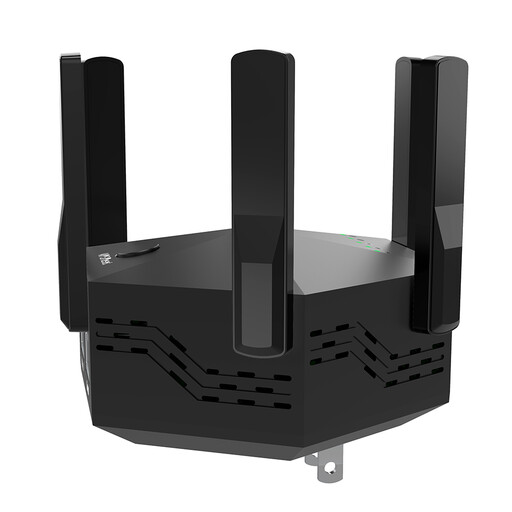
Dual-band Wi-Fi extender, 1200 Mbps, 6 adjustable antennas
For extending an existing Wi-Fi network; the description lists repeater and access point modes.
The product name specifies 1200 Mbps and six adjustable antennas. The description lists two 10/100-Mbps LAN ports.
View at Joybuy
 No image available
Ubiquiti U7 Mesh, 5000 Mbit/s, Power over Ethernet
The product description lists Wi-Fi extension as well as repeater and access point modes.
Power over Ethernet is specified in the product name. Before buying, check that your existing network infrastructure and planned setup are suitable.
View at Joybuy
 No image available
MERCUSYS ME80X Wi-Fi 6 Range Extender, AX3000
For extending your Wi-Fi wirelessly; the signal strength indicator is described as a guide to choosing where to place it.
Dual-band, with stated rates of 574 Mbps at 2,4 GHz and 2402 Mbps at 5 GHz, a Gigabit port and access point mode. The stated wireless rates aren’t measurements of the connection where you study.
View at Joybuy
 No image available
TP-LINK RE235BE BE3600 dual-band Wi-Fi 7 range extender
For extending your Wi-Fi wirelessly; the description lists setup via WPS or app.
Product information lists 2.5-Gigabit Ethernet and EasyMesh compatibility. EasyMesh integration requires a compatible router.
View at Joybuy
 No image available
TP-Link Deco X10 mesh Wi-Fi, 1 Pack, Wi-Fi 6 AX1500
Described as an additional unit for extending an existing TP-Link Deco mesh network, not as a general-purpose extender for any router.
Specifications include dual-band Wi-Fi 6 and two Gigabit Ethernet ports.
View at Joybuy
Frequently asked questions about Wi-Fi extenders for study areas
Is a high Mbit/s figure on the box enough for a learning platform and video call?
No. It doesn’t show what connection you’ll actually get where you study. Check the wireless signal and internet connection separately. Zoom’s bandwidth recommendations depend on the type of call and don’t automatically apply to every learning platform.
Where should you place a wireless extender?
Choose a spot where the extender can still get a good signal from the router and reach your study area, rather than putting it straight into a dead spot. Check the connection indicator after setup. Telekom also recommends moving the extender closer to the Speedport if the connection is weak.
What ongoing costs and support should you check before buying?
For the specific offer, check power consumption, any cables you’ll need, delivery terms and the stated update and support options. These checks don’t replace reviewing the terms of the offer itself.
Do I need an individual frequency licence for a Wi-Fi extender in Germany?
The Bundesnetzagentur lists general frequency allocations for Wi-Fi in the relevant 2,4 and 5 GHz bands. This isn’t blanket authorisation to use any frequency or non-compliant devices. If you’re buying a wireless device offered in Germany, check that it meets the applicable conformity requirements.


