A wireless extender can help you download audiobooks behind thick walls, provided it still gets a fast, stable connection to your router from a midway position. If the signal is too weak there, a supported access point or LAN bridge mode is a good alternative if you have a network cable in place. The connection where you listen matters more than the highest advertised Wi-Fi data rate.
Who might need a Wi-Fi extender in this situation?
Audiobook fans in rooms with poor reception
If you want to download audiobooks in a room where solid walls weaken the signal, start by finding a spot with a good connection to your router. Guidance from FRITZ! and Deutsche Telekom highlights how important the router connection and the extender’s position are.
Homes with a LAN socket near the room
An existing network socket can help if you don’t want the extender to receive data wirelessly through the problem walls. devolo describes using a wired connection in access point mode, while FRITZ! lists a Gigabit LAN port on the FRITZ!Repeater 1200 AX.
Homes with an existing mesh router
If you want to add an extender to your existing mesh network, check that it’s compatible with your specific router model. Deutsche Telekom lists requirements that vary by model.
What should you look for when buying?
Start by checking the connection where you could position the extender. Then see whether a wired connection is an option, and compare mesh features and specifications with what you need.
Wireless extender
A good choice if: you can find a socket on the way to your listening spot where the connection to the router is still stable, and you don’t want to run a LAN cable.
The trade-off: A wall that blocks the signal before it reaches the extender will still be an obstacle, as the device can only pass on the wireless connection it receives.
Access point or LAN bridge
A good choice if: a network cable reaches close to the room and your specific model supports a wired connection.
The trade-off: You’ll need a suitable cable route and a compatible LAN port on the device.
Powerline with Wi-Fi
A good choice if: there’s no suitable midway spot for a wireless extender and no LAN cable, but a pair of adapters can establish a connection over your home’s electrical wiring from the sockets you plan to use.
The trade-off: Performance depends on the electrical setup, and power supplies and dimmer switches can interfere with the connection.
| Criterion |
What to look for |
Who should pay particular attention |
| Reception behind thick walls |
Check possible midway positions. Once set up, test the connection to the router and download an audiobook where you plan to listen. |
If I want to download audiobooks in a room with poor reception, the connection from the router to my listening spot is what matters. Around 36 % of consumers say reliable reception is their main concern. |
| Wired connection |
Check for an existing network socket, a suitable cable route and an explicitly supported access point or LAN bridge mode. |
If the Wi-Fi is already weak at possible midway positions, I’d rather use an existing cable than rely on another wireless link. Around 29 % of consumers say bridging the connection with a cable is their main concern. |
| Router integration |
Check your router model and firmware version, and confirm that the specific mesh combination is supported. |
If I want to add my extender to an existing mesh network, it needs to work with my router. Around 21 % of consumers say integration with their existing router is particularly important. |
| Device and running costs |
Work out how much reception you actually need and how many devices will be in use at once. Compare power consumption and the ports you need. |
If I mainly want to download an audiobook to one device, I want the features and running costs to suit that need. Around 14 % of consumers say keeping devices and running costs to a minimum is their main concern. |
Common misconceptions when buying a Wi-Fi extender
-
Plugging in the extender where the router signal is almost gone
The extender first needs to receive data from the router. Positioning it in the room where you want to use it won’t magically make a very weak signal stronger.
Look for a spot between the router and your listening spot where the connection to the router is still usable, then test a download where you plan to listen.
-
Assuming advertised Mbit/s means a guaranteed download speed
Advertised data rates are technical maximums. Walls, positioning and the connection to the router all affect the signal where you use the device.
Choose based on the connection quality at the position you’re considering, then test a download where you plan to listen to your audiobook.
-
Assuming every mesh-enabled device is fully compatible
Documented mesh support depends on specific router models and, in some cases, their firmware.
Check your router and extender model numbers against the information provided by the relevant manufacturer.
-
Assuming Powerline is a guaranteed interference-free alternative
According to devolo, power supplies and dimmer switches, among other things, can interfere with data transmission over your home’s electrical wiring.
Test the adapters in the wall sockets you plan to use. If the connection is weak, check for possible sources of electrical interference.
Key brands to consider
FRITZ!
The FRITZ!Repeater 1200 AX is a specific Wi-Fi 6 model with Gigabit LAN. For homes with a FRITZ!Box, its documented LAN bridge and mesh features are worth considering.
- FRITZ! lists LAN and mesh support for this model, as well as regular updates on the product page.
- This doesn’t guarantee a wireless connection through thick walls. The connection to the router remains crucial when using Wi-Fi, and ports vary by model.
Telekom
Speed Home WLAN is an option for homes that want to use it as part of a mesh network with a Speedport model supported by Telekom.
- Telekom lists Wi-Fi 6 and mesh compatibility that varies by model.
- According to Telekom, Speedport Smart and Smart 2 models can’t act as the mesh base. Instead, Telekom describes setting them up via LAN.
devolo
According to the manufacturer, the WiFi 6 Repeater 3000 and 5400 can also be used as wired access points. devolo also offers Powerline solutions as an alternative way to connect.
- On supported models, access point mode allows you to connect the device by cable.
- Access point mode requires a LAN cable. Electrical interference can affect a Powerline connection, and manufacturer claims don’t guarantee a particular result in your home.
TP-Link
According to its German product page, the RE700X is a dual-band Wi-Fi 6 extender with Gigabit Ethernet and EasyMesh.
- The product page lists a Gigabit Ethernet port and EasyMesh.
- Advertised band speeds are maximum figures, not measured download speeds behind walls. Check that the mesh feature you want is supported by your router model.
Joybuy products for wireless and LAN connections
This selection includes wireless extenders for suitable midway positions, as well as models that, according to their product information, can also work in access point mode. Before choosing, check the connection to your router or whether you have a suitable LAN cable route.
 No image available
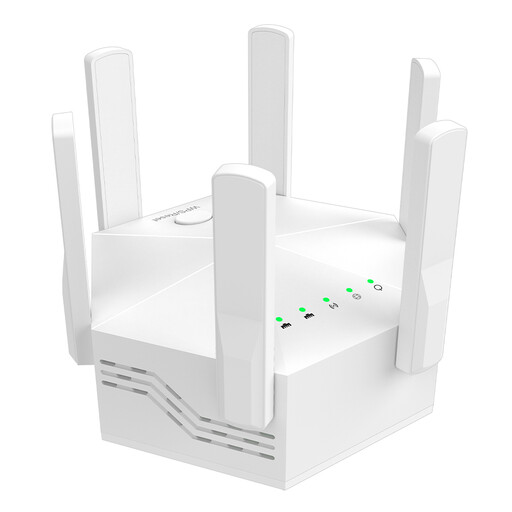
Dual-band Wi-Fi extender, 1200 Mbps, six adjustable antennas
For wireless use in a spot where your router’s Wi-Fi still comes through reliably.
The product title lists dual-band operation, 1200 Mbps and six adjustable antennas. The description lists two 10/100-Mbit/s LAN ports, WPS setup and an EU plug. This extender also needs to be positioned somewhere with a fast, stable connection to the router.
View at Joybuy
 No image available
Wi-Fi extender, 1200 Mbit/s, 5 GHz
For an existing network socket near the room, if you want to use the model in access point mode.
The description lists repeater and access point modes, dual-band operation and two 10/100-Mbit/s Ethernet ports. Access point mode requires a wired network connection.
View at Joybuy
 No image available
TP-Link RE190 AC750 Wireless Repeater, 433 Mbps
For a midway wireless spot where you can check the connection to your router.
The description lists 2.4 and 5 GHz bands, WPS setup and a signal strength indicator to help you choose a position. The extender needs to be within range of your existing router’s Wi-Fi.
View at Joybuy
 No image available
MERCUSYS ME80X AX3000 Dualband-Range-Extender
For a network socket near the room, if you want to use access point mode.
The product information lists 574 Mbit/s at 2.4 GHz and 2402 Mbit/s at 5 GHz, a Gigabit LAN port and a signal strength indicator. Access point mode requires an Ethernet cable to the router.
View at Joybuy
 No image available
TP-Link RE235BE BE3600 dual-band Wi-Fi 7 range extender
For a midway wireless spot, provided it can still connect to your existing router’s Wi-Fi.
The product information lists a 2.5-Gigabit Ethernet port, EasyMesh compatibility and setup via WPS or app. Check that your specific router model supports the mesh feature.
View at Joybuy
Frequently asked questions
Where should I position a wireless extender for downloading audiobooks?
Choose a spot on the way to your listening area where a fast, stable Wi-Fi connection to the router is still possible. Then test the connection where you’ll actually be listening. Directly behind a wall that blocks the signal isn’t necessarily the right place for the extender.
Can I connect an extender through a network socket instead of using Wi-Fi?
Yes, if your specific model has a suitable LAN port and supports access point or LAN bridge mode. A cable can bypass the problem wireless link through thick walls.
What should I check after setting it up?
Check the connection to the router, download an audiobook at your intended listening spot and install any available device updates. For the mesh feature with a Speedport described by Telekom, the specific router model and up-to-date firmware also matter.
Do I need a separate radio licence to use a Wi-Fi extender at home?
You don’t need an individual licence to use Wi-Fi on frequencies generally allocated by the Bundesnetzagentur. However, a radio device sold in Germany still has to meet the relevant requirements. The Bundesnetzagentur lists CE marking and conformity documents among the points to check. This does not confirm that any particular product complies.


