What to look for when buying
First decide whether you can connect to your home office wirelessly or with a network cable. Then check the mesh features you want and whether they’re compatible with your router.
| What to consider |
What to look for |
Who it matters most to |
| Connection to the room where you take calls |
Find a spot between the router and the room where the repeater gets a decent connection, then test it at your desk. |
If I need a reliable connection for calls in my home office, I look for a spot that covers both wireless links. Around 33% of consumers put the connection to their meeting room first. |
| LAN connection between floors |
Check whether a network socket or LAN cable reaches the farthest floor, and whether the device offers Access Point or LAN bridge mode. |
If you can connect your home office by network cable, you can avoid relying on a wireless signal passing through several ceilings. Around 27% of consumers prioritise a LAN connection to the farthest floor. |
| Wi-Fi coverage in several locations |
Check which areas need coverage and whether each wirelessly connected access point will get a good connection to the device it connects to. |
If several rooms or floors need Wi-Fi, I need to plan where to put the access points and how easy it is to expand the system. Around 20% of consumers put Wi-Fi coverage in multiple locations first. |
| Router compatibility |
Check your router model and firmware against the mesh technology and operating mode explicitly supported by the device. |
If you want to keep your existing router, check before buying that the mesh feature you want works with that exact combination. Around 20% of consumers prioritise compatibility with their router. |
Joybuy products for extending your Wi-Fi
The selection mainly includes Wi-Fi repeaters for adding an extra wireless access point. The MERCUSYS ME80X is also listed as having an Access Point mode. When using a wireless connection, the repeater needs to have a decent connection to the router where you place it. For the specific wireless device you choose, also check the conformity information and CE marking required for products placed on the German market.
 No image available
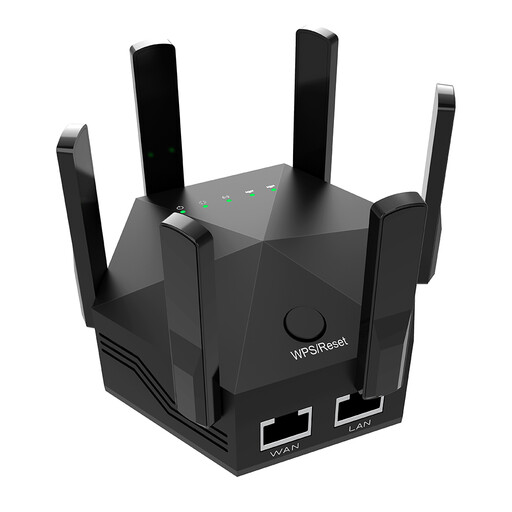
Dual-band Wi-Fi repeater, 1200 Mbit/s, 6 adjustable antennas, EU plug, black
Consider it for a single wireless access point if it still gets a decent connection to the router where you plan to place it.
Described as a dual-band device with a speed of 1200 Mbit/s and six adjustable antennas, for indoor use and with an EU plug.
View at Joybuy
 No image available
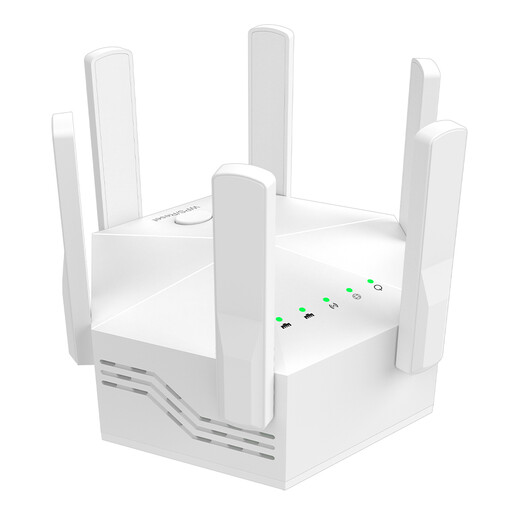
Dual-band Wi-Fi repeater, 1200 Mbit/s, 6 antennas, EU plug, white
Consider it for an extra wireless access point, provided it still gets a good enough connection to the router where you plan to place it.
Described as a dual-band device with a speed of 1200 Mbit/s and six antennas, for indoor use and with an EU plug.
View at Joybuy
 No image available
Compact Wi-Fi booster
Consider it as a compact option for an extra wireless access point if it gets a decent connection to the router where you plan to place it.
The product description calls it a compact device designed to extend your existing Wi-Fi signal.
View at Joybuy
 No image available
TP-Link RE190 AC750 Wi-Fi repeater, 433 Mbit/s, white
Consider it for one extra wireless access point if the router’s signal still reaches the location well.
Described as a dual-band repeater; the product description also mentions a signal strength indicator and WPS setup.
View at Joybuy
 No image available
MERCUSYS ME80X Wi-Fi 6 range extender, AX3000, dual-band
Consider it for extending your Wi-Fi or creating an access point near your home office; Access Point mode requires a LAN connection.
Listed with a Gigabit port, signal strength indicator and Access Point mode. Stated data rates: 574 Mbit/s at 2,4 GHz and 2402 Mbit/s at 5 GHz.
View at Joybuy
Frequently asked questions
How can I tell whether the repeater or my internet connection is affecting my video calls?
Compare the connection where you work with a test near the router or over LAN. The German Federal Network Agency’s broadband measurement tool checks your internet connection; Zoom recommends 2,6 Mbit/s upload and 1,8 Mbit/s download for 720p group video in its web app. This recommendation applies to the specified Zoom application and doesn’t guarantee the same performance with other software.
Where should I put a wirelessly connected repeater?
Choose a spot where it still gets a good connection to the router and can reach your home office. If the repeater shows a weak connection, move it closer to the router and test again where you take calls.
Do I need a router from the same manufacturer for mesh?
Not for every basic Wi-Fi extension, but the mesh features you want depend on the specific combination of devices. TP-Link’s EasyMesh feature on the RE705X requires an EasyMesh-compatible router; FRITZ! has its own requirements for connecting devices to a FRITZ! mesh network.
What ongoing costs and maintenance should I consider?
A device that’s left on all the time uses electricity; the cost depends on its power consumption and your electricity tariff. Keep the firmware up to date and check your Wi-Fi security settings. The Federal Office for Information Security recommends WPA2 or WPA3.
What requirements apply to Wi-Fi repeaters in Germany?
Radio equipment placed on the German market must meet requirements for conformity assessment and CE marking. The German Federal Network Agency checks, among other things, product markings, declarations of conformity and German-language information. A CE marking alone doesn’t prove that a specific offer is identical to a device version that has been tested.


