What should you look for when buying one?
First, check that there’s a usable connection to the router at the planned location. Then consider your internet connection’s capacity, whether Ethernet is an option and what you need for the mesh features you want.
| Criterion |
What to consider |
Who is this most important to? |
| Signal at the installation point |
Check the router connection at the potential location before leaving the extender there permanently. A weak-signal indicator can help you choose where to put it. |
If my meeting space is in a distant room, I need to place the extender somewhere it can still reach the router. Around 36% of consumers put reception at the installation point first. |
| Capacity for simultaneous calls |
Assess upload and download speeds while several people are using the connection at once. Zoom recommends 2.6 Mbit/s upload and 1.8 Mbit/s download for a 720p HD group call in the web app; requirements vary by application and call quality. |
If several people are on video calls at once, I want to check the capacity of my internet connection, not just Wi-Fi coverage. Around 29% of consumers prioritise being able to make simultaneous calls. |
| Ethernet connection |
Check whether a cable can reach the distant room and whether the specific device supports access point or LAN bridge mode there. |
If I can use an Ethernet cable, I want to connect the access point in the distant room through it rather than relying on another wireless link. Around 21% of consumers prefer a wired connection. |
| Mesh compatibility |
Check the exact router model and, where relevant, its firmware against the requirements of the mesh system you want to use. EasyMesh or another mesh feature won’t necessarily work with every router. |
If I want to integrate the connection into an existing mesh network, the router and extender must be explicitly compatible. Around 14% of consumers put mesh compatibility first. |
Wireless, Ethernet and mesh products on Joybuy
This selection includes wireless extenders, wired access points and an additional mesh unit. The key is whether the location has a usable wireless connection, a suitable Ethernet connection and, where needed, PoE+, or an existing compatible mesh network.
 No image available
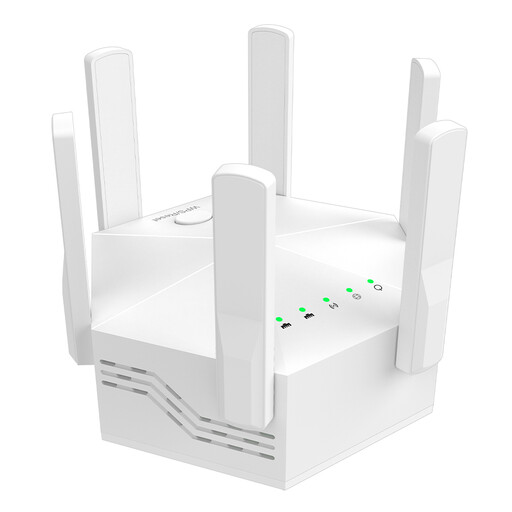
Dual-band Wi-Fi extender, 1200 Mbps, 6 adjustable antennas
For use as a wireless extender when the installation point is still within reach of the router.
Specifications include two frequency bands and two LAN ports, each with 10/100 Mbit/s.
View on Joybuy
 No image available
Ubiquiti UniFi U7 Lite WiFi 7 access point
For a remote Wi-Fi access point with a wired Ethernet connection; product details state that PoE+ is required.
The description lists dual-band Wi-Fi 7 and a 2.5 GbE port.
View on Joybuy
 No image available
MERCUSYS ME80X Wi-Fi 6 range extender
For a location where you want to choose between repeater and access point modes.
Specifications list dual-band speeds of 574 Mbit/s at 2.4 GHz and 2402 Mbit/s at 5 GHz, a Gigabit port and a signal strength indicator.
View on Joybuy
 No image available
TP-Link RE235BE BE3600 dual-band Wi-Fi 7 range extender
For extending your wireless network at a location within range of your existing router.
The model is listed with a 2.5 GbE port and EasyMesh compatibility. EasyMesh requires a compatible router or other suitable mesh devices.
View on Joybuy
 No image available
TP-Link Deco X10 mesh Wi-Fi set (1 pack), Wi-Fi 6 AX1500
Described as an additional unit for an existing TP-Link Deco mesh network, not as a general-purpose extender that works with any router.
The product description lists two Gigabit ports, as well as OFDMA and MU-MIMO.
View on Joybuy
Frequently asked questions about Wi-Fi extenders for video calls
Can an extender make up for an internet connection that’s too slow for several calls?
No. An extender can improve Wi-Fi coverage, but it can’t increase the bandwidth of your internet package. Check your connection while several people are using it at once; Zoom publishes different bandwidth recommendations depending on the application and call quality.
Where should you put a wireless extender?
Place it somewhere that still has a usable connection to the router, rather than in a Wi-Fi dead zone. For Speed Home WLAN, Deutsche Telekom recommends moving it closer to the router or another extender if the indicator shows a weak connection.
Will mesh work automatically with any router?
No. TP-Link requires an EasyMesh-compatible router for EasyMesh on the RE705X. Deutsche Telekom lists specific Speedport models and up-to-date firmware as requirements for a mesh base. Check that your particular combination of devices is compatible.
Why are firmware updates important for an extender?
Install available firmware updates in line with the manufacturer's instructions. Deutsche Telekom warns that missing updates can lead to malfunctions and security vulnerabilities.
What should I look for in a Wi-Fi extender in Germany?
Check the applicable usage conditions for the Wi-Fi frequencies supported by the specific device, as well as its product compliance. The Bundesnetzagentur lists generally allocated Wi-Fi frequencies in the 2.4 and 5 GHz bands and considers CE marking and declarations of conformity, among other things, when monitoring the market. This does not amount to blanket approval for any imported device or frequency setting.


