A wireless repeater may be suitable if it can still receive a usable connection to the router where you plan to place it. Check the connection there, then test the stream at your study spot. If thick walls make the wireless connection too weak, a LAN-connected access point can bypass the obstacle. Powerline is another option that doesn’t need a network cable, but you should test the connection at the sockets you intend to use. Mesh features also depend on the combination of router and range extender.
Which solution is right for you?
Learners with weak Wi-Fi in the next room
If you can place a wireless repeater between the router and your study spot, the key thing to check is whether it still receives a usable signal at the socket you’ve chosen. Deutsche Telekom recommends moving the device closer to the router if the connection is weak.
Learners behind walls that block the signal
If you can’t find a suitable spot for a wireless connection, check whether you can use a network socket or run a cable to your study room. If a LAN connection isn’t possible, powerline may be an alternative, but you should test it at the sockets you intend to use. devolo explains both wired access-point use and possible powerline limitations.
Households with an existing mesh router
If you want to connect your study spot to your existing home network, check that the specific router and repeater work together and follow the documented set-up process. TP-Link, Deutsche Telekom and FRITZ! each specify requirements for their mesh features.
What should you look for when buying?
| What matters |
What to check before buying |
Who is it most relevant to? |
| Wireless connection to the router |
Check the sockets between the router and study room, and the connection indicator; test the stream at your study spot. |
If I want to watch a language lesson without interruptions, the repeater needs to receive a usable signal from the router where it’s placed. Around 36% of consumers prioritise a reliable wireless connection. |
| An alternative for thick walls |
Check for a network socket or cable route, and the relevant access-point or LAN bridge mode; test powerline at the sockets you intend to use. |
If there’s no usable wireless connection between the router and study room, I could use a LAN cable or a powerline connection tested on site. Around 29% of consumers have this as their main priority. |
| Router and mesh compatibility |
Compare your router model, supported mesh technology and the documented set-up process. |
If I want to add the repeater to my existing home network, its mesh feature needs to work with my router. Around 21% of consumers prioritise this compatibility. |
| Using multiple devices at once |
Consider how many devices are used simultaneously in your home, as well as the capabilities of your router and devices. |
If other devices are online while I’m taking a language lesson, I want to take into account how the connection is shared. Around 14% of consumers focus mainly on simultaneous use. |
Common misconceptions when buying
-
Assuming the advertised maximum data rate is your streaming speed
The repeater still needs to receive a connection from the router. A high stated Wi-Fi data rate alone doesn’t tell you how well the stream will reach your study spot.
First, check the connection at possible locations, then test the lesson on the device you’ll use.
An unsuitable location may mean you need to try installing it elsewhere or use a different type of connection.
-
Assuming “mesh” means it works with every router
Mesh features may depend on specific routers and set-up requirements. TP-Link says EasyMesh on the RE700X requires an EasyMesh-compatible router; Deutsche Telekom also lists requirements for its set-up.
Check your router model, repeater model and the intended set-up mode together.
-
Assuming powerline is a guaranteed, interference-free alternative to a cable
devolo warns that some sockets may deliver low data rates and that electrical devices can affect performance. Certain VDSL connections may also experience interference.
Test the connection at the sockets you intend to use. If you have VDSL, check that your connection remains stable too.
You may need to try a different socket or carry out further troubleshooting before you can assess the connection.
Key brands at a glance
FRITZ!
The FRITZ!Repeater 1200 AX is worth considering if you’re looking for a compact Wi-Fi 6 repeater that can be integrated with FRITZ!Mesh.
- FRITZ! says this model has a Gigabit LAN port for a wired connection.
- Check mesh compatibility with your specific router. Manufacturer Wi-Fi performance figures don’t show what connection you’ll get through the walls in your home.
TP-Link
The RE700X is worth considering if you’re choosing between wireless range extension and access-point mode.
- TP-Link lists a Gigabit Ethernet port, access-point mode and EasyMesh support with a compatible router.
- Before buying, check that your router supports the mesh set-up you want. The connection you get at your study spot will depend on the conditions in your home.
devolo
devolo offers repeaters that can be placed flexibly and documents wired access-point use for suitable models. Powerline is another possible way to connect.
- For the WiFi 6 Repeater 5400, devolo lists access-point mode when a LAN cable is available, along with a three-year manufacturer’s warranty and the option to extend it.
- Some sockets may deliver low transfer rates over powerline, and VDSL interference is possible in certain conditions. Advertised coverage figures aren’t a measurement of performance in your home.
Telekom
Speed Home WLAN is worth considering if you want to check how its set-up works with your existing router.
- Deutsche Telekom provides set-up steps and a connection indicator.
- Telekom lists additional requirements for set-up with a Speedport 7 or newer. This doesn’t mean that all routers offer the same mesh features.
Joybuy products on this topic
The Joybuy products below include wireless repeaters and a model that, according to its product details, is also designed for use as a LAN-connected access point.
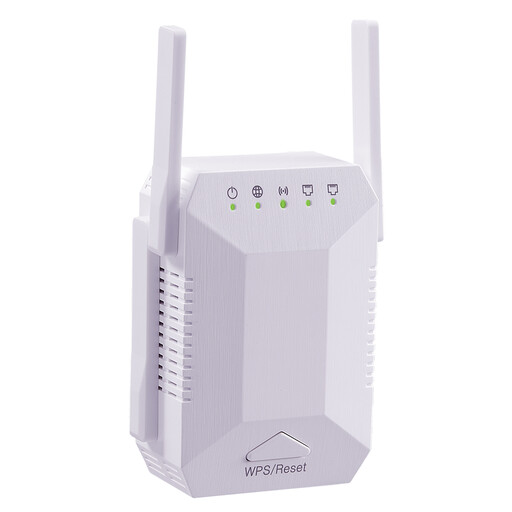 No image available
Dual-band Wi-Fi repeater, 1200 Mbit/s, 4 antennas
A wireless repeater for a room with weak Wi-Fi; it needs to have a connection to the router where you place it.
Details in the product name: dual-band, 1200 Mbit/s, 4 adjustable antennas, for indoor use, white, EU plug and “5G”.
View at Joybuy
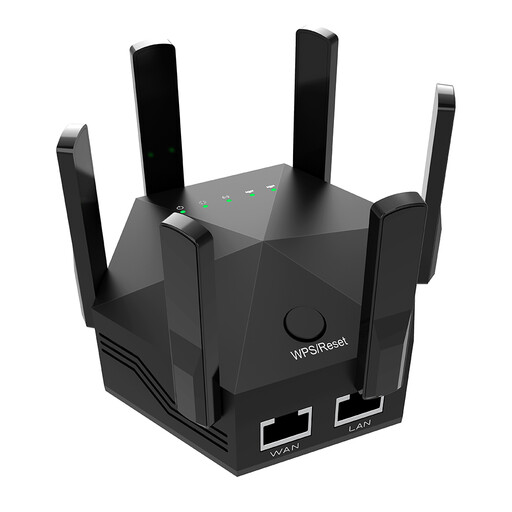 No image available
Dual-band Wi-Fi repeater, 1200 Mbit/s, 6 antennas
For extending Wi-Fi indoors; check that it can still connect to the router at your chosen location.
Details in the product name: dual-band, 1200 Mbit/s, 6 adjustable antennas, for indoor and home use, black and EU plug.
View at Joybuy
 No image available
Wi-Fi repeater, 1200 Mbit/s, 5 GHz
This model is also designed for access-point use with a LAN cable. Check that this mode suits your planned set-up. In repeater mode, it needs to receive a signal from the router where you place it.
Details in the product name: 1200 Mbit/s and 5 GHz.
View at Joybuy
 No image available
Compact Wi-Fi booster
Described as a compact option for extending Wi-Fi around your home. For wireless use, it needs to receive a signal from the router where you place it.
View at Joybuy
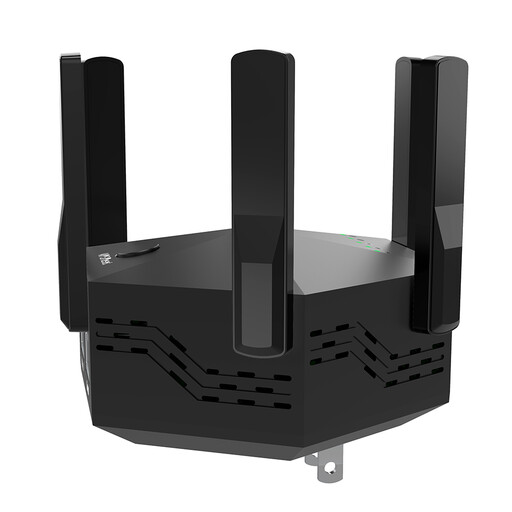 No image available
Dual-band Wi-Fi repeater, 1200 Mbps
Described as a wireless repeater for indoor and home use; check the connection where you plan to place it before streaming your lesson.
Details in the product name: dual-band, 1200 Mbps, black and EU plug.
View at Joybuy
Frequently asked questions
Should I plug the repeater in directly in my study room?
Only if it can still receive a usable connection from the router there. If the device shows a weak connection or insufficient range, try a socket closer to the router, then test the lesson in your study room. Deutsche Telekom explains how to check the location in its guide.
Can I use a repeater as an access point with a network cable?
Yes, if the specific model supports this mode and the cable connects it to your router or home network. TP-Link documents access-point mode for the RE700X; devolo describes it for the WiFi 6 Repeater 5400.
What should I check after set-up?
Check the connection indicator and test the stream itself at your study spot. Keep the device firmware up to date, following the manufacturer’s instructions. Deutsche Telekom warns that skipping firmware updates can cause faults and security vulnerabilities.
Does a longer manufacturer’s warranty replace your statutory rights when buying?
No. Consumer purchases in the EU are generally covered by a minimum of two years of statutory rights against the seller. A voluntary manufacturer’s warranty may offer additional protection, but it can’t reduce those rights. Check the warranty terms for the specific product. This information is based on the European Union’s Your Europe guidance.


