What should you look for when buying?
Wireless Wi-Fi repeater
Best if: There’s a spot between the router and the room where you listen that gets a strong signal, and you don’t want to run a cable.
Bear in mind: The connection still depends on the wireless signal between the router and the repeater.
Access point via LAN
Best if: There’s a usable network cable to the room where you listen, or you can run one.
Bear in mind: The specific device must support access point or LAN bridge mode, and you’ll need a suitable cable.
Powerline with Wi-Fi
Best if: There’s no suitable intermediate location for a repeater and running a cable isn’t practical, but you can test the sockets.
Bear in mind: Data transfer speeds can vary depending on your electrical wiring, sockets and sources of electrical interference.
| What you need |
What to check before buying |
Who is this important to? |
| Signal at the repeater |
A location with a strong signal from the router; a connection quality indicator, if available. |
If I want to extend my Wi-Fi without a cable, I need a suitable intermediate location with a strong signal. Around 36% of consumers prioritise reliable reception at the repeater. |
| Getting through the wall |
Check whether there’s an existing LAN cable and an access point mode; with powerline, test the sockets you plan to use. |
If the wall is blocking the wireless signal, I want to reach the room where I listen via LAN or, if appropriate, powerline. Around 29% of consumers prioritise a connection that bypasses the wall. |
| Music on your local network |
Share your music source, then test the connection to the device you’ll actually use to play it. |
If I want to listen to my own music from a computer or NAS, the source and speakers need to be accessible on the right local network. Around 21% of consumers prioritise access to their local music library. |
| Router compatibility |
Check the exact router model, operating mode and any required hardware or firmware version. |
If I want to use existing mesh features, the router and Wi-Fi extender need to work together. Around 14% of consumers prioritise compatibility with their router. |
For wireless equipment in Germany, the Federal Network Agency lists correct CE marking, product traceability and a declaration of conformity among the points to check. Make sure you check the details for the exact device version in the relevant product listing.
Joybuy products for this topic
Here you’ll find Wi-Fi repeaters and wired access points to consider for extending your home network towards the room where you listen.
 No image available
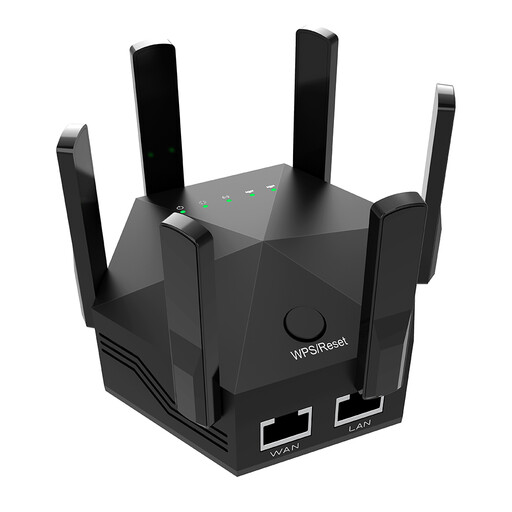
Dual-band Wi-Fi signal booster, 1200 Mbit/s
May be suitable for extending your Wi-Fi wirelessly if there’s still a signal from the router at the planned location.
The product title lists six adjustable aerials; the description lists two 10/100 Mbit/s LAN ports.
View at Joybuy
 No image available
Ubiquiti U7 Mesh
May be suitable for providing Wi-Fi in the room where you listen, provided there’s an Ethernet connection and PoE there. It’s an access point, not a wireless repeater.
The product details list Wi-Fi 7 and a 2.5 Gigabit Ethernet uplink with PoE. Setup is integrated with the UniFi Network system.
View at Joybuy
 No image available
TP-Link RE190 AC750 Wireless Repeater
May suit you if you want to extend your Wi-Fi wirelessly and there’s still a connection to your existing router at the installation spot.
The product details list dual-band operation, WPS setup and a signal strength indicator to help you choose where to place it. The repeater needs to be within range of your existing Wi-Fi router.
View at Joybuy
 No image available
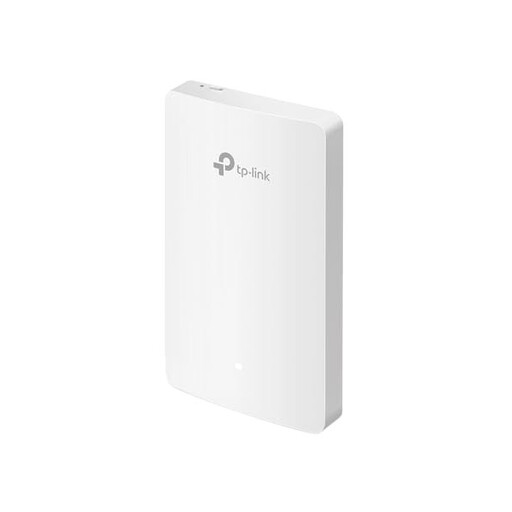
TP-Link EAP235-Wall Omada Wi-Fi 6 Wall Access Point
Can provide Wi-Fi in the room where you listen, provided there’s a usable Ethernet connection to it.
The product title lists four Gigabit ports and LAN speeds of up to 1167 Mbit/s. This access point requires an Ethernet connection.
View at Joybuy
 No image available
MERCUSYS ME80X Wi-Fi 6 Range Extender
May be suitable for extending your Wi-Fi wirelessly if you can place it in repeater mode somewhere between the router and the area with a weak signal.
The product details list AX3000 dual band (574 Mbit/s at 2.4 GHz and 2402 Mbit/s at 5 GHz), a Gigabit port, app control, a signal strength indicator and AP mode. Access point mode requires an Ethernet connection to the router.
View at Joybuy
Frequently asked questions
Where should I place a wireless repeater?
Place it somewhere it can still get a good connection to the router while also reaching the room where you listen. It can’t improve the wireless connection if there’s no signal from the router where you put it.
Why can’t I access my music library even though my Wi-Fi has improved?
Check that your music source is shared and that the network connection is working. Sonos explains how to access a shared library from a computer or NAS on a local network. For AirPlay audio, Apple recommends connecting your controlling device and speakers to the same network.
What extra work might be involved with LAN or powerline?
An access point via LAN needs a usable network cable, and installing one may involve extra work. A powerline starter kit needs suitable adapters and sockets; test the connection using the sockets you plan to use.
What should I check before buying wireless equipment?
Check the details for the specific device version. The Federal Network Agency lists correct CE marking, product traceability and a declaration of conformity among the points to check for wireless equipment.
What should I know about warranties and future updates?
Check the details for the specific model and product listing. FRITZ! offers a five-year manufacturer’s warranty for the FRITZ!Repeater 1200 AX, while Telekom publishes help and firmware information for Speed Home WLAN. A manufacturer’s warranty is separate from any other rights or benefits that may apply to your purchase.


