What should you look for when buying?
First, check whether the planned location can still get a good connection to the router. For several floors, the connection between the nodes and the possibility of running LAN cabling are also important.
A single Wi-Fi repeater
Suitable if: coverage is poor mainly in one viewing area and there’s a possible midway location with a decent connection to the router.
Trade-off: The repeater needs a good wireless connection to the router itself.
Multiple mesh nodes
Suitable if: you want to cover several floors or distant areas and can provide a sufficiently good connection between the nodes.
Trade-off: The devices and router must be compatible with the mesh setup you want.
Wired access point
Suitable if: there’s a network socket or LAN cable on the more distant floor.
Trade-off: The wired connection must be usable, and the device must have an access point mode.
Powerline with Wi-Fi at the destination
Suitable if: there’s no LAN cable to the floor and you can test the connection over your electrical wiring.
Trade-off: Speeds can be low at some sockets; certain VDSL connections may also be affected.
| What matters |
What to look for when buying |
Who it matters most to |
| Connection to the more distant floor |
Choose a location with a good connection to the router. If you’re covering several areas, also consider the connection between the nodes. |
If I need to cover a distant floor, the connection along the whole route matters to me. Around 36% of consumers put coverage across floors first. |
| Uninterrupted playback |
Test the connection at the playback device and check the requirements of the video service you actually use. |
If I want to watch a recording without interruptions, a stable connection at the television is essential. Around 29% of consumers prioritise smooth playback. |
| Backhaul without a wireless signal passing through floors |
Check for existing network sockets and access point mode. If you’re using Powerline, test the sockets you plan to use. |
If there’s a LAN connection to the destination floor, I want to use it for backhaul. Around 21% of consumers prioritise a wired connection. |
| Compatibility with the router |
Check the router model and firmware against the device’s documented mesh compatibility. |
If I want to extend my existing network, I need to know whether the devices will actually work together as a mesh system. Around 14% of consumers prioritise router integration. |
Netflix recommends a minimum of 5 Mbit/s for Full HD and 15 Mbit/s for 4K on its service. These service-specific figures don’t automatically apply to other video services, and they don’t replace testing the connection where you watch.
Joybuy product selection
This selection includes individual Wi-Fi repeaters for one viewing area, as well as wired access points for floors with an Ethernet connection.
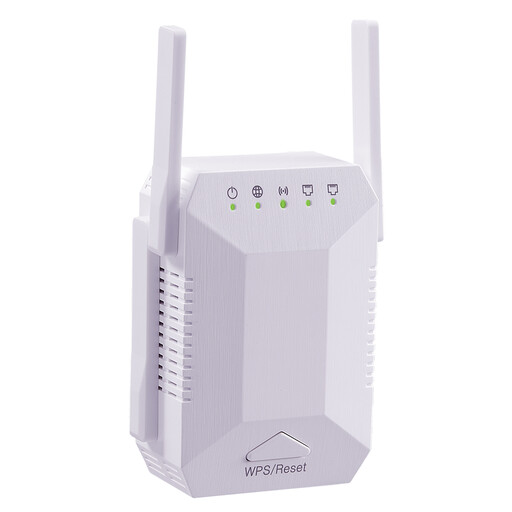 Image unavailable
Wi-Fi Repeater 1200 Mbit/s, 5G, dual-band
For one viewing area where you want to extend an existing Wi-Fi network.
Six adjustable aerials; two 10/100-Mbit/s LAN ports; WPS setup.
Joybuy
 Image unavailable
Ubiquiti UniFi U6+ WiFi 6 Access Point
For a more distant floor with an Ethernet connection and suitable PoE power supply.
Gigabit Ethernet; PoE in accordance with 802.3af. Requires an Ethernet connection and a compatible PoE power source.
Joybuy
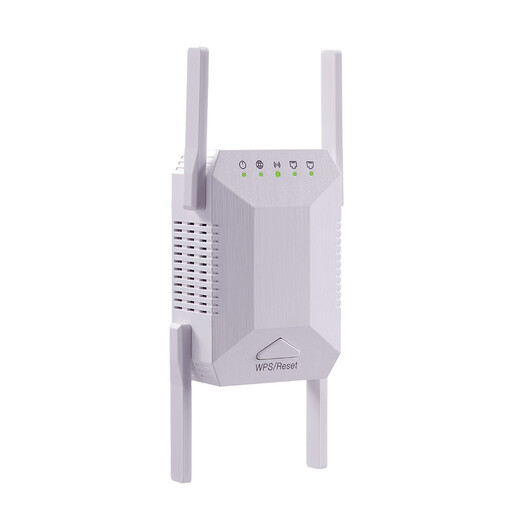 Image unavailable
Wi-Fi Repeater 1200 Mbit/s, 5G, dual-band
For a viewing area where you want to extend an existing Wi-Fi network.
Four adjustable external aerials; two Ethernet ports; WPS setup.
Joybuy
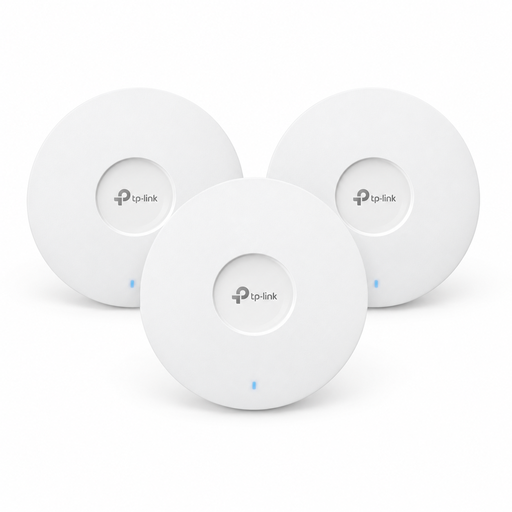 Image unavailable
TP-Link Omada EAP653 AX3000 Wi-Fi 6 access points, 3-pack
For several coverage areas where Ethernet is available at the access point locations.
Three access points; PoE+. The specified 12-V DC adapter is sold separately.
Joybuy
 Image unavailable
Ubiquiti U7 Mesh Wi-Fi 7 Access Point
For a coverage area with an Ethernet connection and a suitable PoE power supply.
2.5-Gigabit Ethernet uplink; PoE. The device requires an Ethernet connection and a suitable PoE power source.
Joybuy
Frequently asked questions
Where should you place a wireless repeater?
Choose a location where the repeater can still get a stable connection to the router while also covering your viewing area. The FRITZ! guide highlights the quality of both connections, so a socket right in the Wi-Fi dead spot won’t necessarily be suitable.
What speed do you need to watch a recording?
It depends on the video service and the resolution you choose. Netflix recommends a minimum of 5 Mbit/s for Full HD and 15 Mbit/s for 4K on its service. Also check the requirements of the platform you actually use and test the connection at your playback device.
Will a mesh repeater automatically work with my router?
No. Mesh setup depends on the combination of router and repeater. Check the supported models and firmware. Telekom also describes Speed Home WLAN operating as a repeater without mesh when used with a router that doesn’t support mesh.
What should I consider when it comes to extra costs and accessories?
Check how many devices you’ll need to cover the floors you want, and whether you need a LAN connection, a suitable PoE power supply or Powerline adapters. If you’re using Powerline, test the connection at the sockets you plan to use.
What should I consider when buying a Wi-Fi repeater in Germany?
Radio equipment placed on the market in Germany must meet the relevant EU requirements. The Bundesnetzagentur lists CE marking, correct manufacturer details, a German instruction manual and a declaration of conformity among the points to check. A claim in a shop listing alone doesn’t independently confirm that the specific version complies.


