A wireless Wi-Fi repeater could be a good option if you can find a spot where it gets a reliable signal from both the router and the room where you listen to music. FRITZ! points out that both wireless connections matter. If the signal to the repeater is already weak, a LAN-connected access point may be a better fit, provided you can run a cable and the device supports access point mode. If you use Sonos, check its network requirements too: Sonos lists restrictions for Wi-Fi setups that use range extenders.
Which option is right for you?
Music lovers behind thick walls
If you want to reach a room further away where you listen to music, you’ll first need to find a spot for a wireless repeater where it can still get a good signal from the router. FRITZ! recommends considering both the connection to the router and the connection to your Wi-Fi device.
Homes with a LAN connection to the listening room
If you can run a network cable to the area in question, you can consider setting up an access point there with a wired backhaul. For the WiFi 6 Repeater 5400, devolo lists access point mode and two Gigabit Ethernet ports.
Users with local music libraries
If your music is stored on a computer or NAS, you’ll need to check that the source is accessible and that your playback system’s requirements are met, as well as checking the Wi-Fi connection. For the NAS music share described in its guidance, Sonos specifies SMBv2 or SMBv3.
What should you look for when buying?
First decide whether the connection to the router will be wireless or via LAN. Then check that your music share and speakers meet the relevant requirements.
Wireless Wi-Fi repeater
A good fit if: you can find a spot where the repeater can reach both the router and the listening room, and your playback devices support extender networks.
Consider: The connection back to the router is still wireless; FRITZ! stresses that its quality matters too.
LAN-connected access point
A good fit if: you can run a network cable to the listening area and the model you choose offers access point mode.
Consider: You avoid a wireless backhaul, but you’ll need a suitable cable connection and must configure the device accordingly.
| What you need |
What to check before buying |
Who is this important for? |
| Reliable connection through walls |
Check the connection to both the router and the listening room at potential locations. With compatible FRITZ! devices, the FRITZ!App WLAN can assess the connection to the router. |
If I want to play music in a room further away, I need a usable signal on both wireless links. Around 36% of consumers put a reliable connection through walls first. |
| A suitable connection back to the router |
Check whether a LAN cable will reach the installation point and whether the model you choose offers access point mode. |
If there’s a cable in the listening room, or there’s no suitable spot for a wireless repeater, I want to connect the access point using that cable. Around 29% of consumers prioritise the connection to the router. |
| Access to your music library and speakers |
Check that your computer or NAS is accessible and that the share is compatible with your playback system. For the NAS share described in its guidance, Sonos specifies SMBv2 or SMBv3 and lists Wi-Fi setups with extenders as unsuitable for its Wi-Fi setup. |
If my music is stored locally, the source and speakers need to work together on the network. Around 21% of consumers prioritise access to their music library and their playback system’s requirements. |
| Set-up and features |
Check the operating mode you need, router compatibility and connections beforehand, rather than assuming a particular mesh feature will be available. |
If I want to keep set-up and ongoing use straightforward, the device needs to work with my existing network. Around 14% of consumers prioritise the right features and a straightforward set-up. |
Common buying mistakes
-
Putting the repeater just beyond the thickest wall
A good signal in the listening room isn’t enough if the repeater itself can’t get a decent connection to the router.
Try an intermediate spot where both wireless links work. If none is suitable and LAN is available, consider using an access point with a wired connection.
-
Assuming the advertised Wi-Fi data rate reflects the connection to your music source
The headline rates in product specifications don’t tell you what kind of connection you’ll get where you plan to put the device.
First choose the right connection back to the router, then test playback in the listening room.
-
Replacing the repeater as your only fix when you can’t access your library
With local music, the source may be unavailable or your playback system’s network requirements may be an issue. Sonos also notes restrictions for Wi-Fi setups that use extenders.
Check your computer or NAS, the share and your speakers’ requirements before settling on a wireless extender.
Brands to consider
FRITZ!
FRITZ!Repeaters may suit homes looking to create a shared mesh network with a compatible FRITZ!Box.
- FRITZ! lists one Gigabit LAN port on the 1200 AX and two on the 3000 AX; the 3000 AX is specified as a tri-band model.
- These manufacturer specifications don’t show how well the wireless signal will travel through the walls of a particular home.
TP-Link
TP-Link describes the RE3000X as a Wi-Fi 6 repeater with access point mode.
- TP-Link says OneMesh lets you connect this model to a OneMesh router.
- Check that the specific router and repeater are compatible; OneMesh isn’t a blanket guarantee of compatibility with any router.
devolo
The manufacturer’s data sheet lists the WiFi 6 Repeater 5400 for both repeater and access point use.
- The devolo data sheet lists two Gigabit Ethernet ports.
- Advertised Wi-Fi rates aren’t a measure of music streaming performance where you plan to put the device.
ASUS
According to ASUS, the RP-AX50 is a dual-band model with repeater and access point modes.
- ASUS specifications list one Gigabit LAN port.
- The specifications for this model don’t prove how well it will work through walls or that every ASUS device is suitable.
Suitable products on Joybuy
This selection includes wireless repeaters and access points for a wired connection. If you choose an access point, check that its power supply, set-up and cabling will work with your network.
 No image available
Ubiquiti UniFi U7 Lite WiFi 7 Access Point, Dual-Band, 2.5GbE, PoE+, White
Worth considering if there’s a wired network connection in the listening room and you want to set up a UniFi access point.
Wi-Fi 7, dual-band, 2.5 GbE and PoE+. The product description specifies PoE (802.3af) power and the UniFi Network application for configuration.
View on Joybuy
 No image available
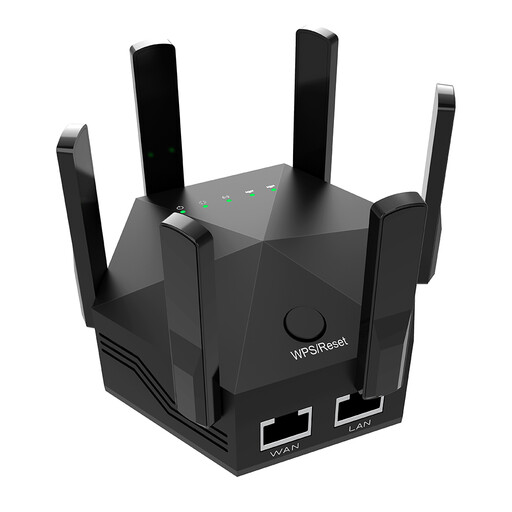
Dual-band Wi-Fi signal booster, 1200 Mbit/s, six adjustable antennas, EU plug
For extending your wireless network indoors. Before setting it up, check that the location can reach both the router and the listening room.
Dual-band, advertised data rate of 1200 Mbit/s and six adjustable antennas.
View on Joybuy
 No image available
Ubiquiti U7 Mesh, 5000 Mbit/s, Power over Ethernet
If you can run an Ethernet uplink to the installation point, consider this access point as a wired option for your listening area.
The product name specifies 5000 Mbit/s and Power over Ethernet. According to the product description, it can be powered via PoE or PoE+ using a compatible injector or network switch.
View on Joybuy
 No image available
TP-Link RE190 AC750 Wireless Repeater, 433 Mbit/s, White
For extending your wireless range. You’ll need to find a suitable spot that can reach both the router and the listening room.
The product name specifies AC750 and 433 Mbit/s.
View on Joybuy
 No image available
MERCUSYS ME80X Wi-Fi 6 Range Extender, AX3000 Dual Band
The product name specifies repeater and access point modes. Check which option suits your network and the location.
AX3000 dual-band: 574 Mbit/s at 2.4 GHz and 2402 Mbit/s at 5 GHz; Gigabit port, app control and signal strength indicator.
View on Joybuy
Frequently asked questions
Where should I put a wireless repeater?
Choose a spot where the repeater can connect to both the router and the listening room. With compatible FRITZ! devices, the FRITZ!App WLAN can assess the connection to the router. Then check playback directly in the listening room.
Why does my music keep cutting out when the signal looks stronger?
If you have a local music library, the source may be offline or asleep. Wireless interference or a weak connection to the speaker could also be the cause. Check the source and network connection separately, as Sonos recommends when troubleshooting music that stutters or skips.
What sharing protocol does a music library on a Sonos NAS need?
The NAS must use SMBv2 or SMBv3 for the share described in Sonos’ NAS guide. Sonos specifies different requirements for older S1 systems, so check which system version you have.
Is a Wi-Fi repeater always the right way to extend Sonos?
No. Sonos lists networks with range extenders as unsuitable for its Wi-Fi setup and recommends a wired setup as an alternative if your Wi-Fi is unreliable or insufficient. Check the requirements for your specific Sonos product.


