What should you consider when buying?
For audiobook downloads in a three-storey house, the key question is whether there’s a usable connection where you need it and where you’d place a wireless repeater. Ethernet availability and router compatibility also affect your choice.
Single wireless repeater
Suitable if: You mainly want to improve coverage in one audiobook-listening spot that currently has a weak signal, and there’s a suitable midway location with router reception.
Bear in mind: The repeater relies on the wireless connection available at its own location.
LAN bridge or access point
Suitable if: There’s a working network connection on the affected floor, or the wireless signal through the ceiling is weak.
Bear in mind: You’ll need an accessible network socket or a suitable cable route, as well as a compatible operating mode.
Multiple mesh access points
Suitable if: Several separate areas need Wi-Fi and your specific device combination supports the mesh feature you want.
Bear in mind: Multiple devices need suitable locations and a connection to one another. A mesh label alone doesn’t guarantee compatibility with every router.
| Concern |
What to check before buying |
Who is this important to? |
| Signal at the download location |
Check the signal where you plan to place the repeater and at the spot where you’ll actually listen. |
If I want to download an audiobook in a particular spot, I need a usable connection there. Around 40% of consumers prioritise signal at the download location. |
| Wireless signal between floors |
Check whether a network socket is accessible and whether the model supports access point or LAN bridge mode. |
If Ethernet is available on the floor I want to cover, I’d like to bypass the weak wireless link. Around 30% of consumers prioritise a wired connection there. |
| Router and mesh compatibility |
Check that your router model, repeater model and required mesh feature are compatible. |
If several devices need to work together, compatibility with my router matters to me. Around 20% of consumers put this first. |
| Number of devices and running costs |
Check how many access points you need and whether any cabling is required. Also consider the power consumption of the specific model. |
If only a few areas need coverage, I don’t want to plan for more devices or installation work than necessary. Around 10% of consumers prioritise keeping the overall effort to a minimum. |
Joybuy products on this topic
This selection includes wireless repeaters and mesh systems for extending Wi-Fi coverage, including devices with stated access point or router modes.
 No image available
TP-Link Deco BE22, 2-pack
An option for covering several areas with Wi-Fi if a system with two units suits your needs.
Product details list Wi-Fi 7, dual-band and Gigabit WAN/LAN ports.
Router and access point modes are listed; check which one suits your existing network.
View at Joybuy
 No image available
Wi-Fi repeater, 1200 Mbit/s, 5 GHz
A possible option for a single dead spot if the router signal is still available where you place the repeater.
The product name lists 1200 Mbit/s and 5 GHz; these figures don’t guarantee download speeds where you listen.
The product description lists two RJ45 Ethernet ports, as well as repeater, access point and router modes.
View at Joybuy
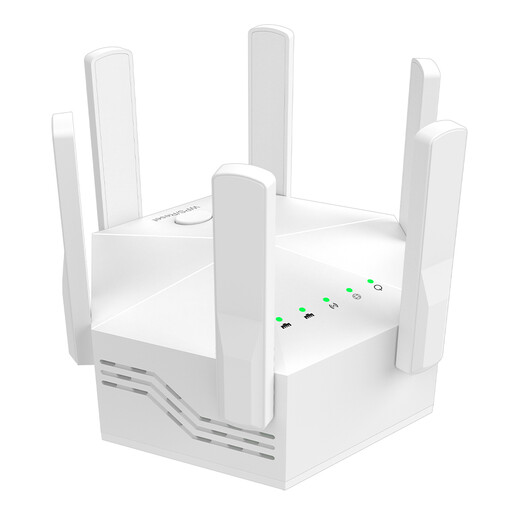 No image available
Dual-band Wi-Fi repeater, 1200 Mbit/s, six antennas
A possible wireless repeater option for indoor use, provided there’s still a usable connection to the router where you place it.
Product details list dual-band, 1200 Mbit/s, six adjustable external antennas and an EU plug.
View at Joybuy
 No image available
TP-Link Deco M4 AC1200, 3-pack
An option for covering several areas if you’re considering a mesh system with three units.
Product details list AC1200, Gigabit ports and an access point mode.
Check compatibility and the recommended operating mode for your existing network.
View at Joybuy
 No image available
TP-Link RE235BE BE3600 Dual-Band Wi-Fi 7 Range Extender
A possible option for extending Wi-Fi if your router supports the EasyMesh feature you need.
Product details list a 2.5 Gigabit Ethernet port and EasyMesh compatibility.
WPS and app setup are listed; check compatibility with your specific router model.
View at Joybuy
Frequently asked questions
Where should I place a wireless repeater to cover another floor?
Place it somewhere it can still get a usable connection to the router, rather than in the dead spot itself. Then check the signal where you want to download your audiobook.
Can I connect a repeater to a network socket on the floor I want to cover?
Yes, if the socket connects to the router and the specific model supports a suitable access point or LAN bridge mode. This type of setup is documented, for example, for the FRITZ!Repeater 1200 AX and the devolo WiFi 6 Repeater 3000.
Does a repeater need the highest Wi-Fi data rate for audiobook downloads?
No. The stated data rate alone doesn’t tell you what download speed you’ll get where you listen. First, you need a usable connection where you want to download; with a wireless repeater, the signal also needs to be usable where you place it.
How can I check whether a mesh repeater will work with my router?
Check the exact router and repeater models against the documented mesh feature. TP-Link lists EasyMesh for the RE705X when used with an EasyMesh-compatible router; general Wi-Fi compatibility isn’t enough to confirm this.
What ongoing factors should I consider when choosing?
Check how many devices you actually need and whether any cabling is required. Compare the power consumption of the specific model, too. A stated Wi-Fi data rate alone doesn’t tell you how much effort the setup will involve for your household.


