A wireless repeater may be a good option if it can still connect reliably to your router from a midway point. Deutsche Telekom recommends moving the repeater closer to the router or mesh base if the connection is weak. If there’s no suitable spot for a wireless connection, a LAN-connected access point or a repeater in access point mode is a better choice – TP-Link describes this mode for connecting to a router via Ethernet. Also check your internet upload speed separately, as better Wi-Fi coverage won’t overcome a limit imposed by your broadband connection.
Who this comparison is for
Uploading design files without a network cable
If you want to upload files from your home office and can place a repeater between the router and the room, check whether it will still receive a good signal from the router at the planned location. Deutsche Telekom recommends moving a Speed Home device closer to the mesh base if the connection is weak.
Home office with LAN access
If you can run a network cable close to your workspace, you can use it to bypass the wireless connection to the router. TP-Link describes access point mode for connecting a repeater to a router via Ethernet.
Not sure why your upload is slow?
If you don’t yet know whether Wi-Fi or your internet connection is limiting file uploads, test each separately. The Bundesnetzagentur offers a broadband measurement tool that lets you compare your connection’s actual data rate.
What to look for when buying
When uploading through thick internal walls, the key factors are the connection back to the router, whether a LAN connection is possible and your actual upload speed.
| Consideration |
What to check before buying |
Who this matters most to |
| Wireless backhaul |
Check the connection indicator at the planned midway point and test the upload from your workspace. |
If I want to extend my network wirelessly, I need a spot with good reception from the router. Around 36% of consumers put a stable wireless backhaul first. |
| LAN connection |
Check whether an Ethernet cable will reach the location and whether the specific model supports LAN bridge or access point mode. |
If the walls weaken the wireless connection to the repeater too much, I want to connect the remote Wi-Fi point by cable. Around 29% of consumers prioritise a wired connection. |
| Internet upload speed |
Measure your broadband connection’s upstream data rate and compare it with a measurement from the affected workspace. |
If I don’t know whether Wi-Fi or my connection is slowing things down, I want to identify the cause before buying a device. Around 21% of consumers put their connection’s actual upload speed first. |
| Router compatibility |
Check the router model, mesh compatibility, operating mode and any setup requirements. |
If I want to keep using my existing router or mesh system, I need a compatible combination of devices. Around 14% of consumers prioritise integration with their existing router. |
Common misconceptions
-
Putting the repeater directly in a dead spot
A wireless repeater needs a usable connection to the router itself. If the connection is weak, Deutsche Telekom recommends moving it closer to the mesh base.
Check reception from the router at the planned location before setting up the device permanently. If there’s no suitable midway point, consider a LAN connection.
Poor placement can waste time on unsuccessful setup or lead to buying another device.
-
Assuming maximum Wi-Fi speeds equal upload speeds
Advertised Wi-Fi data rates don’t automatically reflect how quickly you can upload files through walls. Your internet connection can also limit speeds; the Bundesnetzagentur provides a broadband measurement tool to check this.
Check your connection’s upstream speed and the Wi-Fi connection at your workspace separately before blaming the repeater.
-
Confusing an Ethernet port with a LAN bridge
Having a port doesn’t necessarily mean the connection back to the router will run over a cable. TP-Link and devolo each describe a suitable access point or operating mode for this.
Check the manual for the specific model to see whether it supports the LAN bridge or access point mode you need, and whether a cable can reach its location.
You may need a network cable for a wired connection; depending on the route through your home, additional cable installation may be required.
-
Assuming mesh compatibility without checking
TP-Link says that an EasyMesh-compatible router is required to add the RE705X to an EasyMesh network. Telekom lists its own setup requirements for certain generations of Speedport devices.
Check your router model and preferred operating mode against the manufacturer’s information for the specific device.
Key brands at a glance
FRITZ!
The FRITZ!Repeater 1200 AX, 3000 AX and 6000 are worth considering if you’re looking for a compact dual-band option or a tri-band model for a FRITZ! mesh network.
- According to FRITZ!, the 1200 AX has one Gigabit LAN port, the 3000 AX has two Gigabit LAN ports, and the 6000 has one 2.5-Gigabit and one Gigabit LAN port.
- Rated speeds and ports don’t tell you what upload performance you’ll get through the walls of your home.
TP-Link
According to TP-Link, the RE705X offers both repeater and access point modes, so it may suit a range of existing router setups.
- TP-Link lists a Gigabit port and EasyMesh support.
- An EasyMesh-compatible router is required for the EasyMesh setup described. Manufacturer maximum speeds aren’t measured upload rates through walls.
Telekom
Speed Home WLAN is an option for extending a compatible Speedport home network.
- Telekom lists Wi-Fi 6 and Ethernet.
- For use with a Speedport 7 or later, Telekom lists requirements including a Telekom landline connection, the MeinMagenta app and a Telekom login. These details don’t apply universally to other router combinations.
devolo
According to devolo, the WiFi 6 Repeater 5400 is a desktop device with repeater and access point modes.
- The operating modes are described in the manual.
- The data rate of up to 5400 Mbit/s quoted by devolo isn’t a guarantee of file upload speeds. COMPUTER BILD criticised the tested model’s performance on the 2.4-GHz band.
NETGEAR
The EAX15 is a plug-in Wi-Fi 6 option for extending an existing wireless network.
- NETGEAR lists a Gigabit Ethernet port and a rated Wi-Fi speed of up to 1.8 Gbit/s.
- Check whether the access point mode you need is supported for your intended setup; the rated speed doesn’t tell you what upload performance you’ll get in your home.
Products for repeaters and LAN connections
These Joybuy products include Wi-Fi repeaters for suitable midway locations and access points for a possible wired connection.
 No image available
Ubiquiti UniFi U7 Pro XG WiFi 7 Access Point, Tri-Band, 10GbE, PoE+, White
For a Wi-Fi access point with a wired backhaul, if you can run a network cable to your workspace.
Wi-Fi 7; 10-GbE uplink; PoE+ required. A compatible PoE+ switch or injector is not included. UniFi Network version 9.0.114 or later required.
View at Joybuy
 No image available
Ubiquiti UniFi U7 Pro XGS WiFi 7 Access Point, Tri-Band, 8 Streams, 10 GbE, PoE++, White
For a Wi-Fi access point with a wired backhaul, provided you can run a network cable to the remote area.
Wi-Fi 7; 8 spatial streams; 10-GbE uplink; PoE++ required. A PoE++ switch or injector and a power supply are not included. UniFi Network version 9.0.114 or later required.
View at Joybuy
 No image available
1200 MBit/s 5GHz Wi-Fi Repeater
For a midway location with reception from the router; the product description also lists an access point mode for a possible wired connection.
The RJ45 ports listed in the product description are rated at 10/100 Mbps.
View at Joybuy
 No image available
Compact Wi-Fi booster for extending a wireless network
For extending Wi-Fi in a location where the existing router is still within reach.
The product description lists a compact design and plug-and-play setup.
View at Joybuy
 No image available
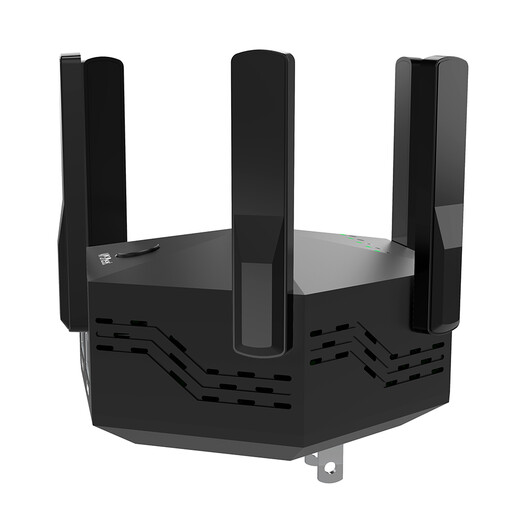
Dual-Band Signal Booster, 1200 Mbps, 6 Adjustable Antennas, EU Plug
The product description lists repeater mode for a suitable midway location and access point mode for a possible wired connection.
Dual-band; six adjustable external antennas; setup via WPS according to the product description; EU plug.
View at Joybuy
Frequently asked questions
Where should you place a wireless repeater when you have thick internal walls?
Place it somewhere it can still connect reliably to the router and reach your workspace. If the connection is weak, Deutsche Telekom recommends moving Speed Home WLAN closer to the router or mesh base; placing it directly in a dead spot won’t help.
Can I simply connect a repeater using a LAN cable?
This only works if the specific device supports the LAN bridge or access point mode you need. TP-Link describes access point mode for the RE705X when the device is connected to the router via Ethernet.
Why isn’t my upload faster even though my Wi-Fi is better?
Check the connection at your workspace and your internet connection’s upstream speed separately. The Bundesnetzagentur’s broadband measurement tool measures your connection’s actual data rate; a repeater can’t overcome a limit imposed by your connection.
What should I check to make sure a Wi-Fi repeater complies with requirements in Germany?
Wi-Fi repeaters supplied in Germany as radio equipment must meet the relevant EU conformity requirements. The Bundesnetzagentur lists CE marking and the required accompanying documentation; check the details for the specific device version on offer. The CE mark isn’t an independent performance test.


