For a single Wi-Fi dead spot, a repeater that’s compatible with your router can be a good choice if you can place it somewhere with a strong connection to the router. If the Wi-Fi signal is still too weak there, a device with a documented Access Point or LAN mode is an alternative when you have a network cable available. If the bottleneck is your internet upload speed, a repeater won’t fix it. Check your connection and upload speed while sharing videos and on a call at the same time.
Who might benefit from a Wi-Fi repeater?
Families with a Wi-Fi dead spot
If you want to share family videos from a particular room, the repeater needs to reach your devices there while still getting a usable signal from the router. FRITZ! and devolo both highlight the connection to the router and the repeater’s placement as important factors.
Households with several devices using Wi-Fi at once
If other devices are online during a video call, the advertised wireless data rate isn’t the only thing that matters. The router connection and your internet service also need to cope with several devices being used at once.
Households with a network cable in the room that needs coverage
If a network cable reaches the area with poor coverage, a device with a documented Access Point or LAN mode can connect to the router by cable. TP-Link and devolo document these modes for the models mentioned.
What should you look for when buying?
Wireless dual-band repeater
A good fit if: There’s a suitable spot between the router and the room you use, with a strong connection to the router.
Things to consider: The extra wireless link still depends on the signal where you place the repeater. FRITZ! lists dual-band Wi-Fi and Gigabit LAN for the 1200 AX.
Tri-band repeater
A good fit if: Several devices are connected at once and there’s a suitable place for the repeater. FRITZ! lists three wireless units for the 3000 AX.
Things to consider: Extra wireless units can’t replace a good connection to the router or sufficient internet upload speed.
Access Point or LAN bridge
A good fit if: A network cable reaches the area you use, or there’s no suitable spot for a wireless repeater.
Things to consider: The cable needs to be in place or possible to install. An Ethernet port alone doesn’t confirm that a particular operating mode is available.
Mesh with a compatible router
A good fit if: You have a compatible FRITZ! or Speedport home network and want to use its mesh features.
Things to consider: Your router and setup are key. Telekom says that without a mesh router, Speed Home WLAN needs a mesh base unit that stays connected by LAN.
| What you need |
What to check before buying |
Who is this important to? |
| Connection in the room you use |
Check possible locations and the connection to the router. Once set up, test the repeater in the place you plan to use it. |
If I want to share family videos in a room with poor coverage, I need a stable connection there. Around 40% of consumers prioritise coverage in the room they use. |
| Uploading videos during a call |
Test the upload speed and call at the same time in the area where you plan to use the repeater. Don’t confuse Wi-Fi link rates with internet upload speed. |
If I’m sharing videos while on a video call, the actual connection matters more to me than a single peak wireless speed. Around 31% of consumers prioritise this kind of simultaneous use. |
| Existing network cable |
Check whether the specific device supports Access Point or LAN bridge mode and can be connected in the area you need. |
If a network cable reaches the room, I’d like to use it for the connection. An existing cable is the top priority for around 15% of consumers. |
| Router compatibility |
Check your exact router model and the mesh or repeater mode you plan to use. |
If I want to keep using my existing router system, compatible integration matters to me. Around 14% of consumers prioritise compatibility. |
Common buying misconceptions
-
Assuming advertised Wi-Fi data rates guarantee video-call speeds
Manufacturers’ wireless data-rate figures and the requirements of a video call are based on different things. A high advertised rate doesn’t guarantee the internet upload speed you need to share videos and make a call at the same time.
Check your Wi-Fi connection and internet upload speed while using both services at once.
-
Putting the repeater in the middle of a dead spot
A wireless repeater still needs a usable connection back to the router. If there’s no signal from the router where you place it, it won’t reliably extend the Wi-Fi.
Choose a spot where the repeater can still get a good signal from the router. If that isn’t possible, check whether you have a network cable and whether the device has a documented Access Point mode.
-
Assuming ‘mesh’ means it’s compatible with every router
Mesh features depend on the router system and the relevant compatibility requirements. A device may work as a repeater without supporting all the mesh features of your existing router.
Check your exact router model against the mesh or repeater mode described by the manufacturer.
Brands to consider
FRITZ!
The FRITZ!Repeater 1200 AX is a compact dual-band option, while the 3000 AX is a tri-band model. FRITZ! mesh is relevant if you have a compatible FRITZ!Box home network.
- FRITZ! lists one Gigabit LAN port for the 1200 AX and two for the 3000 AX.
- The wireless units and LAN ports don’t guarantee a particular call quality or mesh compatibility with any router.
TP-Link
According to TP-Link, the RE705X can be used as a repeater or an Access Point.
- TP-Link lists a Gigabit Ethernet port and an Access Point mode.
- TP-Link says EasyMesh requires an EasyMesh-compatible router. Advertised wireless rates aren’t measurements taken in your home.
devolo
The WiFi 6 Repeater 5400 is a desktop option with repeater and Access Point modes.
- The devolo data sheet lists two RJ45 ports and an Ethernet Access Point mode.
- An advertised combined data rate isn’t a guaranteed speed for a single video transfer.
Telekom
Speed Home WLAN is relevant for Speedport configurations that Telekom explicitly describes as compatible.
- Telekom lists Wi-Fi 6, with Ethernet and Wi-Fi as network options.
- Without a mesh router, Telekom describes a setup where the first Speed Home WLAN unit stays connected by LAN as the mesh base.
Joybuy products for extending your Wi-Fi
The Joybuy products below include Wi-Fi repeaters, devices with Access Point mode and a mesh extender. Before choosing, check that the router, connection type and operating mode you need are compatible.
 No image available
Dual-band Wi-Fi repeater, 1,200 MBit/s, 5 GHz
A potential option if you have a network cable and want to use Access Point mode.
Dual-band; repeater, Access Point and router modes; two RJ45 ports at 10/100 Mbit/s.
View at Joybuy
 No image available
Compact Wi-Fi repeater
Designed to extend an existing Wi-Fi network indoors. The coverage you get depends on where you place it.
The product description highlights its compact design and plug-and-play setup.
View at Joybuy
 No image available
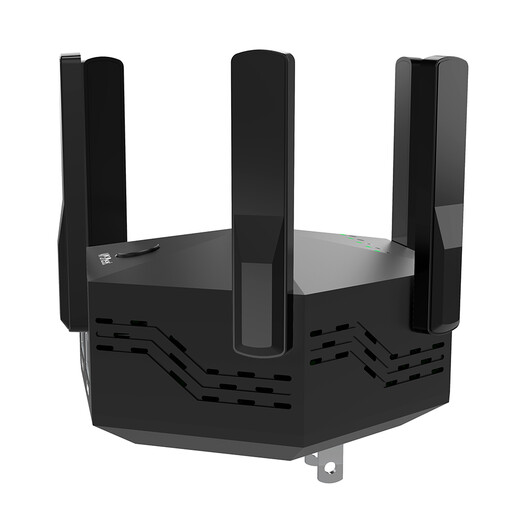
Dual-band Wi-Fi repeater with 6 adjustable antennas
An option for extending your Wi-Fi wirelessly indoors. Check the connection at the planned location before you set it up.
Dual-band; 1,200 Mbit/s according to the product name; six adjustable antennas; WPS setup.
View at Joybuy
 No image available
TP-Link Deco X10 mesh Wi-Fi set (1 Pack)
For households with an existing Deco mesh network that they want to expand with an additional unit.
Wi-Fi 6 AX1500, dual-band and two Gigabit ports. The setup instructions explain how to add it to an existing Deco mesh network.
View at Joybuy
 No image available
MERCUSYS ME80X Wi-Fi 6 Range Extender
An option for extending Wi-Fi or using Access Point mode, as long as you can connect it to the router as required.
Dual-band AX3000: 574 Mbit/s at 2.4 GHz and 2,402 Mbit/s at 5 GHz according to the product specifications; Gigabit port, signal strength indicator and Access Point mode. For Access Point mode, the instructions say to connect the Ethernet port to the router.
View at Joybuy
Frequently asked questions
Can a repeater fix a slow internet upload speed?
No. A repeater extends your Wi-Fi connection, not the upload capacity of your internet service. Try sharing videos and making a video call at the same time. The bandwidth figures given by Zoom depend on the type of call and your settings.
Where should I place the repeater?
Choose a spot where the repeater can still get a strong signal from the router while also covering the area you use. Check the connection indicator and try different locations rather than placing the device straight in a dead spot without testing it.
Is an LAN port enough to use a device as an Access Point?
No, a port alone doesn’t confirm that the device supports this mode. Check the instructions for the specific device. Access Point mode is documented for the TP-Link RE705X and the devolo WiFi 6 Repeater 5400.
What else should I consider before buying?
Check whether you might need to install a network cable, and read the warranty terms for the specific model. FRITZ! lists a five-year manufacturer’s warranty for each of the 1200 AX and 3000 AX offers reviewed. The terms for the product actually on offer apply.


