A Wi-Fi repeater can help with a large game update, but only if it still has a good connection to your router where you plan to put it. If thick walls weaken this wireless link, a wired access point connected via Ethernet is a more targeted alternative. Powerline is another option, although performance depends on your sockets and electrical interference. For a PC or console, you’ll also want to check the actual speed at the device and whether it’s compatible with your router.
Who should consider these options?
Gamers with thick walls between them and the router
If your gaming device has a weak signal, first check whether the repeater would still get a good connection to the router at its intended location. FRITZ! points out that both wireless links matter: the one to the router and the one to the connected device.
Gamers downloading large files
If your main aim is to download large updates to a PC or console faster, check the speed at the gaming device itself. Telekom recommends measuring both at the device and at the router’s internet connection. Advertised wireless speeds don’t tell you how fast a particular download will be.
Households with an existing mesh system
If you want to add another access point to an existing system, check that it’s compatible with your specific router and repeater. Mesh features depend on the system in use and the way it’s set up.
What should you look for when buying?
First, check the signal at the spot where you could place the repeater. Then decide whether a wireless connection, a direct Ethernet connection or Powerline best suits your home.
| What matters |
What to check |
Who is this especially important to? |
| Router signal at the intended location |
Check the connection quality at possible socket locations. Once the repeater is set up, test the download speed at your gaming device again. |
If I have to put the repeater behind a thick wall, I want to know first whether it can still reach the router reliably. For around 36% of consumers, a usable router signal where the repeater is placed is the top priority. |
| Download speed at the gaming device |
Measure the speed at your PC or console separately from the router’s internet connection. Don’t mistake wireless speeds for a promise of download performance. |
When there’s a large update to download, I care about the speed that actually reaches my PC or console. Around 29% of consumers put usable download speeds first. |
| Cable route and connections |
Check whether you can run a cable from the router to the access point, and whether the model supports the right LAN bridge or access point mode. |
If I can run a cable to the gaming room, I want to use it to avoid a poor wireless connection. For around 21% of consumers, having a suitable cable route is the main buying priority. |
| Compatibility with your router system |
Check your router model, hardware version and the specific mesh combinations it supports. |
If you want to keep using your existing mesh system, make sure the specific devices are compatible. Around 14% of consumers prioritise easy integration with their router system. |
Common misconceptions
-
Putting the repeater straight in a dead spot
A strong signal between the repeater and your gaming device isn’t enough if the repeater itself can only get a weak signal from the router.
Check potential locations for a usable connection to the router. If there aren’t any, consider a LAN bridge or test another way of transmitting the signal in your home.
-
Assuming advertised combined Wi-Fi speeds guarantee download speeds
The stated wireless speed isn’t the same as the measured speed at your gaming device or the speed of your internet connection.
Measure the connection at your PC or console, and check your internet connection separately.
-
Assuming “mesh-capable” means it works with every router
Mesh features may require a compatible router, a specific system or a particular hardware version.
Check the specific router and repeater combination that’s supported rather than relying on the word “mesh” alone.
-
Assuming Powerline will work reliably from any socket
devolo says that certain sockets and sources of electrical interference can affect Powerline performance.
Test the sockets you plan to use with your actual setup.
Key brands at a glance
FRITZ!
The FRITZ!Repeater range includes compact models such as the 1200 AX and 1700, as well as models like the 3000 AX and 6000, which have additional wireless units.
- According to the manufacturer, the 1200 AX has one Gigabit LAN port, the 3000 AX has two Gigabit LAN ports, and the 6000 has one 2.5 Gigabit and one Gigabit LAN port.
- FRITZ! mesh features require the right system setup. The connections and advertised wireless speeds alone don’t tell you how fast a download will be through a particular wall.
TP-Link
According to TP-Link Germany, the RE705X is a dual-band Wi-Fi 6 repeater with an Ethernet connection and access point mode, designed to improve coverage in one poorly served area.
- Its Ethernet connection enables access point mode. It’s designed to extend the range of Wi-Fi routers from various manufacturers.
- EasyMesh requires a compatible router. Check the hardware version and specific mesh feature too, rather than assuming different mesh names mean the same thing.
devolo
devolo offers the WiFi 6 Repeater 5400, with Ethernet connections and access point mode, as well as Powerline as an alternative way to transmit data.
- The WiFi 6 Repeater 5400 datasheet lists two Gigabit Ethernet connections and an access point mode.
- devolo notes that certain sockets and sources of electrical interference can affect Powerline performance.
Telekom
Speed Home WLAN is an option for extending coverage with compatible Speedport routers.
- Telekom lists Wi-Fi 6 and an Ethernet connection for Speed Home WLAN.
- Check the compatibility list for your specific Speedport router. Advertised transfer speeds aren’t a measure of how fast a game update will download.
Joybuy products for Wi-Fi in your gaming room
This selection includes wireless repeaters, a wired access point and a Powerline kit for connecting to your gaming device. If you’re buying in Germany, check the conformity information for the specific model and listing.
 No image available
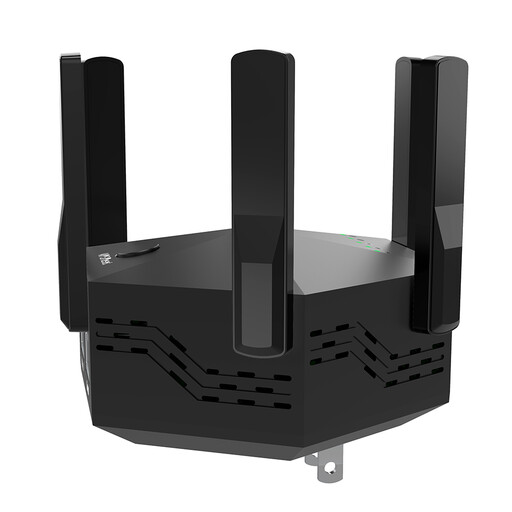
Dual-band Wi-Fi repeater, 1200 Mbit/s, with 6 antennas
Could be worth considering to extend your wireless coverage in an area with a weak Wi-Fi signal, provided there’s still a usable connection to the router at the repeater’s location.
The product name lists 6 adjustable antennas. According to the product description, the device has two 10/100 Mbit/s LAN ports.
Joybuy
 No image available
Ubiquiti U7 Mesh Access Point
Could be a good fit if you can run an Ethernet cable to the desired access point location and have a suitable PoE power supply.
The product description lists Wi-Fi 7, a 2.5 Gigabit Ethernet uplink and PoE. A suitable PoE or PoE+ power supply is required.
Joybuy
 No image available
TP-Link RE190 AC750 Wi-Fi repeater
Could help you find a suitable spot for a wireless repeater. The key is to keep it within range of a usable signal from your router.
The product description lists dual-band Wi-Fi, WPS setup and a signal strength indicator to help you choose where to place it.
Joybuy
 No image available
MERCUSYS ME80X AX3000 dual-band Wi-Fi 6 repeater
Could be suitable for extending your wireless coverage or, if you have an Ethernet cable, for use in access point mode. When used wirelessly, it still needs a usable connection to the router at its location.
The product name lists 574 Mbit/s at 2.4 GHz and 2402 Mbit/s at 5 GHz. The product description lists one Gigabit LAN port, access point mode and a signal strength indicator.
Joybuy
 No image available
MERCUSYS MP300 KIT AV600 Powerline kit
Could be an alternative if you want to avoid a wireless link through walls and the sockets you plan to use are suitable for data transmission.
The product description lists HomePlug AV2 and one Gigabit Ethernet port. Actual performance can vary depending on your home’s electrical wiring and the sockets used.
Joybuy
Frequently asked questions
Where should you put a wireless repeater?
Choose a spot where the repeater can still get a good signal from the router and reach your gaming room. Check the connection quality in potential locations rather than putting the device straight in a dead spot.
Will connecting my console to the repeater with an Ethernet cable automatically make downloads faster?
No. It only replaces the wireless link between the console and the repeater. If the repeater itself has a poor connection to the router, that bottleneck will remain. A cable from the router to the access point avoids it.
What should I check after setup and if I have problems?
Compare the speed at your gaming device with the router’s internet connection, and check where the repeater is placed. Also see whether firmware updates are available for your specific device.
What ongoing requirements should I check before buying?
A repeater needs power, and warranty and update terms can vary by model and supplier. Check the details for the specific device you’re considering rather than assuming the same terms apply across an entire brand.
What conformity information should I check when buying a Wi-Fi repeater for Germany?
Check the labelling and conformity documents for the specific model and listing. The German Federal Network Agency states that products covered by the relevant harmonisation legislation must carry a CE mark. A general statement doesn’t replace checking the individual device.


