A single Wi-Fi repeater can eliminate a dead spot on the floor where you game, provided it’s placed somewhere with a good connection to the router. If the connection between floors is already weak, an Ethernet bridge or several well-positioned mesh nodes may be a better option. Update times also depend on your broadband connection and the link to your gaming device—not the combined headline speeds of your Wi-Fi equipment.
Who are these options for?
Gamers with a dead spot on another floor
If you want to download updates where you usually play, you’ll need to place the repeater somewhere it can still receive a good signal from the router. Where you put it and how well it connects to the router matter more than its advertised range alone.
Homes with weak Wi-Fi on several floors
If you need to cover several areas that are far apart, consider adding mesh nodes or using an Ethernet cable to connect them. With a wireless connection, each node needs to receive a usable signal from the previous one.
Gamers with a console or PC that supports Ethernet
If your gaming device stays in one place, an Ethernet port on the repeater can provide a wired connection for the final link. Also check whether the repeater can connect to the router by cable, or whether it will still rely on Wi-Fi.
What should you look for when buying?
Single Wi-Fi repeater
Best when: you can find a spot between the router and your gaming floor with good reception.
Trade-off: An Ethernet port on the repeater lets you wire up your gaming device, but it won’t fix a weak wireless uplink to the router.
Multiple mesh nodes
Best when: you need to cover several areas and each planned node location has a usable connection to the previous node.
Trade-off: Floors can weaken wireless signals, and every additional node needs a suitable location and a power supply.
Ethernet bridge or Ethernet backhaul
Best when: you can run an Ethernet cable to the gaming floor and need a stable connection there.
Trade-off: You’ll need a suitable cable route, and should check whether an Ethernet port is needed for the uplink. TP-Link lists Ethernet backhaul as an optional connection between Deco X50 mesh units.
Powerline with Wi-Fi
Best when: there’s no suitable location for a wireless connection and you can’t run an Ethernet cable, but you can test the connection using the sockets you plan to use.
Trade-off: According to devolo, electrical appliances and unsuitable sockets can affect the connection. Manufacturer specifications are no substitute for testing it in your home.
| Buying priority |
What to check |
Particularly relevant to |
| Reception and placement |
Check the signal at the planned repeater location, then test the download where you play. |
If there’s a dead spot on the gaming floor, I need to find a place where the repeater can still receive a good signal from the router. Around 36% of consumers put reception and placement first. |
| Usable download speed |
Test your broadband connection separately from Wi-Fi, then check the connection on your gaming device. |
When downloading large updates, I want to know what speed actually reaches my console or PC, rather than relying on combined Wi-Fi speeds. Around 29% of consumers prioritise usable download speeds. |
| Ethernet connection to your gaming device |
Check the number and speed of the Ethernet ports, and whether one is needed for the uplink. |
If my console or PC stays in one place, a cable to the repeater can cover the final part of the connection. Around 21% of consumers pay particular attention to an Ethernet connection for their gaming device. |
| Router and mesh compatibility |
Check your router model against the compatibility list for the repeater and the mesh features you want. |
If I want to keep using my existing router system, I need to make sure the specific combination is supported. Around 14% of consumers prioritise integration with their router and mesh system. |
Common buying mistakes
-
Plugging the repeater in only once you reach the dead spot
A weak uplink won’t be fixed by a high advertised Wi-Fi speed when you’re further away, near your gaming device.
First, find an intermediate spot with a good connection to the router. If there isn’t a suitable location, consider an Ethernet bridge or test another connection option at home.
-
Confusing a wired console connection with a wired uplink to the router
A console connected by cable may still be linked to the router through the repeater’s wireless uplink.
Plan the connection to your gaming device separately from the connection to the router. Check the operating mode and how many Ethernet ports you’ll need.
-
Assuming a product is compatible with your mesh system just because it says “Mesh”
The TP-Link RE700X’s EasyMesh features require a compatible router, while FRITZ!-specific mesh features require a FRITZ!Box.
Check your exact router model against the compatibility information for the repeater you’re considering.
Key brands to consider
FRITZ!
The FRITZ!Repeater 1700 is designed for compact dual-band use, while the FRITZ!Repeater 3000 AX has three radio units and two Ethernet ports to suit different connection and wireless needs. Both are particularly worth considering if you already have a FRITZ!Box.
- According to AVM’s data sheet, when used with a FRITZ!Box, the 1700 adopts the Wi-Fi settings in the mesh. FRITZ! says the 3000 AX has two Ethernet ports.
- The 1700’s two Wi-Fi bands are not the same as the 3000 AX’s three radio units. Manufacturer Wi-Fi speed specifications are not a measure of download speeds across multiple floors.
TP-Link
The RE700X is a standalone repeater with EasyMesh and access point options; Deco X50 is a separate mesh system with optional Ethernet backhaul.
- TP-Link lists a Gigabit port on the RE700X and EasyMesh support when paired with a compatible router. According to the manufacturer, Deco X50 units can also be connected by Ethernet.
- The advertised coverage area of Deco X50 doesn’t guarantee a particular level of coverage through floors or in any specific home layout.
Telekom
Speed Home WLAN is designed to extend mesh coverage with specifically compatible Speedport routers.
- Telekom lists Wi-Fi 6, Ethernet and a compatibility overview for Speed Home WLAN.
- Telekom’s user guide lists additional requirements for setting it up with a Speedport. These don’t apply automatically to other routers or buyers.
devolo
The WiFi 6 Repeater 5400 has an access point mode, while Powerline products use a different transmission method to reach floors that are difficult to cover.
- devolo’s data sheet lists two Gigabit LAN connections for the WiFi 6 Repeater 5400.
- According to the data sheet, the repeater’s guest Wi-Fi is only available in access point mode. devolo also warns that electrical appliances and unsuitable sockets can affect Powerline connections.
Joybuy products for Wi-Fi across multiple floors
The Joybuy products below include standalone Wi-Fi repeaters and a mesh kit to extend your home network. For a wireless uplink, you’ll need a suitable location with a good signal from the router. With a mesh kit, make sure the additional node is also placed where it can maintain a good connection.
 No image available
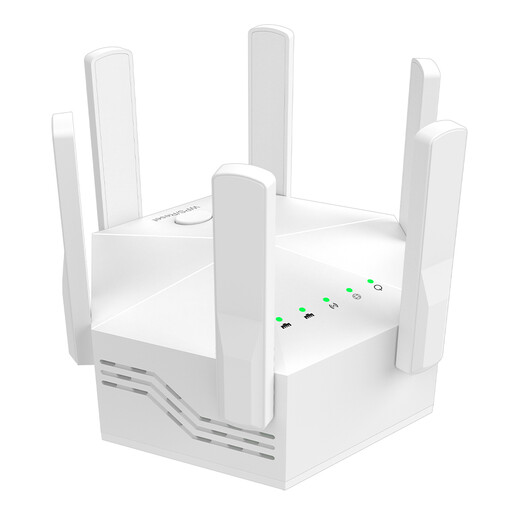
Dual-band Wi-Fi repeater 1200 Mbps, 6 antennas
For extending an existing Wi-Fi network, provided your router supports dual-band; described as suitable for indoor use.
Dual-band; 6 antennas; EU plug; WPS setup according to the description.
View at Joybuy
 No image available
TP-Link RE190 AC750 Wi-Fi repeater
For a single Wi-Fi dead spot, provided you can place the repeater within range of your existing router.
Dual-band; signal strength indicator to help you choose a location; WPS setup according to the description.
View at Joybuy
 No image available
MERCUSYS ME80X Wi-Fi 6 AX3000 range extender
For a gaming device in a fixed location, the Gigabit port can provide a wired connection. In access point mode, the Ethernet port must be connected to the router, according to the manual.
Dual-band; Gigabit port; signal strength indicator; access point mode. For repeater mode, a location with a good signal from the router is recommended.
View at Joybuy
 No image available
TP-Link RE235BE BE3600 Wi-Fi 7 repeater
For a gaming device with an Ethernet connection; when using it wirelessly, place the repeater within range of your existing router.
Dual-band; 2.5 Gigabit Ethernet port; EasyMesh compatible. According to the description, EasyMesh requires compatible devices.
View at Joybuy
 No image available
MERCUSYS Halo H25BE mesh Wi-Fi kit (2-pack)
For extending coverage to another area; according to the manual, the second unit should be placed within range of the first.
Wi-Fi 7 BE3600; dual-band; three Gigabit ports per unit according to the description.
View at Joybuy
Frequently asked questions about Wi-Fi repeaters
Where should I place a wireless repeater?
Don’t place it where the router signal is already barely reaching. Check the connection indicator at possible midway locations. If the connection is weak, Telekom recommends moving the device closer to the router or the previous repeater.
Will a repeater speed up a slow broadband connection?
A repeater extends your home network, but it won’t increase your broadband speed. Test your broadband connection separately from Wi-Fi before blaming long update times on your wireless network alone.
When isn’t a single repeater enough?
If the connection to the router is already weak at the possible repeater location, a single wireless repeater may not reliably solve the problem. In that case, consider an Ethernet bridge or several mesh nodes in suitable locations. The only way to assess Powerline is to test it using the sockets you plan to use.
Do I need to register a Wi-Fi repeater for personal use in Germany?
You don’t need to apply for an individual frequency allocation to use the Wi-Fi bands at 2.4 and 5 GHz that are generally allocated by the Bundesnetzagentur; the relevant conditions of use still apply. Radio equipment covered by the applicable EU harmonisation legislation must meet the required product conformity standards.


