What should you look for when buying?
First, separate your broadband upload speed from the Wi-Fi reception at your workspace. Then consider router compatibility and whether you can run a cable to help you choose the right type of device.
| What matters |
What to check before buying |
Who it matters most to |
| Uploading during a video call |
Check your broadband upload speed separately from the Wi-Fi connection, then compare it with the upload speed at your workspace. |
If I need to upload drafts and stay on a call at the same time, I want to know whether my broadband can handle both; around 36% of consumers prioritise uploading and video calling at the same time. |
| Signal at your workspace |
For wireless use, choose a spot with a good enough connection to the router, then check the signal at your workspace. |
If the signal is poor where I work, I need a spot where the repeater can still reach the router; around 29% of consumers prioritise signal at their workspace. |
| Connecting to your router’s mesh network |
Check your router model and the mesh features you want against the specifications of the specific repeater. |
If I want to manage access points together through my router, the mesh feature needs to be genuinely compatible; around 21% of consumers pay particular attention to router integration. |
| Existing Ethernet cable |
Check whether the specific model has an access point or LAN bridge mode that suits the way you plan to use it. |
If there’s already a way to run a cable to my workspace, I want to be able to use it for Wi-Fi access; around 14% of consumers prioritise a LAN connection. |
Wi-Fi products at Joybuy
The Joybuy products below cover Wi-Fi extenders, wired access points and mesh Wi-Fi to improve coverage in your workspace. For each device, check that its operating mode, router and any cable connection suit your needs.
 No image available
1200 MBit/s 5 GHz Wi-Fi repeater
This device could help improve Wi-Fi coverage at a poorly served workspace; if you’re using a cable connection, check the stated AP mode.
Two RJ45 ports with 10/100 Mbit/s; AP mode.
View at Joybuy
 No image available
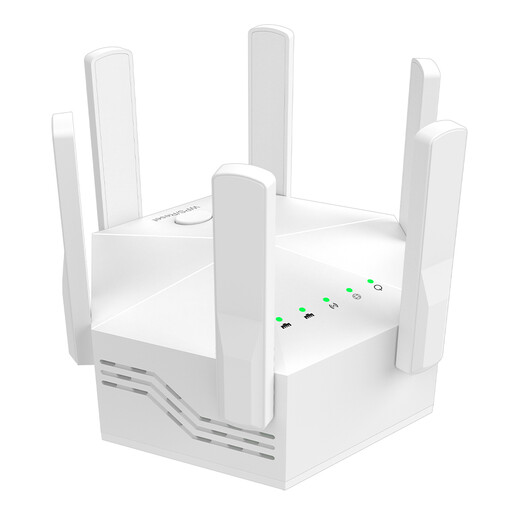
Dual-band Wi-Fi booster, 1200 Mbit/s, 6 antennas
For extending Wi-Fi indoors; check that the connection to the router remains good enough at your chosen location.
Dual-band operation; six adjustable external antennas; WPS setup.
View at Joybuy
 No image available
Compact Wi-Fi booster
An option if you want to extend an existing Wi-Fi network to more rooms; check the connection at your planned location.
Dimensions: 9 × 7.5 × 6 cm; weight: 168 g.
View at Joybuy
 No image available
Ubiquiti U7 Mesh
This wired access point may suit you if an Ethernet cable reaches the location where you want Wi-Fi.
Wi-Fi 7; 2.5 Gigabit Ethernet uplink; designed for PoE power. According to the product description, you’ll need a suitable PoE/PoE+ injector or compatible switch.
View at Joybuy
 No image available
TP-Link Deco M4 AC1200, 3-pack
This mesh system could help improve Wi-Fi coverage across several rooms; check that the setup you have in mind suits your network.
Three units; dual-band Wi-Fi; two Gigabit ports per unit; access point mode. The product information lists additional Deco units for extending the mesh network.
View at Joybuy
Frequently asked questions
How can I tell whether my Wi-Fi or broadband connection is slowing things down?
Compare your upload speed as close to the router as possible, or over LAN, with the upload speed at your workspace. The Bundesnetzagentur offers a broadband speed test that is independent of providers and technology. If your broadband upload speed is already limited, a repeater can’t increase the capacity of your connection.
Where should I put a wireless repeater?
Place it somewhere it can still get a good enough signal from the router, then check the connection at your workspace. According to the manufacturer, the devolo WiFi 6 Repeater 5400 displays the signal strength of its connection to the router.
When is a wired access point a good choice?
An access point may be a good choice if an Ethernet cable reaches the location where you want Wi-Fi and the specific device supports this operating mode. Also check that your cabling suits the connection method you plan to use.
How can I check whether a repeater will work with my existing mesh network?
Check your router model and the mesh feature you want against the details for the specific repeater. TP-Link requires an EasyMesh-compatible router for EasyMesh on the RE705X; Telekom provides a compatibility list of specific Speedport models for Speed Home WLAN.
What should I check for compliance when buying a repeater in Germany?
The Bundesnetzagentur’s assessment criteria include correct CE marking, product identification, manufacturer details, required information in German and a correct declaration of conformity. CE marking alone isn’t an independent measure of Wi-Fi performance.


