A Wi-Fi repeater can help if the Wi-Fi signal is weak in your classroom and there’s still a good connection to the router at a possible midway location. If the wireless link to that point is unreliable, a model with a documented access point or LAN bridge mode is an option, provided you can run an Ethernet cable to it. Also check whether your internet connection, rather than your Wi-Fi, is the bottleneck when several video calls are taking place. Advertised maximum Wi-Fi speeds don’t guarantee stable video calls.
Who might benefit from a repeater
Learners in a Wi-Fi dead zone
If the signal is weak in your classroom, you’ll need to find a location where the repeater itself still has a good connection to the router. When the connection is weak, Telekom recommends placing Speed Home WLAN closer to the Speedport or another Wi-Fi booster.
Households with several video calls at once
If lessons and other video calls are happening at the same time, it’s worth checking your Wi-Fi coverage and internet connection separately. The Bundesnetzagentur offers a test to measure your connection’s actual data rate.
Users with an existing mesh router
If you want to extend an existing FRITZ! or Speedport network, check that the specific router and repeater combination is supported. FRITZ! and Telekom each specify the requirements for integrating their devices with their mesh or router systems.
What to look for when buying
First, check whether the bottleneck is your Wi-Fi or your internet connection. Then choose the right type of device based on its location, whether you can run a cable to it and whether it supports your router’s mesh system.
| Priority |
What to check before buying |
Who it matters most to |
| Signal in the classroom |
Check possible midway locations and the connection to the router before testing the signal in the classroom. When the connection is weak, Telekom recommends placing Speed Home WLAN closer to the router. |
I need a stable Wi-Fi connection in my classroom and can place the repeater somewhere suitable along the way. Around 36% of consumers rank signal reception as their top buying priority. |
| Several video calls at once |
Check your Wi-Fi and internet connection separately. Also compare them with the requirements of the lesson or video-conferencing platform you actually use. |
If I have lessons and other video calls running at the same time, I want to find out whether the Wi-Fi or the internet connection is slowing things down. Around 29% of consumers focus on simultaneous use and checking their connection. |
| Integration with an existing mesh system |
Check your router model and mesh technology: TP-Link’s EasyMesh feature on the RE705X requires an EasyMesh-compatible router, while Telekom specifies compatible Speedport models. |
I want to extend my existing mesh system and use the integration that works with my router. Around 21% of consumers focus on compatibility with their router and mesh system. |
| Wired connection |
Check whether you can run an Ethernet cable to the location and whether the instructions for the specific device specify an access point or LAN bridge mode. TP-Link and devolo document these modes for certain models. |
If the wireless link to the router is unreliable, I’d like to connect the repeater by cable if possible. Around 14% of consumers prioritise a wired connection or have a suitable cable route. |
Common misconceptions
-
Plugging the repeater straight into a dead zone
A repeater needs a connection to the router too. If you put it somewhere the router’s Wi-Fi signal is already weak, the repeater’s own link back to the router may be weak as well.
First, find a midway location with a decent connection to the router, then check the signal in your classroom. When the connection is weak, Telekom recommends placing Speed Home WLAN closer to the router or another booster.
-
Assuming an advertised maximum Wi-Fi speed means better video calls
The advertised maximum wireless speed alone doesn’t tell you how good the connection will be in your classroom. The wireless link to the router and your internet connection also play a part.
Don’t choose a product based on a number in its name alone. Check the location, connection to the router and internet connection separately.
-
Assuming Wi-Fi compatibility means mesh compatibility
A device may extend your Wi-Fi without being able to join every router’s mesh system. TP-Link specifies that the RE705X’s EasyMesh feature requires an EasyMesh-compatible router.
Before buying, check your router model against the repeater’s stated mesh requirements.
Brands to consider
FRITZ!
The FRITZ!Repeater 1200 AX is worth considering if you’re looking for a compact Wi-Fi 6 device that integrates with a compatible FRITZ! mesh system.
- FRITZ! lists mesh support, 2.4 and 5 GHz Wi-Fi, and a Gigabit LAN port among the 1200 AX’s features.
- The advertised maximum Wi-Fi speed isn’t a measured data rate in your classroom. Check compatibility with your router.
TP-Link
According to TP-Link, the RE705X can extend your Wi-Fi wirelessly or work as a wired access point.
- TP-Link documents EasyMesh support for the RE705X when paired with an EasyMesh-compatible router.
- General Wi-Fi compatibility doesn’t automatically mean the mesh feature you want will work with your router.
devolo
The WiFi 6 Repeater 3000 is an option if you’re looking for a plug-in repeater or an access point that uses an existing Ethernet cable.
- devolo lists a Gigabit LAN port, access point mode and mesh support with other devolo Wi-Fi products among this model’s features.
- Manufacturer claims about easy setup or video calls don’t replace testing performance in your own classroom.
Telekom
Speed Home WLAN may suit households with a Speedport that’s specifically listed as compatible.
- Telekom lists the Speedport Smart 3 and Smart 4 among the compatible models.
- Check your router model and setup process: the instructions specify different setup requirements for Speedport 7 and newer models.
Joybuy products
This selection includes wireless Wi-Fi repeaters, devices with a documented access point mode and an additional unit for an existing TP-Link Deco mesh system. The right option for you depends on the signal at the midway location, whether you can run a cable and the network you already have.
 No image available
1200 MBit/s 5GHz Wi-Fi repeater
The product description lists repeater and access point modes. For access point use, you’ll need a suitable cable route to the location.
Described as a dual-band device with two RJ45 ports, each specified at 10/100 Mbit/s.
View at Joybuy
 No image available
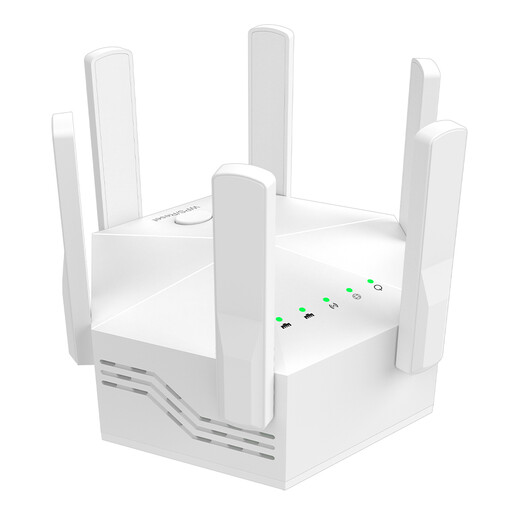
Dual-band Wi-Fi repeater with 1200 Mbit/s and 6 antennas
Described as a wireless Wi-Fi extender; the product description also says it can be set up using WPS.
According to the description, your router must support dual-band. The stated data rate of up to 1200 Mbit/s isn’t a measure of video-call performance.
View at Joybuy
 No image available
Compact Wi-Fi booster
Described as a compact Wi-Fi extender for flats and houses; the product description says it offers plug-and-play setup.
View at Joybuy
 No image available
TP-Link Deco X10 (1 Pack)
Described as an additional unit for extending an existing TP-Link Deco mesh system; the stated mesh extension applies to this system.
Wi-Fi 6 AX1500, dual-band and two Gigabit ports are listed as product features.
View at Joybuy
 No image available
MERCUSYS ME80X Wi-Fi 6 Range Extender
The description lists repeater and access point modes. For access point use, an Ethernet cable must connect the extender to the router.
Features include dual-band, a stated data rate of up to 2976 Mbit/s and a Gigabit port; the maximum speed doesn’t guarantee video-call performance.
View at Joybuy
Frequently asked questions
Will a repeater be enough if two video calls are stuttering at once?
Only if your local Wi-Fi connection is the bottleneck. Also check your internet connection and the requirements of the video-conferencing platform you actually use. Zoom recommends 2,6 Mbit/s upload and 1,8 Mbit/s download for a 720p HD group video call in its web app. This isn’t a general threshold for every online learning platform, nor does it guarantee support for several simultaneous calls.
Where should I put the repeater?
Place it somewhere it can still get a good connection to the router, rather than directly in a dead zone. If Speed Home WLAN has a weak connection, Telekom recommends placing it closer to the Speedport or another booster. Then test the signal in your classroom.
What should I consider when ordering online and returning an item?
According to the Verbraucherzentrale, online orders in Germany generally come with a 14-day right to cancel after you receive the goods; you must notify the retailer that you’re cancelling. Before ordering, check the terms of the specific offer and make sure you have any Ethernet cable you need.


