A wireless repeater can work well if it receives a good signal from the router at a suitable midway point and can also reach your streaming device. If the signal back to the router is already too weak because of the walls, a wired access point can bypass the wireless link to the router. Powerline with Wi-Fi is another option, although performance depends on the sockets and your electrical wiring. Then check mesh compatibility and the actual speed available at your streaming device for the resolution you want.
Which solution is right for you?
Film night in a Wi-Fi dead zone
If you want to stream in a room beyond thick internal walls, first check whether the router, a potential repeater location and your streaming device can all get a usable connection. Deutsche Telekom recommends placing the extender closer to the router or another extender if reception is poor.
Home with Ethernet to the TV room
If an Ethernet cable reaches, or can be run to, the area beyond the walls, you could use a repeater in access point or Ethernet bridge mode. According to devolo, a wired connection can bypass Wi-Fi obstacles such as thick walls.
Home with an existing mesh network
If you want to keep using your router, check the exact model against the repeater’s supported mesh features. TP-Link says an EasyMesh-compatible router is required for EasyMesh; Telekom lists certain Speedport models as compatible with Speed Home WLAN.
What should you look for when buying?
Wireless Wi-Fi repeater
Suitable if: the router signal is still strong at the planned location and the repeater can reach your TV or streaming player from there.
Bear in mind: the connection back to the router is still wireless, so check reception at the repeater’s location and the connection at your streaming device.
Access point with an Ethernet connection
Suitable if: an Ethernet cable runs, or can be run, from the router to the area beyond the walls, and the device supports wired mode.
Bear in mind: the cable route, connection and operating mode all need to be suitable; an Ethernet port alone does not guarantee mesh compatibility.
Powerline with Wi-Fi
Suitable if: there’s no suitable Ethernet route and a wireless repeater cannot get a usable signal from the router at a possible location.
Bear in mind: sockets and sources of electrical interference can affect performance; test the connection at the sockets you plan to use.
| Buying criterion |
What to look for |
Who is this especially important for? |
| Reception where you place the repeater |
Check possible midway locations and the connection to the router. A signal indicator can help you position the repeater, but it doesn’t replace testing the connection at your streaming device. |
If I want to stream despite thick walls, I need a location where the repeater can still receive the router’s signal and reach my streaming device. Around 36 % of consumers say reception is their top buying priority. |
| Connection back to the router |
Check whether an Ethernet cable and a suitable access point mode are possible. With Powerline, test the connection at the sockets you plan to use. |
If I can’t find a suitable location for a wireless connection, I want to bypass the walls on the way back to the router wherever possible. Around 29 % of consumers give top priority to a wired or in-home-tested connection back to the router. |
| Router and mesh compatibility |
Check the router model, supported mesh system and required operating mode against the manufacturer’s information. |
If I want to keep using my existing router, the repeater needs to work with its mesh system. Around 21 % of consumers put router and mesh compatibility first. |
| Streaming on your device |
Measure the connection on the device you’ll actually use. Netflix recommends at least 3 Mbit/s for HD, 5 Mbit/s for FHD and 15 Mbit/s for 4K UHD for a stable stream. These are service recommendations, not guaranteed repeater speeds. |
If the resolution matters to me, the speed available at my TV or streaming player is more important than a maximum figure on the box. Around 14 % of consumers place the greatest importance on the streaming performance they can actually achieve. |
Common buying misconceptions
-
Plugging the repeater in beyond all the thick walls
At the destination, the connection from the repeater back to the router may already be too weak.
Check reception at several possible midway locations. If none offers a usable wireless signal, consider using an Ethernet connection back to the router.
-
Assuming the advertised Wi-Fi speed equals streaming performance
A quoted maximum speed doesn’t tell you how fast or stable your internet connection will be at the TV.
Measure the connection at your streaming device and compare it with the recommendations for the streaming service you actually use and the resolution you want.
-
Thinking of Powerline as an interference-free shortcut through walls
Performance may be lower at some sockets or affected by electrical appliances. devolo highlights these potential issues.
Test the kit at the sockets where you plan to use it, then compare the connection with any available Ethernet option.
Depending on the solution you choose, you may need additional Powerline adapters.
-
Assuming the word “mesh” means full router compatibility
Mesh features may require a specific compatible router system. TP-Link says the RE3000X requires an EasyMesh-compatible router to use its EasyMesh feature.
Before buying, check the exact router model, supported mesh system and operating mode you need.
Key brands to consider
FRITZ!
The FRITZ!Repeater 1200 AX, 3000 AX and 6000 differ in areas such as their wireless configuration and connections. Check that the model you choose is right for your FRITZ! home network.
- According to FRITZ!, the 1200 AX has one Gigabit LAN port, the 3000 AX has two Gigabit LAN ports, and the 6000 has one 2.5-Gigabit and one Gigabit LAN port.
- The number of ports and advertised Wi-Fi data rate don’t prove that the signal will be strong enough at your streaming device through the walls in your home.
TP-Link
The RE3000X is described as a Wi-Fi 6 range extender with an access point option and EasyMesh functionality. Check whether your router supports the mesh feature you want.
- According to TP-Link’s documentation, the RE3000X has a Gigabit Ethernet port and a signal indicator.
- The EasyMesh feature described requires an EasyMesh-compatible router; it doesn’t guarantee coverage through thick walls.
devolo
According to devolo, the WiFi 6 Repeater 5400 can also be used as an access point. Magic Powerline products use a different transmission route and are a separate type of product.
- Access point mode is an option if you have a suitable Ethernet connection to the router.
- devolo notes that Powerline speeds may be low at some sockets and that electrical appliances can cause interference.
Deutsche Telekom
Speed Home WLAN is designed for homes that want to keep using a compatible Speedport router and extend their home network.
- Deutsche Telekom lists Wi-Fi 6 and compatibility with certain Speedport routers.
- Check the exact router combination. If the connection is weak, Telekom recommends moving the extender closer to the router or another extender.
Joybuy products for extending Wi-Fi and wired connections
This selection includes wireless Wi-Fi repeaters, an additional mesh unit and a model with access point mode for extending Wi-Fi around your home.
 No image available
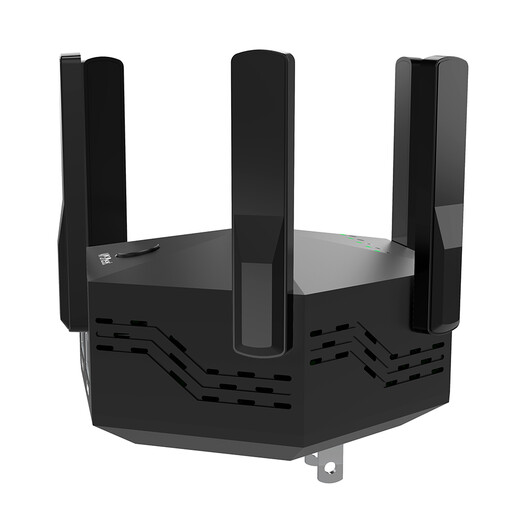
Dual-band Wi-Fi repeater, 1200 Mbit/s, with 6 aerials
For extending your network wirelessly when the repeater can still pick up a usable Wi-Fi signal from the router at its location.
The product description lists 1200 Mbit/s, six adjustable aerials and two 10/100-Mbit/s LAN ports.
View at Joybuy
 No image available
TP-Link RE190 AC750 Wi-Fi repeater
A wireless extension option if there’s a usable signal from your existing router at the planned location.
The product description lists dual-band operation, a signal strength indicator and a WPS button. The signal strength indicator can help you position the repeater.
View at Joybuy
 No image available
TP-Link Deco X10 Wi-Fi 6 AX1500, 1 Pack
This additional unit could be a good fit if you want to extend a compatible Deco mesh network.
The product description lists dual-band Wi-Fi 6 and two Gigabit ports.
View at Joybuy
 No image available
MERCUSYS ME80X Wi-Fi 6 AX3000
Access point mode could be useful if you can connect the device to your router using Ethernet.
The product description lists dual-band operation, a Gigabit LAN port, a signal strength indicator and app control. Access point mode requires an Ethernet connection to the router.
View at Joybuy
 No image available
TP-Link RE235BE BE3600 dual-band Wi-Fi 7 range extender
A wireless extension option if the router’s Wi-Fi signal is still usable at the planned location.
The product description lists a 2.5-Gigabit Ethernet port and EasyMesh compatibility. The EasyMesh features described require an EasyMesh-compatible router.
View at Joybuy
Frequently asked questions
Where should I place the repeater?
Place it somewhere with a good connection to the router that can also reach the area where you use your streaming device. If reception is poor, Deutsche Telekom recommends positioning Speed Home WLAN closer to the Speedport router or another extender. Then check the connection at your streaming device.
Will an Ethernet cable from the repeater to the TV be enough if the walls block the router’s signal?
A cable from the repeater to the TV only improves the final connection between those two devices. If you also want the connection back to the router to bypass the walls, a suitable device in access point or Ethernet bridge mode needs to be connected to the router’s network by Ethernet.
How can I check whether my setup can stream at the resolution I want?
Measure the connection directly on your streaming device. Netflix recommends at least 3 Mbit/s for HD, 5 Mbit/s for FHD and 15 Mbit/s for 4K UHD for a stable stream. These service-specific guidelines don’t guarantee that a repeater will achieve those speeds in your home.
How can I tell if a repeater is compatible with my mesh router?
Check the exact router model and supported mesh system against the repeater manufacturer’s information. For example, the EasyMesh feature described by TP-Link requires an EasyMesh-compatible router.
What should I look for in the CE marking on a Wi-Fi repeater?
The Federal Network Agency notes that products covered by EU harmonisation legislation and placed on the EU market by a manufacturer or importer must carry the CE marking. For a specific device, check the marking and the required accompanying documents.


