Presenters working through thick walls
If you want to connect a room further away, first check whether there’s still a usable wireless connection where you could put the repeater, or whether an Ethernet cable could bypass the wall.


A wireless repeater may be suitable if it can still receive a usable signal from the router where you plan to put it. A strong signal at the presentation area alone isn’t enough. If the wireless connection through the wall is weak and you can use an Ethernet cable, a repeater in Access Point or LAN bridge mode can bypass the wireless link. Before buying, check that the device supports the mode you need, is compatible with your router or mesh system, and review the documentation for the specific device.
If you want to connect a room further away, first check whether there’s still a usable wireless connection where you could put the repeater, or whether an Ethernet cable could bypass the wall.
If you need a wireless connection, check the router signal at the planned repeater location and test the connection in the room before your presentation.
If you want to add the presentation room to your existing router system, check that both the router and repeater support the specific mesh feature you need.
Suitable if: you can find a spot before the thick wall with a usable router signal and can’t run an Ethernet cable.
Bear in mind: The repeater can only extend the connection it receives itself.
Suitable if: an Ethernet cable or suitable network socket can connect the router to a location on the other side of the wall.
Bear in mind: The device must support wired operation, and a suitable cable route and connections must be available.
Suitable if: you need to cover other areas as well as the presentation room, and your router and devices support the mesh feature you need.
Bear in mind: Additional devices need extra space and a suitable connection between the access points.
| Buying priority | What to check | Who is it most relevant to? |
|---|---|---|
| Connection through or around the wall | Is there an Ethernet connection at the destination, and does the device support Access Point or LAN bridge mode? | If I need to get through a thick wall, I first check whether a cable can bypass the wireless link. Around 36% of consumers put the connection route through or around the wall first. |
| Reliable connection while sharing a presentation | Check the signal where you plan to put the repeater, then test the full set-up in the presentation room. | If my connection needs to hold during a presentation, I test the whole set-up in advance. Around 29% of consumers focus mainly on a reliable connection while sharing. |
| Connecting to your existing router | Check the router model and the mesh feature you want against the details for the specific repeater. | If I want to keep using my existing network, I check that the specific mesh feature is supported rather than relying on general Wi-Fi connectivity alone. Around 21% of consumers prioritise router and mesh compatibility. |
| Set-up and operation | Check the socket location, set-up process and whether an Ethernet cable is needed for the mode you want. | If an easy set-up matters to me, I check in advance where the device can go and what’s involved in setting it up. Around 14% of consumers prioritise the effort involved in set-up and operation. |
A repeater extends the Wi-Fi signal it receives itself. If its connection to the router is already weak where you put it, a signal on your device in the destination room doesn’t prove that you have a usable connection to the router.
Check the router signal at the planned location. If there’s no suitable wireless connection there, see whether an Ethernet connection is possible.
A wired connection requires a usable cable route or a suitable network socket.
Manufacturers’ maximum data-rate figures aren’t measurements taken at your specific location. Walls and positioning affect the connection that matters for your presentation.
First decide between a wireless and a wired connection, then test your presentation at the venue.
A Wi-Fi connection doesn’t automatically mean a particular mesh feature will work with every router. The TP-Link RE700X requires a compatible router for EasyMesh; Telekom also has its own requirements for adding Speed Home WLAN to a mesh network.
Check your router model and the specific mesh feature supported before relying on the connection you want.
Depending on your router and the mesh feature you want, extra set-up may be needed or the feature may not be available.
FRITZ!Repeater models include options for a compact Wi-Fi 6 upgrade or a model with multiple wireless units.
According to the manufacturer, the RE700X supports Access Point mode as well as repeater mode.
According to devolo, the WiFi 6 Repeater 3000 and 5400 can also be used as wired access points.
Speed Home WLAN is an option if you’re checking compatibility with a suitable Telekom mesh system.
According to the German ASUS specification, the RP-AX50 supports repeater and Access Point modes.
This selection includes Wi-Fi repeaters that connect to the router wirelessly, as well as models described as supporting wired Access Point mode. For the specific product on offer, also check the CE marking, EU Declaration of Conformity and any required German-language documentation. The Federal Network Agency lists these as checks for radio equipment.
 No image available
May be suitable for a wireless connection, or as a wired access point if an Ethernet connection is available.
Listed features include two 10/100 Mbit/s RJ45 ports, plus repeater, Access Point and router modes.
 No image available
May be suitable if there’s still a usable connection to the router at the planned location.
The product description lists a compact design and plug-and-play set-up.
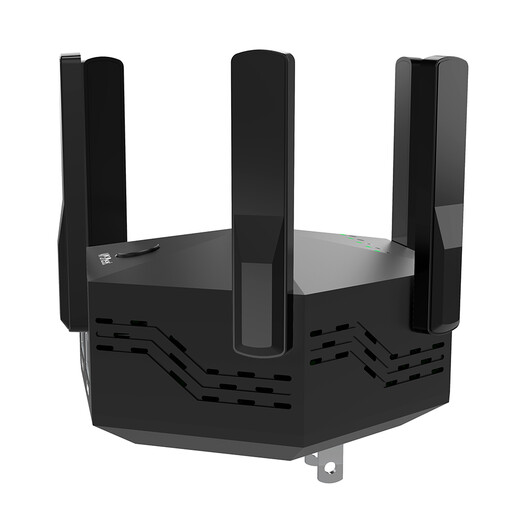 No image available
May be worth considering for wireless coverage if the router signal is still usable at the planned location.
Listed features include dual-band operation, six adjustable antennas, a WPS button and an EU plug version.
 No image available
May be suitable for a wireless connection or for Access Point mode with an Ethernet cable.
Listed features include AX3000 dual-band, 574 Mbit/s at 2.4 GHz, 2402 Mbit/s at 5 GHz, a Gigabit Ethernet port and a signal-strength indicator.
For Access Point mode, the Ethernet port must be connected to the router by cable.
 No image available
May be suitable for extending your wireless coverage if there’s a suitable connection to the router at the planned location.
Listed features include a 2.5 Gigabit port, MLO, Smart Roaming and EasyMesh compatibility.
For EasyMesh, check whether your existing router also supports the feature you need.
Choose a spot where the repeater can still get a usable Wi-Fi signal from the router, rather than placing it based only on the signal strength on your device in the destination room. Then check the connection during a practice presentation.
Yes, if the specific device supports Access Point or LAN bridge mode and there’s a usable wired connection to its location. devolo lists this as an option for the WiFi 6 Repeater 3000 and 5400; TP-Link describes it for the RE700X.
Not necessarily for general Wi-Fi coverage. Check specific mesh features separately: EasyMesh on the TP-Link RE700X requires a compatible router, and Telekom lists its own requirements for adding Speed Home WLAN to a mesh network.
The Federal Network Agency lists the CE marking, an EU Declaration of Conformity and any required German-language documentation as checks for radio equipment. Check these documents for the specific product on offer; the product name alone doesn’t confirm that they’re available.
Check whether there’s a usable Ethernet cable or suitable network socket at the location you want, and whether the repeater supports Access Point or LAN bridge mode. Without an Ethernet connection, a wireless solution depends on a suitable router signal where you put the repeater.