A wireless repeater is a good option if it can still get a strong connection to your router from a spot before the thick walls. Put it in a dead zone and it will simply repeat an already weak connection. If there’s no suitable spot for a wireless repeater, an access point connected via LAN is a good alternative. Also check whether your router supports the mesh mode you want, and whether video call problems also occur when you’re near the router.
Which solution is right for you?
Video calls behind thick walls
You work behind thick internal walls and may be able to find a spot outside your home office where the router signal is strong. With a wireless repeater, what matters is how good the connection is at that spot – not just how strong its signal is at your desk.
Home office with a possible LAN connection
You can run an Ethernet cable to your home office or nearby and want to avoid a wireless link between the router and the device extending your network. Check whether the specific device offers a suitable access point or LAN bridge mode.
Home with an existing mesh network
You want to extend your existing router system. Check the requirements for the mesh mode you want against your exact router model. A repeater working in general doesn’t automatically mean you can use its mesh features too.
What should you look for when buying?
First, check whether there’s a spot where a wireless repeater can get a usable connection to your router. If not, compare a LAN connection or – if you can’t run a cable – Powerline.
| What to consider |
What to check before buying |
Who should pay particular attention? |
| Wireless connection through the walls |
Check possible socket locations and test the connection where you plan to put the repeater and where you make calls. |
If I make calls behind thick internal walls, I need to place the repeater somewhere the connection to the router is still strong enough. Around 36 % of consumers rank a reliable wireless connection as their top purchasing priority. |
| Connection to the home office |
Check whether you can run a cable and whether the device supports access point or LAN bridge mode. Test Powerline using the sockets you plan to use. |
If there’s no suitable spot for a wireless repeater outside my home office, I want to see whether a cable or Powerline can provide a connection there. Around 29 % of consumers say a reliable connection to the home office is their top purchasing priority. |
| Router compatibility |
Check your exact router model against the requirements for the mesh mode you want to use. |
If I want the extender to work with my existing mesh network, I’ll check whether it’s compatible with my specific router model. Around 21 % of consumers put compatibility with their existing router first. |
| Cause of the dropouts |
Compare the same activity near the router and in your home office; check the requirements of your video conferencing software. |
If calls also drop out near the router, I want to find out first whether my internet connection, rather than my Wi-Fi coverage, is the problem. Around 14 % of consumers make this diagnosis their priority before buying. |
A repeater extends your local Wi-Fi coverage, but it won’t automatically fix a problem with your internet connection. And a high advertised Wi-Fi data rate alone doesn’t tell you whether the connection will be stable through a particular wall where you make calls.
Which mistakes should you avoid?
-
Plugging the repeater in beyond the wall that blocks the signal
A wireless repeater passes on the Wi-Fi it receives from the router. If its connection is already weak, that weak section remains part of the route the signal has to travel.
First, find a spot where the router’s Wi-Fi still comes through clearly. If there’s no suitable location, consider an access point connected via LAN.
-
Assuming general router compatibility means mesh compatibility
A device may extend a router’s Wi-Fi without supporting the mesh features you want. TP-Link explicitly states that the RE705X requires an EasyMesh-compatible router for EasyMesh.
Check your exact router and repeater models against the requirements for the mesh mode you want to use.
-
Assuming Powerline will give you a stable connection through every wall
How well data travels over your electrical wiring depends on your home’s electrical setup. Devolo warns that data rates may be low at some sockets and that electrical devices can cause interference. Interference can also occur with certain VDSL setups.
Test the connection using the sockets you plan to use. If you have VDSL problems, check the manufacturer’s advice for the specific adapter range.
Depending on the results, you may need to test additional adapters and spend time finding the right location.
-
Trying to fix an internet connection problem by buying Wi-Fi equipment
A repeater extends local wireless coverage, but it won’t automatically increase your internet connection speed.
Compare your connection and a video call near the router with the same activity in your home office. If problems occur near the router too, check your internet connection separately.
Brands to consider
FRITZ!
The FRITZ!Repeater 1200 AX is a dual-band option for homes looking to extend a compatible FRITZ! mesh network.
- FRITZ! says the model supports Wi-Fi 6, 2.4 and 5 GHz, and has a Gigabit LAN port.
- Mesh features require a compatible FRITZ! home network. The maximum Wi-Fi speeds don’t show how well it will perform behind a particular wall.
TP-Link
The RE705X is worth considering for extending your Wi-Fi or as a wired access point.
- TP-Link lists dual-band Wi-Fi 6, Gigabit Ethernet and access point mode for this model.
- EasyMesh explicitly requires an EasyMesh-compatible router; general router compatibility on its own isn’t enough.
Devolo
The WiFi 6 Repeater 3000 is described as a conventional Wi-Fi extender. The brand’s Powerline products are a separate option to consider.
- Devolo says the repeater is compatible with Wi-Fi routers and supports mesh with other Devolo Wi-Fi products.
- For Powerline, Devolo warns that data rates may be low at some sockets and that electrical devices can cause interference. This isn’t a measure of the repeater’s performance.
Deutsche Telekom
Speed Home WLAN is an option for extending compatible Speedport setups.
- Deutsche Telekom lists Wi-Fi 6 and Ethernet, and explains how to connect the device to compatible Speedport routers.
- The user guide lists additional setup requirements for use with a Speedport 7. Check the device generation and the relevant instructions.
Joybuy products for extending your Wi-Fi
The products below are wireless repeaters for extending your existing Wi-Fi network. The MERCUSYS ME80X is also described as supporting access point mode over Ethernet.
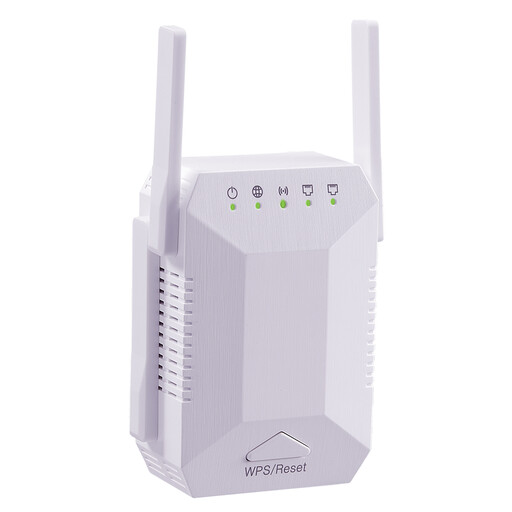 No image available
Wi-Fi Signal Booster, 1,200 Mbit/s, Dual Band, 5G, 4 Aerials
Suitable for wireless use if the router’s Wi-Fi reaches the planned location; the product description lists dual-band Wi-Fi and WPS.
It also lists four adjustable aerials and two Ethernet ports.
Joybuy
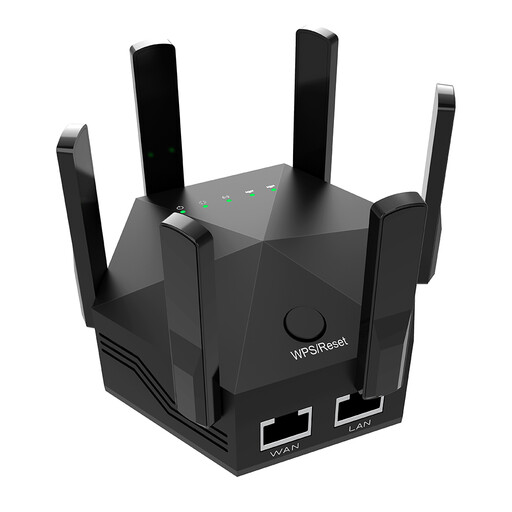 No image available
Wi-Fi Signal Booster, Dual Band, 1,200 Mbit/s, 6 Aerials
Described as a wireless repeater that connects to your existing router using WPS; check that the router’s Wi-Fi reaches the planned location.
The product description lists six adjustable aerials and two 10/100 Mbit/s LAN ports.
Joybuy
 No image available
Compact Wi-Fi Booster
Described as a compact Wi-Fi booster for extending an existing wireless network.
Joybuy
 No image available
TP-Link RE190 AC750 Wireless Repeater, 433 Mbps
The signal strength indicator described can help you find a spot where the router’s Wi-Fi still reaches.
Dual-band operation and WPS are listed as setup options.
Joybuy
 No image available
MERCUSYS ME80X Wi-Fi 6 AX3000 Range Extender
Can be used as a wireless repeater if the router’s Wi-Fi reaches the chosen location; an access point mode via Ethernet is also listed as an option.
The product details list dual-band, 574 Mbit/s at 2.4 GHz and 2,402 Mbit/s at 5 GHz, a Gigabit port, app control and a signal strength indicator.
Joybuy
Frequently asked questions
Where should you place a wireless repeater?
Place it somewhere it can still get a strong Wi-Fi signal from your router, rather than in a spot where the signal has already dropped out. Once it’s set up, check the connection where you actually make video calls too.
Does a high advertised Mbit/s figure guarantee glitch-free video calls?
No. A high stated data rate can’t make up for a poor wireless connection to your router or an inadequate internet connection. Zoom recommends different upload and download speeds for its web app, depending on the type of call and video quality. These recommendations don’t apply universally to all video conferencing software.
What should you check when setting up a repeater with a different router?
Check separately whether the repeater can extend the router’s Wi-Fi at all, and whether it also supports the mesh features you want. TP-Link requires an EasyMesh-compatible router for EasyMesh on the RE705X.
What legal requirements should you be aware of when buying a Wi-Fi repeater in Germany?
Radio equipment covered by the relevant EU rules and placed on the EU market must carry the CE marking. Germany’s Federal Network Agency describes this as a mark of conformity, not independent proof of Wi-Fi performance. Check the information for the specific device; a CE marking doesn’t tell you how well its signal will travel through your walls.


