Who should think carefully about their router choice?

Households with multiple video calls at once

When several people use the home network at the same time, reception where you take calls and a suitable internet connection are important. FRITZ! documents automatic detection and prioritisation of video conferences on the FRITZ!Box 7690 running FRITZ!OS 8.50.

Music collectors with a local library

If you want to play music from a USB storage device over your home network, check that the sharing method, file system and player are all compatible. FRITZ! lists UPnP AV as a requirement for the media server playback described for the FRITZ!Box 4060.

People with Wi-Fi dead spots

If music or calls don’t work reliably everywhere, first find out whether the bottleneck is Wi-Fi reception or your internet connection. Only then can you decide whether it makes more sense to replace the router or make a targeted change to your home network.

What should you look for when buying?

DSL router with built-in modem

A good fit if: You have a compatible DSL connection and want to share music directly from connected storage.

Consider: The manufacturer specifies USB 2.0 for the FRITZ!Box 7690; video conference prioritisation is documented for FRITZ!OS 8.50.

Router connected to a modem

A good fit if: You already have a suitable cable, DSL or fibre modem and want to upgrade your router’s Wi-Fi and music-sharing capabilities.

Consider: The FRITZ!Box 4060 needs a modem upstream; your players and storage format must also be compatible with its media server.

Improve your existing home network

A good fit if: Your music collection is already accessible through a compatible NAS, or your current router handles the sharing.

Consider: Better wireless coverage won’t fix an unsuitable internet connection or a lack of support for your player or sharing method.

Priority What to check before buying Who is this most important to?
Video calls at the same time Check your internet connection and reception where you take calls. Only count on prioritisation if it’s documented for the specific model and software version; FRITZ! lists this feature for the FRITZ!Box 7690 running FRITZ!OS 8.50. When I’m on a call while others are using the home network, a stable connection matters more to me than a peak speed in isolation. Around 31% of consumers say video calls are their main priority.
Sharing music over your home network Check that the sharing method, player support and storage file system are compatible. According to FRITZ!, the described FRITZ! media server requires UPnP AV and a supported file system. If several compatible devices need access to my local collection, I want to check that the storage and players will work together before buying. Around 31% of consumers put music sharing first.
Reception where you use your devices Identify areas with a weak signal, then weigh up repositioning the router, adding a wired access point or using additional mesh units against replacing the whole router. If calls or music cut out in certain rooms, I want to improve the wireless connection there rather than relying on a higher headline speed alone. Around 19% of consumers prioritise coverage.
Connection type and existing equipment Check whether you have DSL, cable or fibre, and whether you already have a modem or ONT. The FRITZ!Box 7690 has a DSL modem; the FRITZ!Box 4060 is designed to work behind a modem. If I want to keep using my existing connection equipment, the router needs to suit my network termination point. Around 19% of consumers say connection and equipment compatibility is their top priority.

Common misconceptions

  • A USB port doesn’t automatically mean you can share music

    For the FRITZ! media server described here, players need to support UPnP AV. You’ll also need a suitable file system and the right settings.

    Before buying, check that the sharing method works with your player and existing storage.

  • A router without the right modem won’t work with every connection

    The FRITZ!Box 7690 has a DSL modem. The FRITZ!Box 4060, on the other hand, is designed to connect behind a suitable modem.

    First check your connection type and existing network termination equipment, then choose the right type of router.

  • Wi-Fi 7 doesn’t tell you everything about reception or frequency bands

    FRITZ! lists Wi-Fi 7 on 2.4 and 5 GHz for the FRITZ!Box 7690. An advertised data rate doesn’t show how good the connection will be where you actually use it.

    Check the frequency bands and reception where you take calls separately; don’t assume the Wi-Fi generation guarantees good reception.

  • Check that port specifications match the exact model version

    Joybuy’s listing for the FRITZ!Box 7690 mentions four Gigabit LAN ports. The FRITZ! data sheet instead lists one 2.5 Gigabit WAN/LAN port, one 2.5 Gigabit LAN port and two Gigabit LAN ports.

    If the LAN port configuration matters, check the full model version against the manufacturer’s specifications.

Key brands at a glance

FRITZ!

The documented models cover both DSL connections with a built-in modem and use behind a modem.

  • FRITZ! describes the FRITZ!Box 4060 as having a USB 3.0 port and a media server. For the 7690, the manufacturer documents video conference prioritisation with FRITZ!OS 8.50.
  • The 7690 has USB 2.0 according to the manufacturer. With the 4060, players need to support UPnP AV, and the storage format and settings must be compatible.

TP-Link

The Archer AX55 is described as a dual-band Wi-Fi 6 router with USB 3.0. It may be worth considering as a router behind a suitable network termination point.

  • TP-Link Germany lists 2.4 and 5 GHz Wi-Fi and a USB 3.0 port for the Archer AX55.
  • A USB port alone doesn’t confirm support for a particular music-sharing method. Check the exact hardware version and the media server function you need.

ASUS

The RT-AX86U Pro is a dual-band Wi-Fi 6 router with USB ports. ASUS also provides general instructions for setting up a media server on compatible routers.

  • ASUS lists USB 3.2 Gen 1 and USB 2.0 for the RT-AX86U Pro. Its instructions explain how to make music available from connected USB storage.
  • ASUS advises checking connection and storage compatibility for the specific model. The general instructions aren’t a performance test of the RT-AX86U Pro.

Joybuy products related to this topic

The products below relate to Wi-Fi coverage and DSL connections. If you want to play music directly from USB storage, check separately that the router’s media server function works with your player and storage device. Radio equipment covered by EU harmonisation legislation and placed on the EU market must carry the CE marking (Federal Network Agency); check the information for the specific listing.

TP-Link Deco BE22 Mesh Wi-Fi 7 system, 2-pack

TP-Link Deco BE22, Mesh Wi-Fi 7 system, 2-pack

Could suit households where several devices use Wi-Fi; the product is described as a mesh system for video calls and roaming.

Dual-band Wi-Fi 7; two units. If you want to play music directly from USB storage, check that the media server function you need is supported before buying.

View at Joybuy
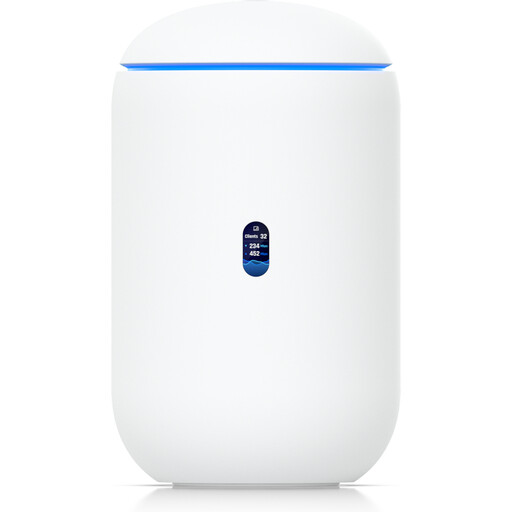
Ubiquiti UniFi Dream Router 7 Cloud Gateway

Ubiquiti UniFi Dream Router 7

Could be an option for a home network with built-in Wi-Fi and planned UniFi management; music sharing and video conference prioritisation aren’t confirmed.

Tri-band Wi-Fi 7, 10G SFP+, 2.5 GbE PoE and 64 GB microSD according to the product name. The product description says management requires an active internet connection and UniFi Network version 9.0.108 or later.

View at Joybuy

TP-Link Deco M4 Mesh Wi-Fi system AC1200, 3-pack

TP-Link Deco M4, Mesh Wi-Fi system AC1200, 3-pack

Could suit a home network that needs Wi-Fi in several rooms, if one unit can connect to an existing modem.

Dual-band AC1200 Wi-Fi and Gigabit ports according to the product name. The described router setup requires a connection to a modem; check separately whether music sharing or call prioritisation is supported.

View at Joybuy

FRITZ!Box 7530 AX, Wi-Fi 6 DSL router

FRITZ!Box 7530 AX, Wi-Fi 6 DSL router

Could suit a compatible ADSL or VDSL connection if you need a built-in DSL modem.

The product name lists VDSL Supervectoring 35b, dual-band Wi-Fi, mesh and four Gigabit LAN ports. Check that it supports the music-sharing method you need and is compatible with your player and storage.

View at Joybuy

TP-Link Deco S4 Mesh Wi-Fi system AC1200, 3-pack

TP-Link Deco S4, Mesh Wi-Fi system AC1200, 3-pack

Could be useful for Wi-Fi in several rooms if one unit can connect to an existing modem and the others can be placed in different rooms.

Dual-band AC1200 Wi-Fi and Gigabit ports according to the product name. The described setup requires a modem; check separately whether it supports the music-sharing method you need.

View at Joybuy

Frequently asked questions

Is a USB port enough to play my music on all my devices?

No, a USB port alone isn’t enough. For the FRITZ!Box 4060 media server described here, your player needs to support UPnP AV. The storage device and file system must also be compatible, and you’ll need to set up the media server function. Check that your player can play your music files too.

Can I connect the FRITZ!Box 4060 directly instead of using a DSL modem?

No, according to FRITZ!, the FRITZ!Box 4060 is designed to connect to a cable, DSL or fibre modem upstream. Before buying, check what kind of network termination equipment you have.

Do I absolutely need Wi-Fi 7 for video calls?

No, Wi-Fi 7 isn’t a requirement for uninterrupted video calls. FRITZ! lists Wi-Fi 7 on 2.4 and 5 GHz for the FRITZ!Box 7690, and documents video conference prioritisation with FRITZ!OS 8.50. Your connection, reception and network load where you actually use your devices still matter too.

Can I use my own router in Germany?

For passive optical fibre networks, the Federal Network Agency confirms that you can choose your own end device at the network termination point. It also refers to the same freedom of choice for VDSL and cable networks. That doesn’t mean every device is technically compatible with every connection, so check the modem, network termination point and connection type.

What should I know about CE marking and wireless standards?

According to the Federal Network Agency, products covered by EU harmonisation legislation and placed on the EU market must carry the CE marking. Check the information for the specific listing. A label such as Wi-Fi 7 doesn’t tell you whether the 6 GHz band is used or whether a particular listing complies with the rules.