
Lieferung heute & morgen

Qualitätsgarantie
App herunterladen
Kategorien
A smart plug, also known as a Wi-Fi socket, is a device that makes it easy to turn conventional household appliances into smart devices. It is placed between a standard wall outlet and an appliance's power cable. Its primary function is to control the power supply to the connected appliance over a Wi-Fi network. This enables remote control via an app, automation through schedules, and integration into smart home systems.
The right choice of model depends on its technical specifications and your intended use case. The following criteria are essential for making an informed decision.
The maximum electrical load a smart plug can handle is specified in watts (W) and amps (A).
Using an appliance whose power consumption exceeds the plug's specifications can lead to overheating and damage. Look for safety certifications like CE and TÜV, which confirm compliance with European safety standards.
Seamless integration into existing ecosystems is a key feature. Most models are compatible with popular voice assistants:
Control is managed through voice commands, enhancing user convenience. Always check the product description for explicit compatibility details.
The companion app for the smart plug is the central hub for configuration and control. Basic functions include turning the plug on and off. Advanced features offer significant added value:
The physical dimensions are crucial, especially when using the plug in a power strip. Compact, round, or square designs prevent adjacent outlets from being blocked. Connection to the home network is typically made over the 2.4 GHz Wi-Fi band, as it offers a longer range than the 5 GHz band. A setup that doesn't require an additional hub (bridge) greatly simplifies installation and is ideal for beginners.
Based on the technical criteria above, we present two models that cater to different user needs.
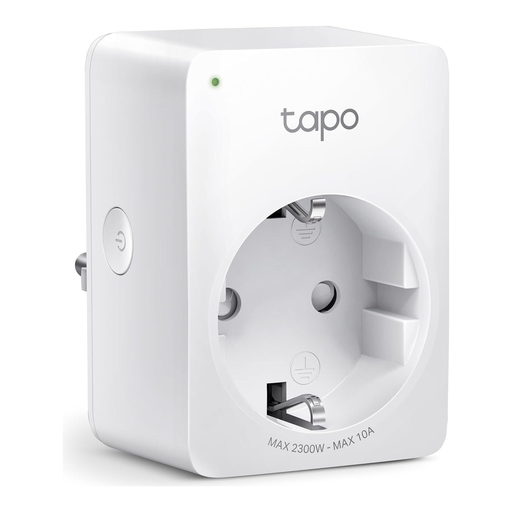
The Tapo P100 is a compact smart plug that focuses on the core functions of remote control and automation.
Why we recommend it: The Tapo P100 offers a reliable and straightforward solution for basic smart home automation. Its installation requires no hub, and the setup via the Tapo app is intuitive. The compact design is a practical advantage in tight spaces.
Pros:
Who it's for: This model is ideal for smart home beginners and users who want to remotely control and automate low-to-medium-load devices (up to 2300 W / 10 A), such as lighting, fans, or consumer electronics, but don't need an energy monitoring feature.
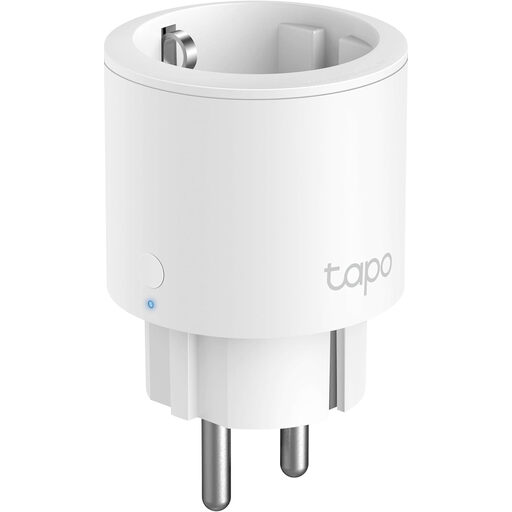
The Tapo P115 expands on the P100's functionality with detailed energy monitoring and a higher load capacity.
Why we recommend it: The Tapo P115 addresses the growing demand for home energy management. The ability to analyse power consumption in real-time and view historical data offers clear value for cost-conscious users. Its higher maximum load of 3680 W also expands the range of compatible appliances.
Pros:
Who it's for: The Tapo P115 is aimed at users who want to actively monitor and manage their energy consumption. It is also the right choice for operating more powerful household appliances that require a 16 A load capacity.
The models featured here cover common use cases. However, the market offers a wide variety of designs and specific features. If you are looking for alternative form factors or colour options, for example, you can find more models in our product range.
Discover our selection of white sockets.
1. What is the difference between a smart plug and a timer plug? A classic mechanical or digital timer plug can only switch devices on and off according to a fixed schedule. A smart plug also offers remote control from anywhere via an app, flexible real-time schedule adjustments, voice control, and often includes extra features like energy monitoring.
2. Do I need a separate hub for a smart plug? Most modern smart plugs, including the Tapo P100 and Tapo P115 models, do not require a hub. They connect directly to your 2.4 GHz Wi-Fi router. This simplifies the setup process and reduces initial costs. However, some smart home systems (e.g., those based on Zigbee or Z-Wave) do require a central control unit (a hub or bridge).
3. How secure are smart plugs? Security depends on compliance with both electrical and data safety standards. Look for products with CE and, ideally, TÜV certification, which confirm electrical safety according to EU standards. For data security, reputable manufacturers use encryption protocols (e.g., WPA2/WPA3) for communication. It is also recommended to secure your Wi-Fi network with a strong password and keep the plug's firmware up to date.